I gave dsh a second memory service
My DeepSeek Harness has had memorix attached the whole time. Months of use, zero problems.
Yesterday I was going through the ai-memory repo. The support matrix has a row for DeepSeek Harness, status: MCP only. A memory service that set aside an adapter slot specifically for dsh — that I had to try.
Installed it, ran it for a night. Conclusion up front: this is not a better memory, it is a different way of layering memory. Picking the wrong layer is a lot more trouble than picking the wrong tool.
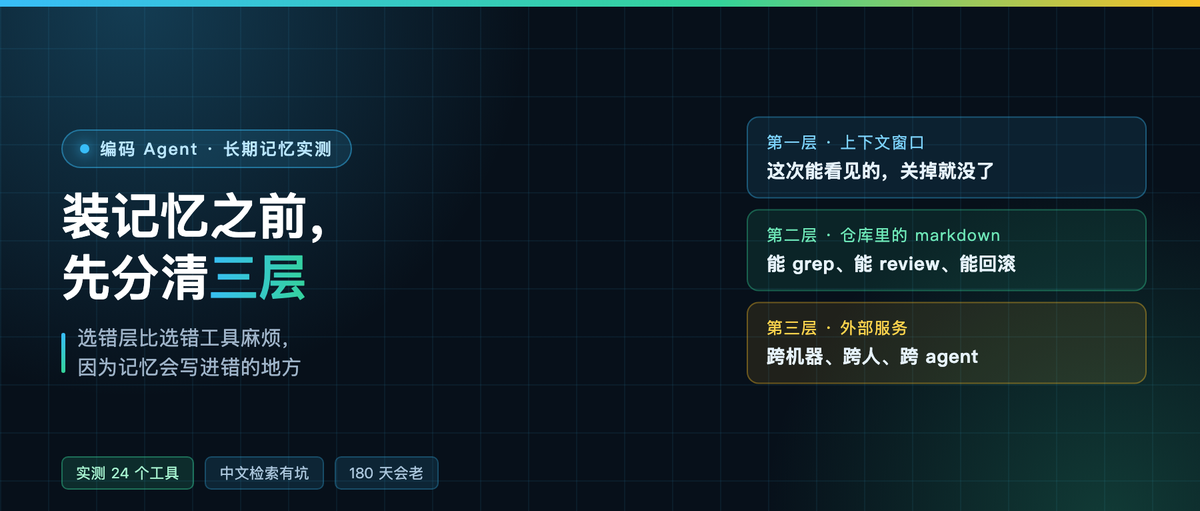
Memory actually has three layers
The first layer is in the context window. Whatever the model can see this time is gone when the session closes. Compaction, truncation, switching models — all lost.
The second layer is in the repo. AGENTS.md, notes, a small wiki. Git tracks it, you can grep it, you can review it, and git diff shows you what actually changed.
The third layer is in an external service. A background process stays alive, across machines, across people, across agents. Whoever connects reads the same copy.
Most agent memory tools on the market talk about the third layer but ship something that crowds into the first, usually by stuffing summaries back into the prompt. What makes ai-memory different is that it touches all three: the first layer as the entry point, the second as the substrate, and the third is the actual job.

What you are actually installing
The macOS build is a 17,817,781 byte archive, sha256 identical to the official release. Unzip it and it is a single file, 39,835,136 bytes, no runtime dependencies, and --version returns 3.1.2.
Its data directory holds three things: wiki stores markdown, db stores the SQLite index, raw stores the original observations. The real substance is that pile of plain markdown files under wiki. The index can be rebuilt whenever.
I wrote three pages and got three files on disk: 435, 446 and 585 bytes. Indistinguishable from notes I typed by hand. That is worth more than any feature, because the files are yours — the tool dies and the notes are still there.
The real novelty: a job can only be claimed once
The tool list has a handoff group: begin, accept, list, cancel. A handoff has an owner, can be claimed exactly once, and once claimed it is yours.
There is also a message group: send, list, pop, cancel. Messages across projects, and popping one counts as claiming it.
Strictly speaking these two groups are not memory, they are scheduling. When you work half a day in Claude Code in the morning and a different agent picks it up at night, the hard part is not “what did it forget”, it is “who owns this unfinished work”. It turns that into a protocol.
On dsh you get MCP, no hooks
The output of install-mcp --client dsh says it itself: print only, MCP only, no lifecycle capture.
The generated snippet uses @deepseek-ai/dsh-mcp-client, identical to the memorix entry in my cordis.patch.yml. Only command and args differ.
Translated: on dsh it does not record anything on its own. No lifecycle hooks means no “write a page when the session ends” step. To get dsh to remember something, the agent has to actively call write page.
This is the reminder I keep on both of my machines: “supported” in a support matrix does not mean the experience is the same. The cost of that MCP only line lands entirely on automatic capture.
Tool surface: 24 vs 20
Same MCP probe, initialize then tools list, two numbers came out.
ai-memory 3.1.2 has 24 tools, all memory-prefixed, covering pages, briefing, query, handoff, message, decay, lint.
Local memorix 1.9.1 has 20. The extras are project context, codegraph status and the session lifecycle ones.
Similar count, different direction: one grows toward cross-agent collaboration, the other toward project context and code graphs.

The Chinese search problem: I ran three comparison tests
This is the pitfall I most want to talk about.
The CREATE TABLE for the index spells out the tokenizer: unicode61 remove_diacritics 2 tokenchars '/_-'. unicode61 tokenizes on spaces and punctuation, so a run of consecutive Chinese becomes a single token.
Which produces this. I wrote three pages of Chinese notes and searched directly:
search "构建缓存"   → 1 hit (the body has exactly "Gradle 构建缓存", whole string as one token)
search "白屏"       → 0 hits (the body has "渲染偶发白屏", whole string as one token)
search "渲染"       → 0 hits
search "skiko"      → 1 hit (an English word tokenizes itself)
To confirm I was not searching wrong, I wrote another page and deliberately put spaces on both sides of “白屏”. Searched again, this time it hit.
So the rule is: a Chinese query has to exactly equal some contiguous run of Chinese in the text, otherwise you get zero results. That is not a bug, it is an inevitable consequence of the tokenizer, but it makes people think the memory was never written.

Two practical workarounds. Leave spaces on both sides of key terms when you write a page, like “遇到 白屏 时”. Or just use English keys and keep the Chinese in the body.
Project scope falls into scratch
I called briefing from a static MCP client and got zeros across the board. Reading the parameter docs turned up one line: a static client must pass both workspace and project on every call.
Skip them and everything lands in a fallback project called scratch. Your memory is not lost, it is just filed in a different drawer.
dsh’s mcp client is static, so once it is wired up every call needs those two parameters, otherwise you get the classic “I definitely saved that, why did it forget”.
Memory ages on its own
The config has a set of decay parameters: lambda 0.02, sigma 0.6, mu 0.04 by default, a cold threshold of 0.20, hard delete at 180 days.
In usable terms: a page nobody reads slowly goes cold, past the cold threshold it can be compacted and the plot compressed into a conclusion, and after 180 days it may actually be deleted. Raw observations are never pruned by default; the config value is 0.
It also has one rule I think is right: memory that has been accessed decays more slowly. Opening, searching, following a link all count as uses. That makes more sense than wiping on a timer.
I measured the startup briefing size too. Empty project 651 characters, three pages 1,136, ten pages 1,340. So every session it puts a bit over a thousand characters into context. That amount is acceptable.
How to choose
Three questions, in order.
First, do you want “what happened in this repo” or “how many live threads do I have on this machine”. The former is the repo layer: AGENTS.md plus one directory, no service to install. Only the latter needs the third layer.
Second, does your agent client give you lifecycle hooks. If yes, the third layer can capture on its own. If no, you gain a manual write-a-page step, and you have to judge for yourself whether you will keep doing it.
Third, are your notes mostly Chinese or mostly English. If mostly Chinese, accept the search limitation first and do not expect it to find things like a search box does.
My own conclusion: for now the third layer is only a relay channel across machines. Day-to-day stuff like “I hit this pitfall before” stays as markdown in the repo, one line at a time, with a diff I can read.
Which layer does your agent’s memory live in right now? Comments are open.