First, a small thing
I have three agents installed in my terminal right now: claude, opencode, gemini. A few days in and I hit a new annoyance. Once there are several sessions, I have no idea who is running, who changed which files, or who spent how much. I end up scrolling through terminal history to figure it out.
JetBrains is clearly thinking about the same thing, and its answer is much bigger than another chat box.
Its answer is called Air
On September 22, JetBrains CEO Kirill Skrygan wrote the post himself, pulling half a year of scattered work into one system called Air.
Three products inside: Air in JetBrains IDEs (directing agents from inside the IDE), Air Teams (turning individual agent activity into team workflow), and Air Governance (org-level visibility and cost control).
The opening line is honest, so I will quote it:
AI can produce code. Organizations still have to produce software. Agentic development is changing how software gets made, but it hasn’t changed what it costs to be wrong.
There is another line I think is the most valuable thing in the whole post:
Code becomes cheaper to generate but more expensive to verify.
Meaning: writing code got cheaper, verifying it got more expensive. So they put their bet on the verification side.
On October 1, Air in IDEs opened its EAP.
What it is: not an AI provider, a hub
One line in the official description matters most:
It is not an AI provider, and it ships with no agents installed.
Meaning: it does not build models, it ships with zero agents preinstalled, what it does is plug your agents in. Three design points, restated: multiple agents working in parallel, each session isolated in a temporary worktree, and you can see the cost of every session. Also, double-tap Ctrl and a new session starts with the current context already attached.
JetBrains plays this very modestly. Their line is that they built their own agent and intend to make it the best, but Air does not require you to use theirs, and that they have no reason to make the ecosystem smaller. They can say that because they hold something else: 26 years of code intelligence.
I installed it
Start with the useful conclusion: you do not need the EAP to try it. The plugin marketplace has two compatibility lines, one for the 2026.3 EAP and one for 2026.2 stable. I took the latter (version 262.8665.481, 33,519 downloads at the time).
I installed it on Android Studio 2026.2 (build 262.9437). The plugin requires platform version 262.8665, so it is compatible. After startup, this line in the log is the first piece of evidence:
Loaded custom plugins: ... Air (262.8665.481), Kotlin Multiplatform (262.9437.115-AS), ...
The lines after it are more interesting. I think they are worth more than the plugin itself:
INFO - AcpRegistryFetcher - Starting ACP registry fetcher
INFO - AcpRegistryFetcher - Fetching signed registry bundle from
       https://resources.jetbrains.com/agentclientprotocol/registry.zip
INFO - AcpRegistryFetcher - Verified signed registry v1.0.0 with 41 agents
INFO - AcpAgentsConfigService - ACP configuration file
       '/Users/trevorwang/.jetbrains/acp.json' not found,
       no local ACP agents will be configured.
INFO - CodexIdeContextIpcTransport - Codex IDE context IPC listening on
       /var/folders/.../codex-ipc/ipc-501.sock
INFO - AirCloudRunAvailabilityServiceImpl - Air cloud runs: not offered
       - no JetBrains Account is signed in

Those six lines say: it pulls a signed agent registry on startup; the registry holds 41 agents; the entry point for local custom agents is ~/.jetbrains/acp.json; it opens a local IPC socket for Codex so the agent can ask the IDE for context; cloud runs need a JetBrains account, and without one they are not offered.
One more thing I did not expect: Agent Client Protocol is already in Android Studio 2026.2’s bundled plugin list. So ACP support does not come only from this new plugin. The IDE itself already ships it.
Who are those 41 agents
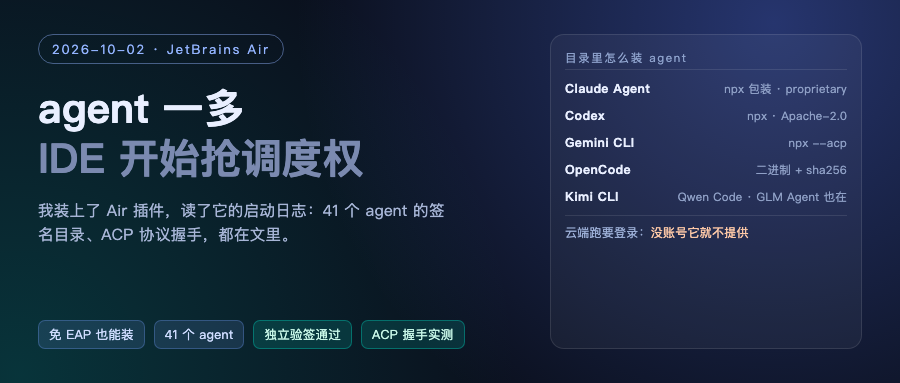
That registry is signed and distributed, so I pulled it down and unpacked it myself: inside is registry.json, registry.json.asc, and a public keyring. I verified the signature myself and it passed. Public key fingerprint B46DC71E03FEEB7F89D1F2491F7A8F87B9D8F501.
Out of the 41, here are the ones you will recognize:
- Claude Agent, Codex, Gemini CLI, GitHub Copilot, Cursor
- Devin, Amp, Cline, goose, Junie, Factory Droid, OpenCode
- Kimi CLI, Qwen Code, MiniMax Code, GLM Agent, Mistral Vibe, Qoder CLI
The Chinese vendors are all in there.
How they install says the most about what this registry really is. Four real entries:
Claude Agent 0.85.1   npx @agentclientprotocol/[email protected]  (license: proprietary)
Codex 2.1.1           npx @agentclientprotocol/[email protected]           (Apache-2.0)
Gemini CLI 0.62.0     npx @google/[email protected] --acp                (Apache-2.0)
OpenCode 1.18.34      per-platform binaries plus sha256 checksums         (MIT)
So installing an agent in this system is: one npx command, or a binary with a checksum. Note the Claude line, where the wrapper is proprietary. Anyone doing enterprise compliance should look at that detail.
I had a conversation with an ACP agent myself
I could not click through the GUI. This machine has not granted that process screenshot and accessibility permissions, so I cannot move the mouse. So I switched to a harder form of verification: bypass the IDE entirely, run the Claude ACP wrapper from the registry in a terminal, and hand-write JSON-RPC to shake hands with it.
This is the real response, not something I made up:
{"protocolVersion": 1,
 "agentCapabilities": {
   "_meta": {"claudeCode": {"promptQueueing": true}},
   "promptCapabilities": {"image": true, "embeddedContext": true},
   "mcpCapabilities": {"http": true, "sse": true},
   "loadSession": true,
   "sessionCapabilities": {"close": {}, "delete": {}, "fork": {}, "list": {}, "resume": {}}}}
It also pushed a notification on its own saying it was not logged in:
_auth/status_update {'authStatus': {'kind': 'none', 'label': 'Not logged in'}}
After sending session/new, it returned a session ID and four modes: Manual (ask before changing), Accept edits (auto-accept changes), Plan (plan first), and auto.
Then I made a mistake worth writing down too: when sending session/prompt I filled in a fake session ID to save effort, and it answered -32603 Internal error: Session not found. Meaning the protocol requires the real ID returned by session/new, and a wrong one just gets you an internal error. Not friendly to newcomers.
Three conclusions: the protocol side is alive on my machine; the agent reports its own capabilities and login state proactively; authentication did not complete, so I never got a model answer. To run a real conversation you have to finish authorization first, which is the step in the IDE.
Why anyone doing KMP or Android should care
First, Android Studio and IDEA share a codebase. Every log above was printed by Android Studio, and the ACP plugin is even bundled. JetBrains is where KMP comes from, so wherever it goes, your toolchain goes.
Second, it admits one thing:
The era in which the whole software development system can be contained in one window is ending.
One window cannot hold the whole development process anymore. Coming from a company that has built IDEs for 26 years, that carries weight.
Third, its bet is explicitly on multiple vendors, and the reason is stated plainly: models are good at different things, the leaderboard changes every few months, and teams already have their own preferences. So it does not bet on who wins. It wants everyone to pass through it.
My read
First, the real move here is scheduling control. Whoever holds the switchboard for your pile of agents (who is running, what changed, what it cost) holds the developer’s daily entry point. You can orchestrate in a terminal too, tmux plus scripts gets you there, but the IDE holds real code intelligence. It argues that handing agents this intelligence saves money, because agents no longer have to rediscover information already in the code.
Second, openness is a strategy, not goodwill. ACP is an open protocol it pushed together with Zed, and most of the 41 agents are not theirs, even Claude, Codex and Cursor are in the registry. It does not need to bet on a winner. It wants everyone to pass through once.
Third, I mark the boundary as usual. What I verified: installation and version compatibility, that the plugin actually loads, the signed registry and its 41 entries, independent signature verification, and the ACP handshake plus the capabilities the agent reports. What I did not manage: multi-session parallelism in the IDE UI, worktree isolation, and the cost display. Local permissions were not enough, I could not click. So this post counts as log-and-protocol-level evidence, not a full feature test. On top of that it is still EAP, so do not rush to change your workflow.
References:
- Air in IDEs EAP post: https://blog.jetbrains.com/ai/2026/10/air-in-ides-eap/
- September 22 Air announcement post (signed by the CEO): https://blog.jetbrains.com/blog/2026/09/22/introducing-jetbrains-air/
- ACP protocol site: https://www.jetbrains.com/acp/
- ACP registry and submission entry: https://github.com/agentclientprotocol/registry
- Air plugin page: https://plugins.jetbrains.com/plugin/33314-air-alpha
- Android Studio download: https://developer.android.com/studio
Verification boundary: the plugin version line and download count come from the JetBrains plugin marketplace API; the Android Studio version comes from the product-info.json of the local install; plugin loading, registry fetch, the 41 agents, the acp.json path, the Codex IPC socket and the cloud-needs-login lines all come from the real idea.log on this machine.
The list of 41 agents, the distribution method of each entry and the licenses come from the fetched registry.json; I verified the signature independently with pgpy and it passed. The handshake response is real terminal output. Authentication was not completed, so no model answer was obtained.