By the time a cross-platform project reaches release, there is usually more than one distribution path. One through Google Play, one straight from your own site, and sometimes a test build for the QA folks. Android’s developer verification reprices the entry cost of each path, and the three bills are not calculated the same way at all.
Three paths, three bills
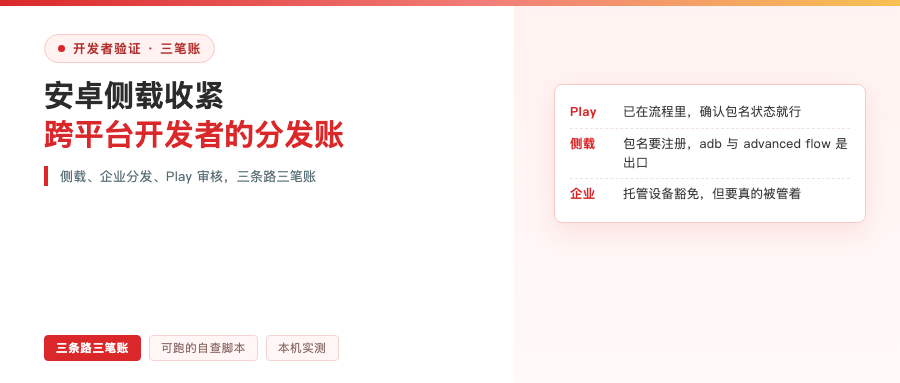
Start with the Google Play path. For a team that already has a Play developer account, this bill is close to zero. The app is already inside the verification flow, packages using Play App Signing get their package names claimed automatically, and all you have to do is confirm your status on the developer verification page. The new cost is time, and the review cycle is unchanged.
Now the sideload path. When users download your APK in a browser and install it directly, after September 30, 2026 they will have to clear an identity check in four countries: the package name has to be registered, and the package has to be signed with your private key.
The team left an exit. Development installs through the Android Debug Bridge are unaffected, the advanced flow lets users grant a one-time pass, and a free limited distribution account covers 20 devices. The catch: once the advanced flow is off, updates to unregistered apps fail. Those builds you hand to QA have to fit inside those 20 devices.
Then the enterprise internal distribution path. Managed devices installing from an organization store get an exemption, as long as the device is genuinely managed. If the same app also ends up on employees’ own unmanaged phones, register it anyway. What this means for cross-platform teams is that internal test builds and demo builds still count as package names and identities — you cannot skate past it with “it’s only internal.”
Why the math is messier for cross-platform teams
The first reason is the number of package names. A KMP or Flutter project often produces several artifacts out of one repo: the main build, assorted flavors, test builds, each with its own package name. Verification works off package name and signing key, so your inventory has to cover every artifact and every key, not just the one that ships to the store.
The second is where the keys come from. On one team you can easily have a keystore generated on a CI machine, a keystore someone keeps locally, and the one Play App Signing hosts. The more names there are, the easier it gets to ship a build that was not signed with the key you thought.
The third is what you submit. In the end this verification asks for two things: a package name, and an APK signed with your private key. The first gets checked for duplicates, the second has to prove itself.
While we are on boundaries: this verification only governs package names on Android-certified devices. If the same project also ships to HarmonyOS or iOS, those signing materials are a separate system and outside these rules. But archiving your keys and being able to run your own check is something both sides should be doing.
First: archive the keys, and be able to prove it
Registration requires proving the package name is yours, and the credential they accept is an APK signed with your private key. In other words, the signing key graduates from something sitting in a build cache into an identity document. The official FAQ has a line specifically about this: lose the key and you cannot register the package name, so use a key management solution.
Archiving is not enough by itself. You have to be able to prove it at any time. I wrote a thirty-line script that, in one run, prints an APK’s package name and certificate fingerprint and compares them against the archived fingerprint list. Same code, same package name, signed with a different key, and the output forks:

Identical package name, completely different fingerprint. That is what using the wrong key looks like. This happens on teams more often than you would guess, especially after a CI machine gets replaced or someone regenerates a keystore.
Three archiving rules. Keep the keystore file, the alias, and the fingerprint list together, in a password manager or the team vault; keep the fingerprint list as plain text, one SHA-256 per line, so machines can diff it; wire that step into the release process as a gate, and block the release when it does not match. The official docs also mention that one package name can register multiple signing keys, which is what you want when rotating keys.
Second: check whether the package name is taken before you ship
Package names are claimed first come, first served. You check for collisions when you pick the name, not on launch day.
Google opened the Android Developer ID Status API specifically for this, and it returns three states: registered, unregistered, and registered but tied to a different certificate fingerprint. That last one is the painful case, because it means someone else holds the package name.
When you do collide, the official path is to apply for registration, but it needs extra review, and the docs say outright that the package name may be in use by other developers at the same time. Anyone who has done Android knows what two apps sharing a package name means.
The API has a quota, 1,000 calls per project per day, and it has to be attached to a Google Cloud project: create the project, enable the API, set up auth. I do not have that setup on this machine, so this section follows the docs only — I never actually issued a request. For day-to-day status checks, the package name lists in Play Console and the Android Developer Console show it directly, as registered, unregistered, or draft.
Third: accounts and paperwork, start what you can start
For an individual developer, this step is just identity verification. Organizations need two more things: a D-U-N-S number, and a company site verified through Search Console.
D-U-N-S is free, you apply on the Dun & Bradstreet site, and the process takes up to 28 days. It is the only item on the whole list whose waiting time you cannot compress, and the official help docs specifically warn about third-party services charging steep fees for it.
On cost: a full distribution account is a one-time $25, the same ballpark as Play’s registration fee; limited distribution is free. Money and forms are not the real problem. The real cost is those 28 days up front.
Three traps that will stop you
The first is losing the key. This is not an inconvenience, it is an inability to register the package name — meaning you never get that name back.
The second is someone else registering the package name first. After you apply you may end up sharing it, which is a landmine with an unknown detonation date.
The third hides on the limited distribution path. Once the advanced flow is off, updates to unregistered apps fail. The official FAQ is explicit: unregistered apps can only be installed and updated through the advanced flow or the Android Debug Bridge. In the 20-device scenario, remember not to flip that switch off.
What to do now, what can wait
Already in effect: four countries, seven participating stores (Google Play, Samsung Galaxy Store, Xiaomi GetApps among them), covering certified devices on Android 7 and up, with the first phase limited to phones and tablets as form factors.
Three things you can do right now: archive your keys and hook up the self-check, check whether your package names are taken, and get the D-U-N-S and account paperwork moving.
What can wait: stores not on the list, and direct sideloading by users, are unregulated until this round expands. The official timeline is a global rollout in 2027 and beyond, and they recommend developers complete verification before that; press coverage puts the early pace at the US and UK first. Apps already on Play have to register for all form factors — enforcement just starts with phones and tablets.
One phrase worth remembering: the official FAQ says “not applicable for now,” not “never.” The gap between those two sentences is that 2027 slot.
Last thing
Add up the three bills and the most expensive item is not the $25. It is the lead time on identity paperwork, and the fact that a signing key has no substitute. Ten minutes to fill in a form, 28 days for D-U-N-S, and if the key is gone there is no second one. So for a cross-platform team this should not be something you remember the week before launch. It belongs as a step in the release process.
Which path does your project take? And can you find that signing key right now? Talk in the comments.
References:
- Android developer verification official guide https://developer.android.com/developer-verification/guides
- Official FAQ https://developer.android.com/developer-verification/guides/faq
- Check package name registration status (Developer ID Status API) https://developer.android.com/developer-verification/guides/check-registration-status
- Register a package name with the Console API https://developer.android.com/developer-verification/guides/developer-console-api