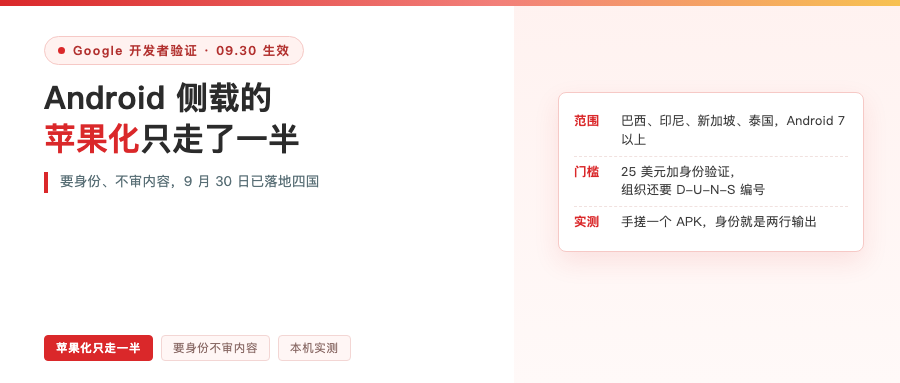
If you have friends in Brazil, Indonesia, Singapore or Thailand, after September 30 they may run into something new: tap install in some app store, get a prompt saying the developer isn’t verified, and it won’t install. At the same moment, the China-market Android phone in your hand installs anything with no change at all.
The Chinese tech scene hasn’t talked about this much. The English community has been arguing for a while. The Hacker News thread from October 1 pulled 338 points and 141 comments. F-Droid, on the free software side, put out an open letter together with the Electronic Frontier Foundation, and the title is one line: opposing Android developer verification.
So this is worth taking apart. What it changed, and who actually gets hurt.
In Google’s own words: apps have to be registered by verified developers
Google puts it plainly. The official guide opens with: Android requires all apps to be registered by verified developers before users can install them on certified Android devices.
Let’s draw the boundaries first:
- Takes effect September 30, starting in Brazil, Indonesia, Singapore and Thailand
- Covers seven stores: Google Play, HONOR App Market, OPPO App Market, Samsung Galaxy Store, Transsion Palm Store, vivo App Store, Xiaomi GetApps
- Applies to certified devices on Android 7 and up, with the check delivered through Google Play services
- This round only covers phones and tablets
- Global rollout in 2027, with verification extended to all third-party Android stores
One detail matters more than it looks: this round only covers those seven stores. The official FAQ is explicit — if you distribute through other channels, or users just sideload, these new requirements don’t touch you for now.
In other words, the sideloading road isn’t blocked. There’s just an ID check at the entrance.

Google’s own analogy is refreshingly candid. They say it’s like checking ID at the airport, which is a different thing from security screening. What’s being confirmed is who the developer is. The app’s content isn’t reviewed, and neither is where it came from.
Three roads, pick one
The official docs give three paths. The difference sits in the identity verification column.
| Full distribution | Limited distribution | Sideloading unregistered apps | |
|---|---|---|---|
| Who it’s for | Organizations and professional developers | Students, hobbyists, individuals | Developers who won’t verify |
| Identity verification | Required | Not required | Not required |
| Distribution scope | Any store or your own site | Up to 20 devices | Any channel, but users must enable advanced flow |
| User experience | Same as today | Install after accepting an invite | Set up once, then install freely |
Full distribution means handing over identity: a developer console account at $25 one time, a D-U-N-S number if you register as an organization, up to 28 days for review, plus a website verified with Google Search Console.
Limited distribution is the door left open for people who don’t want to hand over a government ID. Free, no cap on app count, but limited to 20 devices and users have to accept your invite. Students, hobbyists, and people writing apps for themselves take this road, it’s the least hassle.
The third road is for users: apps from unregistered developers still install, but the user has to go through advanced flow setup once. Google says the point of those safeguards is to give users time to break off coercion.
One official line to note: once advanced flow is turned off, updates to unregistered apps fail. That road works as a destination, not as a daily driver.
I built an APK by hand. What gets verified is really just two things
Concepts go further if you run them yourself. My local Android SDK had aapt2, d8, zipalign, apksigner and keytool, enough to hand-assemble an APK without Android Studio.
The flow: write an AndroidManifest.xml with just the package name com.example.handmade, javac one class, d8 it into classes.dex, aapt2 link to produce the APK, then generate an RSA key pair on the spot with keytool and sign with apksigner.
Then pull the identity out and look at it:
Signer #1 certificate DN: CN=Handmade Identity Demo, O=none, C=CN
Signer #1 certificate SHA-256 digest:
0a220aaa9b719f34f97e88cb46a95de020fba812fee540251cc2cae7a188a269
Verified using v2 scheme (APK Signature Scheme v2): true

package: name='com.example.handmade' versionCode='1' versionName='1.0'
An 8,619-byte APK, and the identity is those two lines: the package name com.example.handmade, plus the certificate fingerprint, that SHA-256 starting with 0a22. That pair is what Google wants you to register. Officially: provide an APK signed with your private key, which links that APK to your developer account.

A control test makes it more interesting.
I verified the unsigned APK and it flatly reported DOES NOT VERIFY, missing META-INF/MANIFEST.MF. Then I signed the same APK with a second key. Not a character of code changed, the package name didn’t change, and the fingerprint went from starting 0a22 to starting ee56.
So what gets verified is the person, not the code. Which explains why the official FAQ has a line specifically saying that if you lose your signing key you can’t register the package name. That keystore file isn’t a build cache, it’s an ID card. Archive it like private data.
This isn’t App Store-ification, it’s macOS notarization
Most people’s first reaction is that Google is going Apple. That read is only half right.
Where it’s similar is real: distribution hangs off an account. On Apple’s side every install path hangs off the Apple Developer Program, $99 a year, and organizations also need a D-U-N-S. On macOS it’s more direct — Gatekeeper checks a notarization ticket online on first run. And the third-party marketplaces Apple opened up in the EU also require confirming at install time that the source is an authorized channel.
Where it’s not similar is the point, and there are two places.
First, Google doesn’t review content. The official help doc says outright that app content and functionality information is not collected. Apple’s setup is review plus cut: content rules up and down, and under the newest EU terms it’s 26% for in-app purchase, 20% for alternative payments, 15% for link-outs, and another 5% for third-party marketplaces or web distribution.
Second, Google left a no-identity exit: 20-device limited distribution, advanced flow, and adb development installs that are completely untouched. Apple has no counterpart.
There’s also a fun contrast in direction. In the EU, Apple is being pushed open by the Digital Markets Act. Google here is voluntarily tightening. Nobody is copying anybody — two curves pointing opposite ways, meeting in the middle.
The line actually worth watching is the one about verification extending to all third-party Android stores. At that point Google isn’t just the doorman of its own yard, it’s the identity issuer for other people’s stores.
Who gets hurt
Ordinary users won’t. The experience genuinely doesn’t change, which is the hardest thing for opponents to argue.
Three other groups will. Non-profit repos like F-Droid are first in line, and their open letter is blunt:
Installing or launching any app on a certified device will phone home to Google to verify that the developer and app have been approved.
They host thousands of apps, verification binds to package name, which means every volunteer has to hand their identity to Google. Their conclusion is to advise developers not to register.
The second group is people who can’t complete verification. The official FAQ admits it: developers in sanctioned regions cannot complete verification. Offline environments, no documents to produce, or a region where the flow simply doesn’t work — those people are shut out of distribution.
The third group is any future distributor that wants to compete with Play. They can’t even go live without going through Google’s registration process first.
For developers in China, three practical moves
First, if your app is Play-only and you use Play App Signing, you’re already inside this flow. Google claims it automatically, no extra action needed. To check your status, just look at the developer verification page in Play Console.
Second, if you have overseas users and distribute outside Play, what you should do now is archive your signing keys properly, apply for the D-U-N-S early, and treat 2027 as the real deadline instead of staring at this September.
Third, for apps you only write for yourself or a small circle, adb is officially kept and advanced flow works too — but remember that updates to unregistered apps depend on it, so don’t turn it off.
One API worth knowing about: Google opened the Android Developer ID Status API, which tells you whether a package name is registered, 1,000 calls a day. It has to be attached to a Google Cloud project to call, which I don’t have here, so I’m only noting it as a lead. For people who distribute, it means you can ask who owns a package name before installing.
Last
This isn’t a security check. It’s the gatekeeping right of distribution moving out of the operating system and into Google’s account system. Nearly invisible to ordinary users, a structural blow to non-mainstream distribution.
The 2027 global rollout is the watershed. These four countries today are just a very cheap pilot that can be adjusted at any time.
If you’ve got an app that only distributes inside China, will you register, or wait for 2027? Talk it out in the comments.
References:
- Android developer verification official guide https://developer.android.com/developer-verification/guides
- Official FAQ https://developer.android.com/developer-verification/guides/faq
- F-Droid open letter https://f-droid.org/en/2026/02/24/open-letter-opposing-developer-verification.html
- Hacker News discussion https://news.ycombinator.com/item?id=49917761