No download page on the official site, but the build keeps shipping
@deepseek-ai/dsh-desktop 404s on npm. The last five releases in the official repo have zero attachments. Searching the whole site for “download” turns up nothing. Follow those three leads and you conclude: there is no official desktop app.
But the build keeps shipping. It is not on a download page. The URLs look like this:
https://download.deepseek.com/dsh-desk/feeds/mac-arm64/nightly-mac.yml
https://download.deepseek.com/dsh-desk/feeds/win-x64/nightly.yml
It is an electron-updater feed manifest — the file an already-installed desktop app pulls its own updates from. Nobody ever intended anyone to click it by hand, so there is no page, no entry point, and the directory listing 404s too. You can only get there with the exact address.
What is in that YAML
The mac-arm64 one is 518 bytes total. The core is these lines:
version: 0.1.7-rc.2
files:
  - url: >-
      https://download.deepseek.com/dsh-desk/bin/mac-arm64/deepseek-harness-0.1.7-rc.2-mac-arm64.zip
    sha512: >-
      aOfxtRvFqTRRp3zqu6nXNgILgVdHDPyfslhUVNnU1wMYw1dY1vTelptJeAmUDt7G822SCqHzxtPwMmvCGekveA==
    size: 372794444
releaseDate: '2026-09-24T14:10:00.562Z'
Manifest text on the left, what I verified on my own machine on the right:

The Windows one points at deepseek-harness-0.1.7-rc.2-win-x64.exe, 288245480 bytes.
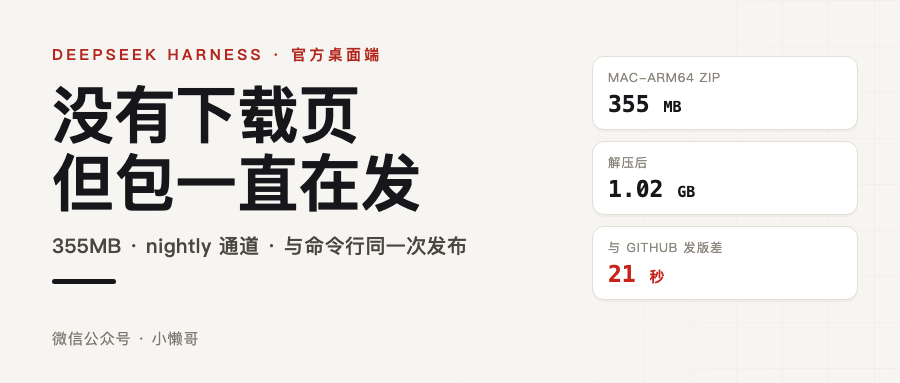
One detail is telling. The mac manifest’s releaseDate is 2026-09-24T14:10:00.562Z, while dsh-v0.1.7-rc.2 on GitHub was published at 2026-09-24T14:10:21Z. Twenty-one seconds apart. The desktop app is not a build tacked on days later; it comes out of the same release run as the CLI.
I HEADed both packages, HTTP 200 on both, and the real sizes line up:
- mac-arm64 zip: 355MB, last modified 09-24 14:20
- win-x64 exe: 274MB, last modified 09-24 14:12
Later I actually downloaded the mac build. 372794444 bytes, not a single byte off the size in the manifest, and the sha512 I computed matches the string in the manifest exactly. Unzipped it is DeepSeek Harness.app: 9,535 files, 1.02GB unpacked. 355MB expanding to 1GB is the price of shipping an entire runtime inside.
Two platforms only, and a single nightly channel
I tried every path I could guess at:
feeds/mac-arm64/nightly-mac.yml   → 200
feeds/win-x64/nightly.yml         → 200
feeds/mac-x64/nightly-mac.yml     → 404
feeds/win-arm64/nightly.yml       → 404
feeds/linux-x64/nightly-linux.yml → 404
feeds/mac-arm64/latest-mac.yml    → 404
macOS arm64 and Windows x64. That is it. The repo docs actually name three packaging targets (mac-arm64, mac-x64, win-x64), but the Intel Mac one never shipped.
There is no latest-mac.yml either, and that is not an oversight. The repo docs say each release publishes nightly.yml or nightly-mac.yml, and a stable release additionally publishes latest.yml / latest-mac.yml pointing at the same artifacts. Nightly only means the official desktop app has no stable release yet.
The version history makes it clearer still. Same naming rule, walking backwards:
0.1.7-rc.2     → 200
0.1.7-rc.1     → 200
0.1.7-alpha.2  → 404
0.1.7-alpha.1  → 404
0.1.6-alpha.2  → 404
0.1.5-rc.3     → 404
The official desktop app only started shipping at 0.1.7-rc.1, which is September 23. Everything before that 404s. The “desktop versions” in earlier articles were all community shells someone wrapped around it.
What is inside 355MB
An Electron shell reaching 355MB is definitely not about the shell.
The official desktop app carries the whole runtime: Python, Node.js and pnpm ship inside the package. The requirement in the docs reads “the application must be able to run on a machine with no system Node.js or pnpm”, and the way they do it is running dsh under Electron’s ELECTRON_RUN_AS_NODE mode, with every package operation going through the bundled pnpm.
That Python is not decoration either. It installs numpy, pandas, python-docx, python-pptx, openpyxl, Pillow, lxml and XlsxWriter, registers three bundled skills — office-docx, office-pptx, office-xlsx — and routes Office tasks through the bundled LibreOffice by default. On first call it installs offline into $DSH_HOME/dsh-runtimes/dsh-primary-runtime; after that it never touches your system Python and never edits PATH.
A couple of days ago I pulled the source and built it once. First thing it does on launch is take port 19387, separate from the web version’s 3080, so both can be open at the same time.
One release number locks a whole version set
This is the decision I think is most worth learning from in the entire desktop app, and it is written down in the official design notes.
The Electron shell and the dsh inside it are two independent packages. The GUI protocol also binds the web client and backend versions together, so the moment you let each side pick its own version you get “an unvalidated combination of shell, client, backend and plugins”, and you cannot tell whether an update is even usable.
What they do: one Desktop release number identifies both the Electron artifact and the exact @deepseek-ai/dsh and @deepseek-ai/dsh-desktop-host dependencies it uses. The release process cannot pick a different core version at build time or at runtime.
Which produces that slightly convoluted but very hard line: even if the shell code did not change at all, updating dsh has to produce a new Electron release.
That explains the two things I saw earlier: releaseDate sits 21 seconds from the GitHub release, and rc.1 and rc.2 each have their own 355MB package. Even if not one line of Electron changed between them, the desktop app gets rebuilt anyway.
The desktop profile is reserved, and the CLI cannot touch it
The desktop app and a dsh installed with npx share the same .dsh directory, but two things have to stay separate:
- Shared: sessions, settings, credentials, workspaces, storage
- Not shared: executable packages, the lockfile,
node_modules, plugin activation state, package manager config
So the desktop app has its own exclusive profile at ~/.dsh/profiles/desktop. And the CLI reserves every case variation of the name desktop. You cannot start it from the command line, dump its config, or manage its plugins; the request gets refused outright. The desktop app belongs to Electron.
Other details show how carefully that line is drawn: Electron takes a process-lifetime single-instance lock before restoring the profile or starting the Host, so a subsequent launch only focuses or rebuilds the window and never touches profile state. The renderer runs nodeIntegration: false, contextIsolation: true, sandbox: true, and preload exposes only launch-ready, native directory picking and theme sync — never raw ipcRenderer, the filesystem, shell, or pnpm arguments.
That private Desktop Host package is not published to npm, which is also why searching @deepseek-ai/dsh-desktop on npm gives a 404. It was never meant to be installed on its own.
Update and uninstall: two checks, and a ~/.dsh that never moves
Updates go through the usual electron-updater path, but the team added two safeguards: the manifest carries a sha512, and on Windows there is signature checking as well — app-update.yml holds the expected publisher identity, and a downloaded manifest cannot change it.
The install process also accounts for things like losing power halfway through. The Windows installer unpacks the new version next to the install directory, quits the old app, then swaps by renaming directories on the same volume. The old directory stays until the swap succeeds; if unpacking fails the old version is left untouched; if the swap fails it tries to restore the old directory. When unpacking really fails, the full 7-Zip error gets written to the update cache directory under %LOCALAPPDATA%, the dialog shows only the first line, and there is a “copy error message” button next to it.
macOS is stricter: the App and the DMG each go through notarization, in parallel, and the artifact only moves into its final directory if both succeed.
One detail on the uninstall side I quite like: the Windows uninstaller deletes Electron’s user data, the product directory under %APPDATA% and the update download cache, but never touches ~/.dsh. Your sessions, settings, credentials and plugins all stay. Reinstall and it is exactly as you left it.
If you want to try it
macOS (Apple Silicon):
https://download.deepseek.com/dsh-desk/bin/mac-arm64/deepseek-harness-0.1.7-rc.2-mac-arm64.zip
Windows x64:
https://download.deepseek.com/dsh-desk/bin/win-x64/deepseek-harness-0.1.7-rc.2-win-x64.exe
Worth checking the sha512 after downloading; the manifest hands it to you:
openssl dgst -sha512 -binary deepseek-harness-0.1.7-rc.2-mac-arm64.zip \
  | openssl base64 -A
The mac build should print aOfxtRvFqTRRp3zqu6nXNgILgVdHDPyfslhUVNnU1wMYw1dY1vTelptJeAmUDt7G822SCqHzxtPwMmvCGekveA==.
Three things to be clear about:
First, this is the nightly channel. The team positions it as a developer preview, not a stable build for daily use.
Second, I only verified that the package is real. The manifest is readable, both packages return HTTP 200, sizes and sha512 match, and what comes out of the archive matches what the docs describe — all of that I ran on my own machine. But I did not install it and I did not launch it, so I am not vouching for whether it runs once installed. I also did not re-verify macOS signing and notarization (the docs say the App and the DMG are each notarized in parallel, and the artifact only ships if both pass). Whether to install it, and which version, is your call.
Third, it is not the only option. The community shells are still maintained and each tracks a different dsh version: dshdesktop is built on 0.1.5-rc.2 while the official build is already at 0.1.7-rc.2, with voice input and account login in between. Want the new stuff, follow official. Want it working out of the box without wrestling with signing and notarization, go to the community side.
Wrapping up
The team never built the desktop app as “software you download”. It is part of the update channel, which is why it only exists in YAML manifests, and only exists as a convention across the bin/ and feeds/ directories.
When you are checking whether something “exists”, it is worth asking yourself first: if it was never meant to be found by hand, where would it live.
Links: