On-device search used to be assembly work. Images had to go through a captioning model to become text, audio had to be transcribed, video had to be frame-extracted with subtitles added, and then all of it got thrown at a text embedding model. Every modality you added meant another chain, another slice of latency, another pile of intermediates.
On October 6, Google DeepMind released EmbeddingGemma 2, and they folded that whole chain into one model.
What it is
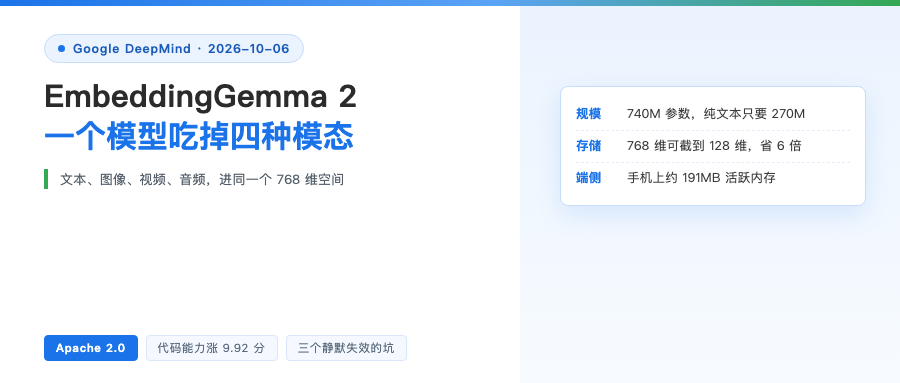
740M total parameters, split three ways: a text-plus-code trunk at 270M, a vision encoder at 170M, an audio encoder at 300M. Four modalities (text, image, video, audio) project into the same 768-dimensional space, and they can interleave — just mark media positions with placeholders.
The context window is 8,192 tokens, 4x the previous generation. A single input fits up to 5.5 minutes of audio, 29 images or 58 video frames.
The license is Apache 2.0. Per Google, the architecture builds on Gemma 4 and shares lineage with Gemini Embedding. The previous EmbeddingGemma passed 20 million downloads, which is the confidence behind opening up across all modalities in one shot.
Four configurations, one shared vector space
The most interesting part here is the modularity. You load only the encoders you need:
text only       270M
text + image    440M
text + audio    570M
all modalities  740M
The key is that last line: all four configurations share the same vector space. A query encoded with the 270M setup can be compared directly against a document encoded with the full 740M. Which means you don’t have to commit up front — build the index on text alone, and when you want image search one day, add the vision encoder in. The vectors you already computed don’t get recomputed.

Storage drops sixfold
Output is 768 dimensions, but it uses Matryoshka representation learning, so vectors truncate to 512, 256 or 128 dimensions, saving up to 6x on storage.
The cost is in Google’s own table: at 256 dimensions, text and code quality basically holds, and multimodal retrieval sits around 95%; at 128 dimensions text and code retain about 90%, but image, video and audio fall to roughly 75%. Google’s advice is clear — keep 128 dimensions for large indexes and first-pass ranking, don’t run multimodal retrieval on it directly.
Code is where it jumped hardest
Multilingual text barely moved. The real jump is code:
MTEB Multilingual v2   61.36   (previous generation 61.15)
MTEB Code v1           78.68   (previous generation 68.76)
Code went up 9.92 points, about 14%. Google states the uses plainly: local codebase indexing, semantic code search, retrieval for coding agents.
Scores for the other modalities are listed too, official numbers, 768 dimensions:

How small is on-device, really
Google’s measured numbers: on a Pixel 11 Pro, after quantization, text-only weights sit at about 191MB of active memory, all-modality about 567MB. Quantize further and it compresses more — Unsloth is even talking about running it in 0.5GB of memory.
Pairing it with Gemma 4 has a hidden benefit: the two models share the same text tokenizer and audio encoder, so running on-device RAG with both costs less total memory than running each on its own.
Three traps that fail silently
All of these are in the official model card and worth pulling out on their own, because none of them throws an error.
The first is precision. Don’t use float16. The model’s activation range exceeds fp16’s dynamic range, and the result is NaN or quietly degraded vectors, with no exception raised. Use bfloat16, or float32 on hardware without native support.
The second is truncation. Slicing breaks unit length, so after shortening you have to redo L2 normalization. Skip it and nothing errors — the ranking quality just rots slowly while the scores still look respectable.
The third is dimension alignment. Query and document must be the same dimension. A 768-dimensional query can’t be scored against a 128-dimensional corpus.
Also, text input needs a task prefix: SearchQuery plus Document for retrieval, CodeRetrieval for code retrieval, and the respective symmetric prefixes for classification and clustering. You can skip the prefix and it still runs, quality just drops. Media inputs take no prefix.
The ecosystem showed up fast
Tooling basically ready on launch day: sentence-transformers (from 6.1.0), transformers, vLLM, SGLang, MLX, Ollama, LM Studio, Qdrant, LiteRT.
The GGUF build for llama.cpp is in the ggml-org repo, fine-tuning docs are Unsloth’s, and on the browser side there’s transformers.js plus a WebGPU demo.
On shipping forms, Google AI Edge Gallery added two demos. One is Instant Media Search: search your local photo library as you type — typing the German “Katze schläft auf Tastatur” lands straight on the shot of the cat asleep on the keyboard.
The other is Video Moments Finder, which takes a description like “a kid laughing” and jumps straight to that moment in the video, no audio transcription and no subtitle generation.
On Mac they also shipped AI Edge Foresight, a local meeting assistant that uses EmbeddingGemma 2 for file retrieval and Gemma 4 for understanding, tapping system audio and the microphone, working offline.
Further out, ML Kit will offer this capability in the coming weeks with NPU acceleration; MediaPipe’s UniversalEmbedder and SemanticRetriever already support it, and there’s a bonus use — with no fine-tuning at all, compare user input directly against category labels and you get millisecond-level intent routing.
One judgment
What’s actually valuable in this news isn’t another leaderboard number. It’s that a 740M open model replaces a three-stage pipeline. What you save isn’t just memory, it’s the intermediates and all that serialized latency.
For people working on on-device RAG, local file search or codebase indexing, this is the thing worth spending an afternoon on this year. One caveat: the main HF repo has no GGUF or ONNX — for on-device deployment you have to grab them from the ggml-org and litert-community repos.
Which scenario would you move back to local? Comments are open.
References:
- Official launch post https://blog.google/innovation-and-ai/technology/developers-tools/embeddinggemma-2
- Model card https://huggingface.co/google/embeddinggemma-2
- Developer guide https://developers.googleblog.com/en/embeddinggemma-2-the-developer-guide/
- AI Edge shipping post https://developers.googleblog.com/google-ai-edge-with-embeddinggemma-2/