The KMP map
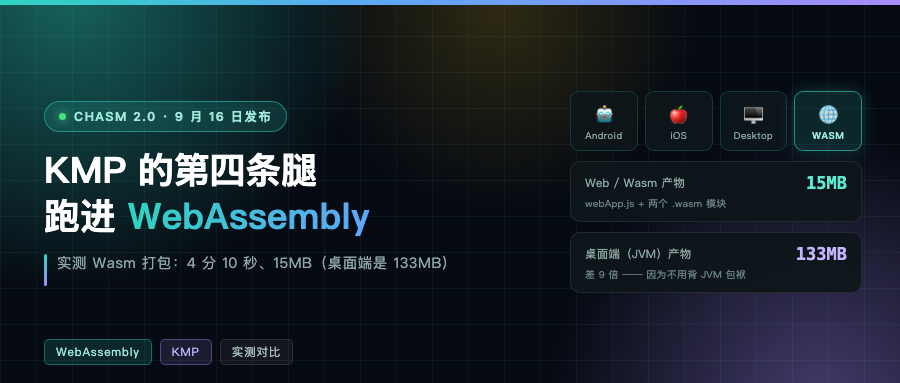
Android, iOS, desktop. Those are the three places KMP has covered solidly for the last few years. The fourth leg is WebAssembly, and last week’s Chasm 2.0 release is on that line.
Before looking at it, there is one easy confusion to clear up first, or you will get the whole roadmap wrong.
Chasm: a Wasm runtime written in Kotlin
Its self-description is one line: Chasm is a WebAssembly runtime built on Kotlin Multiplatform. In other words, a WebAssembly runtime built with KMP.
Mind the word order. It is a thing that runs Wasm, written in Kotlin. It is not Kotlin compiled to Wasm. Those two point in opposite directions. More on that shortly.
The project sits at 227 stars now (221 when I wrote the first draft) and supports the Wasm 3.0 spec, minus Memory64 and vector instructions. It implements the Tail Call, Typed Function References, Wasm GC, Multiple Memories, Exception Handling and Wide Arithmetic proposals. A runtime that handles GC and exceptions is not a toy anymore.
2.0 shipped September 16, and the author says plainly that it is full of breaking changes: a new Android target (min SDK 28); the JVM target floor raised to JDK 17; the Host Function API rewritten, from passing a list of values in and returning a list of values out to reading and writing the runtime stack directly; the deprecated macosX64 and iosX64 targets removed; the Gradle plugin no longer supporting AGP 8.
One note on progress: as of writing this (September 21), there are no commits or releases after 2.0. The author is collecting feedback. That is the right pace. A major version just shipped, hold steady before iterating.
What caught my attention most is one trade-off the author spells out:
I want to do everything within the native constraints of each platform, and that means no FFI or anything like it.
Anyone who does cross-platform work knows the weight of that sentence. The cheap way to let a JVM call a Wasm runtime is a thin C interface on top. He took the expensive path: a native implementation per platform. The cost is double the work. The payoff is no FFI dependency and no ABI compatibility headaches.
Don’t mix them up: these two point opposite ways
I suspect a lot of people see Kotlin and Wasm next to each other and jump straight to: does KMP support Wasm now?
No. These are two things pointing in opposite directions.
Kotlin/Wasm is the official compilation target. Its job is compiling Kotlin source into .wasm and shipping it off to the browser. Direction: outbound.
Chasm does the opposite work: take an existing .wasm file, execute it in its own runtime, running on JVM, Android and iOS. Direction: inbound.
Mix those two up and your understanding of the whole roadmap is off.
The fourth leg means the official one
The official docs are plain about it: Kotlin/Wasm compiles Kotlin to WebAssembly, for Compose Multiplatform web apps or for running in a standalone Wasm VM outside the browser (the latter reaching platform capabilities through WASI).
Two points.
One: the Web platform target for Compose Multiplatform is Kotlin/Wasm. Which means UI written in Compose really does run in a browser, sharing the same UI code with Android, iOS and desktop. That is what the fourth leg actually means.
Two: there are hard browser requirements. It needs the WebAssembly garbage collection (WasmGC) and exception handling proposals. I assumed Safari would be the problem child; after checking the official material, the bar is lower than I expected. The versions:
| Browser | Minimum version |
|---|---|
| Chrome / Chromium family (Edge, Brave, Opera, Samsung Internet) | 119 |
| Firefox | 120 |
| Safari / WebKit | 18.2 |
| Node (outside the browser) | 22.0 |
The Safari row deserves its own explanation. 18.2 landed at the end of 2024, shipping as iOS 18.2 / macOS 15.2. On iOS and iPadOS, Safari rides along with the OS; users do not update it separately. So translated, that requirement is not don’t use Safari, it is don’t let your users sit on ancient hardware. Get that one wrong and the whole technology decision flips.
One more detail worth knowing: the exception handling proposal now comes in an old and a new version. The Kotlin toolchain supports both, but the wasmJs target uses the legacy one by default, for wider compatibility. Switching to the new one takes explicit configuration.
Measured: what the Wasm side costs
Measured on a real KMP project on this machine, with both a JS and a Wasm target. First the numbers from my first draft, on Kotlin 2.4.0 + CMP 1.11.1:
$ ./gradlew :app:webApp:wasmJsBrowserDistribution
→ BUILD SUCCESSFUL in 4m 10s
→ 50 actionable tasks: 50 executed
Four minutes ten, and that is with dependencies already cached.
The artifacts:
| File | Size |
|---|---|
| 6e23e542…wasm (skiko rendering) | 8.25 MiB |
| 212a0e38…wasm (application code) | 5.97 MiB |
| webApp.js | 529 KiB |
| index.html + styles.css | about 1 KB |
The two wasm files add up to 14.2 MiB; the whole directory is about 15MB.
Then I temporarily bumped the project to Kotlin 2.4.20 + CMP 1.12.0 and ran it again:
$ ./gradlew :app:webApp:wasmJsBrowserDistribution
→ BUILD SUCCESSFUL in 3m 33s
→ 50 actionable tasks: 48 executed, 2 up-to-date
| Kotlin 2.4.0 + CMP 1.11.1 | Kotlin 2.4.20 + CMP 1.12.0 | |
|---|---|---|
| Build time | 4m 10s | 3m 33s |
| skiko wasm | 8.25 MiB | 8.24 MiB |
| app wasm | 5.97 MiB | 5.67 MiB |
| webApp.js | 529 KiB | 526 KiB |
| wasm total | 14.22 MiB | 13.91 MiB |
Not dramatic, but the direction is clear: builds half a minute faster, app wasm down 0.30 MiB, about 5%.
I should be clear that this is not a strictly even comparison. Two tasks hit cache on the second run, so part of that 3m33s is savings rather than the compiler getting faster. But the conclusion that this line keeps getting faster and smaller holds.
Compare the desktop numbers, packaged for JVM: 133MB, roughly nine times as much. The reason is simple. Of those 133M, 77M is the JVM runtime and 20M is Skia. In the browser neither gets bundled. No JVM, and rendering goes straight to the browser’s Canvas and WebGL.
That is the most concrete benefit of the Wasm side: you do not carry the runtime.
webpack does throw a string of warnings during the build, saying several assets exceed the recommended 244 KiB ceiling. It names webApp.js at 529 KiB and both wasm files. 8.25 MiB is over thirty times its suggestion. Meaning: without code splitting and lazy loading, a user downloads 15MB on first open. On a weak connection that is a real experience problem.
What the Web side picked up this month
While bumping versions I went through two sets of release notes. A few items matter a lot if you build Chinese-language apps, so they get their own section.
Web changes in CMP 1.12 (August 25):
- Automatic Noto font loading. When a glyph is not covered by the theme font, it loads Noto on demand. Anyone building Chinese or multilingual apps knows what that means: rare characters used to render as tofu blocks
- Two tofu fixes specifically: unknown glyphs on a text field’s first draw, and tofu on the second and later draws of the same text
- Fixed a bug where
div#cmp_a11y_rootwas sized 0×0. That one is serious: it made everything Compose rendered invisible to hit-test based accessibility tools - Wheel events now carry both axes, which fixes diagonal scrolling. Precise trackpad gesture detection on Chrome. Fixed pointer state left dangling after
pointercancel, which system gestures, palm rejection and device disconnects all trigger - Also fixed: focusing a text field on a mobile browser could hide the soft keyboard
- The web target also picked up haptic feedback support and
Modifier.keepScreenOn
CMP 1.13.0-alpha01 (September 10):
- The deprecated
compose.web.targets(...)Gradle plugin API is gone. If it is still in an old build script, the upgrade fails outright - Experimental support for system window insets on the web
- A new experimental API for rendering WebGL textures
- When the browser or device lacks WebGL2, you get a message you can understand instead of an opaque crash
Kotlin 2.4.20 (September 7) moved the Wasm backend a lot more. This release notes page has sixty-odd Wasm entries. Three you will hit sooner or later:
- Range checks are on by default. Better safety, a bit of performance in exchange
wasmExportsis deprecated and banned. If you reach into wasm exports directly through JS interop, the upgrade breaks- Prototyping suspend functions generated via the stack-switching proposal. Not usable yet, but worth remembering the direction. It is the official path for async in Wasm
One upgrade caveat: refactoring callable references and generating a unified fun interface base class broke klib binary compatibility. If your dependencies include someone else’s published wasmJs klib, they may need to republish. This kind of break is far more sensitive in the multiplatform ecosystem than on the JVM. Run a build before upgrading; do not find out at release time.
Where it fits, where it doesn’t
The best deal is when you already have a KMP project and want a web client for free. Same as desktop: add a target. Internal tools and admin backends work too. You do not care about a 15MB first load, you care about one codebase.
Where it really pays off is logic-heavy apps with relatively fixed UI. The more business logic you share, the better the math.
Going the other way: consumer marketing pages and lightweight sites, do not bother. A 15MB first load plus old-browser incompatibility is a bounce. SEO-dependent products are out too, because crawlers cannot see content rendered by Wasm. If Web is your only platform, plain React or Vue is less trouble.
The test compresses to one question: is your core value the Kotlin code you already wrote? If yes, use Wasm. If not, do not force it in the name of technology uniformity.
Appendix: a minimal working project
Three steps to a running app.
Step one, add the target in build.gradle.kts:
plugins {
    alias(libs.plugins.kotlinMultiplatform)
    alias(libs.plugins.composeMultiplatform)
    alias(libs.plugins.composeCompiler)
}

kotlin {
    @OptIn(org.jetbrains.kotlin.gradle.ExperimentalWasmDsl::class)
    wasmJs {
        browser()
        binaries.executable()
    }

    sourceSets {
        commonMain.dependencies {
            implementation(compose.runtime)
            implementation(compose.foundation)
            implementation(compose.material3)
        }
    }
}
Step two, write the entry point at src/wasmJsMain/kotlin/main.kt:
import androidx.compose.ui.ExperimentalComposeUiApi
import androidx.compose.ui.window.ComposeViewport
import kotlinx.browser.document

@OptIn(ExperimentalComposeUiApi::class)
fun main() {
    ComposeViewport(document.body!!) {
        App()
    }
}
Step three, put the UI in commonMain, shared by all three platforms:
@Composable
fun App() {
    MaterialTheme {
        var count by remember { mutableStateOf(0) }
        Column(Modifier.padding(24.dp)) {
            Text("Hello, Wasm!")
            Button(onClick = { count++ }) {
                Text("点了 $count 次")
            }
        }
    }
}
Run it:
./gradlew wasmJsBrowserDevelopmentRun   # dev mode, with hot reload
./gradlew wasmJsBrowserDistribution     # production bundle
ComposeViewport is Compose Multiplatform’s mount point on Web/Wasm, roughly the same role as setContent on Android or application on desktop. So the integration cost of the fourth leg is one target and one entry function, with the UI code still shared.
How to use Chasm
Back to the project from the opening. Here is what using it looks like, the minimal example from the README:
plugins {
    id("io.github.charlietap.chasm.gradle") version "3.0.0-2.0.0"
}

chasm {
    modules {
        create("ExampleService") {
            binary = layout.projectDirectory.file("src/main/resources/example.wasm")
            packageName = "com.example"
        }
    }
}
With that in place, the build reads your .wasm file and generates a Kotlin class, ExampleService, where every exported function becomes a Kotlin function you can call directly. You use an existing Wasm module like an ordinary Kotlin library.
Underneath is a single Wasm VM abstraction: on JVM and native platforms it uses Chasm’s own implementation, in the browser it reuses the host’s built-in VM.
What does that solve? Say you have a C/C++/Rust library compiled to Wasm and you want it inside an iOS app. That used to mean writing FFI glue. Now you call it as a Kotlin library. Or take a cross-platform plugin system, where plugins ship as Wasm and the host executes them.
That is the real reason Chasm deserves its own section. It shows the other half of what Wasm can do.
My take
Chasm and Kotlin/Wasm in the news at the same time is a good thing. One sends Kotlin out, one brings Wasm in; they connect the two from opposite directions. Two-way connection like that means the ecosystem is growing some depth.
The real barrier for Wasm is not technology, it is size and compatibility. A 15MB bundle, browser requirements for GC and exception handling: those are hard commercial constraints, not engineering fastidiousness. When I measured that 4m10s build time I thought, this technology is mature now. But mature does not mean right for your product.
One more thing: these four KMP surfaces are nowhere near equal. Android and iOS have a decade behind them, desktop five or six years, Web/Wasm two or three. Holding them to the same standard is unreasonable. The smoothness you are used to on Android will mostly need re-learning on Wasm.
If you want a web client, my advice is to add a Wasm target to your existing project first and run a Hello World. The config above, half an hour to verify. The important part is in your existing project. You will hit real problems immediately: whether your dependencies publish wasmJs variants (the most common blocker), whether your expect/actual declarations miss a wasmJs branch, how much build time you add. A toy project will not show you any of that; only real dependencies expose it. Half an hour hitting the wall is a much better trade than two weeks of refactoring followed by discovering the library does not support it.
Will you add a web client to your KMP project? Is a 15MB first load acceptable? Comments are open.
Sources: the CharlieTap/chasm repo and the 2.0.0 release notes; the official Kotlin docs on Kotlin/Wasm and “Supported versions and configuration”; the official WebAssembly roadmap for GC support versions; the Compose Multiplatform 1.12.0 and 1.13.0-alpha01 release notes; the Kotlin 2.4.20 release notes; a Reddit r/Kotlin thread. Test environment: Mac mini (M4, 16GB), project is a KMP app with both JS and Wasm targets, built once under Kotlin 2.4.0 + CMP 1.11.1 and once under Kotlin 2.4.20 + CMP 1.12.0 (the upgrade was temporary; the project was restored afterward).