Writing Kotlin in VS Code has always been a compromise
Completion is guesswork, go-to-definition is luck, and you do not dare press rename. On October 15, JetBrains turned the Java and Kotlin engine from IntelliJ IDEA into a language server extension and shipped 1.0, installable in VS Code, Cursor, and Google Antigravity.
Below, VS Code means Visual Studio Code and IDEA means IntelliJ IDEA.
I ran it against an Android project on this machine for a full pass. The engine really is IDEA’s. But there is one condition you should know up front: the intelligence is not in the editor, it is in a server the extension downloads for itself after launch, and that server wants a license.
What it actually delivers
The capability list from the official 1.0 release notes, plus what the extension itself reports, gives you this in practice:
- One index across mixed projects. Java, Kotlin, and projects mixing both are all understood, and jumping to a definition on the other side does not break the chain. That means no more installing three or four language plugins at once, and no more worrying about them fighting each other.
- Completion, navigation, inspections, quick fixes, rename, formatting. These are the highest-frequency moves day to day, and they are this extension’s selling point.
- Maven, Gradle, and Bazel are all understood, JUnit runs, and large repos do not choke.
- A debugger with simulated breakpoints and async call stacks, which is useful for coroutine-heavy code.
- Cursor’s Agents Window gets dedicated support: it can be given its own language server instance so the agent gets analysis built on IDEA’s inspections, including JSpecify null-safety and special handling for the Spring framework.
- The language server also ships an MCP server, built with ktor’s SSE and the MCP Kotlin SDK. The team does not promote this much, but for anyone who wants agents to consume code intelligence directly, it is a new path.
One recommendation worth following: it overlaps with the Java extensions from Red Hat and Oracle on inspections and quick fixes, and the team explicitly recommends disabling those two when running both. Spring Tools does not conflict and can stay.
Installing takes one command
Set expectations first: the package you download from the marketplace is only 1.4 MB. The actual intelligence is downloaded at runtime.

So “install a plugin” is split into two halves: a shell in the editor, and 361 MB on JetBrains’s servers. The shell holds only commands, settings, and grammar files — not one line of language analysis code. The unpacked server takes 1.2 GB and bundles its own JetBrains Runtime 25.
For a command-line install, VS Code looks like this:
code --install-extension JetBrains.intellij-server --force
code --list-extensions --show-versions
# [email protected]
1.0.27 shipped packages for six platforms — Apple silicon, Intel, two for Linux, two for Windows — all released on the same day, October 15. Editors like Cursor pull from Open VSX; VS Code pulls from Microsoft’s marketplace.
Of those 43 settings, only a few are worth touching
The extension adds 43 settings to the editor, and the overwhelming majority should stay at defaults. These are the ones I would change:
| Setting | Default | When to change it |
|---|---|---|
| intellij.jdkForSymbolResolution | empty | When the JDK used for symbol resolution is not the one the project runs on, point at the path here |
| intellij.additionalJvmArgs | empty | When analysis on a large project is starved, add JVM flags like -Xmx |
| intellij.buildTool | auto-detect | When you want to pin Gradle or Bazel in a multi-module repo |
| intellij.workspace.reloadOnBuildFileSave | always | Re-imports every time you save a build file; switch to manual if that gets noisy |
| intellij.projects | empty | When one workspace holds several projects and you do not want them seeing each other |
| intellij.dev.serverPort | -1 | When a server is already running and you want the editor to connect to it instead of starting another |
| intellij.trace.server | off | When you want to see what actually goes back and forth between editor and server |
That last one deserves a note. The default of -1 means “start one myself”; set a port number and it becomes “connect to that one.” The switch existing at all tells you the team designed this language server as a standalone process, and the editor is just its first client.
So I skipped the editor and talked to the server directly
If it is a standalone process, there is no reason to go around it. The installed package has an executable called intellij-server. Start it and read the flags — the surface is bigger than what the editor exposes:
./bin/intellij-server --help
# --stdio                     stdio mode, for editors
# --socket=127.0.0.1:9999     server mode, default port 9999
# --port-file=<path>          write the bound port to a file so clients can find it
# --idle-timeout=10m          exit when no client is connected
# --multi-client              allow multiple clients at once
# --data-sharing=none         turn telemetry off
# --system-path=<path>        where caches and indexes go
One more detail is fun: first launch asks you for a EULA hash, and that hash is the first 16 characters of the SHA-256 of the EULA.txt in the package. What it is asking you to confirm is “I agree to this version of the terms.” Change the terms and the hash changes.
I wrote a hundred-line Python client and spoke the LSP protocol at it directly:

The handshake took 1.4 seconds. It reports itself as IntelliJ Language Server by JetBrains, version ILS-263.7084.0, corresponding to the 2026.3 platform. It reported back 25 capability keys, 22 of them Providers: completion, navigation, rename, inlay hints, semantic highlighting, type hierarchy, call hierarchy are all there.
Then I asked it to import that Android project on this machine, and it actually did it. The log listed the Gradle model item by item, from ModuleSourceSets to AndroidProject, ending with Successfully imported.

Numbers, for the record: the first import (Gradle daemon has to start, dependencies have to resolve) took 21 seconds; with the daemon and caches warm, an import takes 978 milliseconds, and 10.5 seconds from process start to ready. On memory, the language server itself is 626 MB, and the Gradle daemon it spawns adds another 914 MB — and the daemon survives after you shut the server down, waiting out a three-hour idle timeout before exiting.
Here is the wall: no license, no answers
All of the above is the good part. Now the thing nobody tells you before you install.
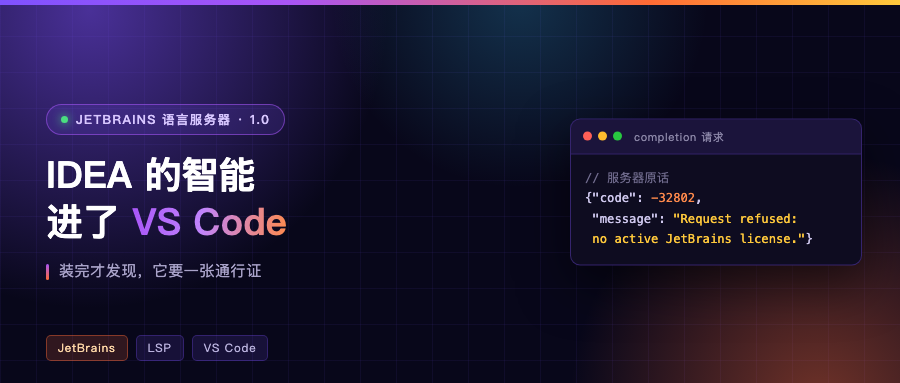
The server is up, the project is imported, the ready notification has been sent. Then I request a completion and get this back:
{"code": -32802,
 "message": "Request refused: no active JetBrains license."}
Hover, document symbols, go-to-definition, one after another — same code, same sentence every time. It can connect, compute, and import. It just will not hand you the results. A quick license status query gives its side of it: not licensed, feature requests are parked.
The team is blunt about it in the release notes:
With version 1.0, the extension moves out of its free preview phase. Using it now requires an IntelliJ IDEA Ultimate subscription after a 30-day trial period during which you can try out its full feature set for free.
The same notes have a line worth more attention:
The license is explicitly designed for human use; we’ll release an update regarding licensing models for purely agentic use soon.
In plain terms, the license is granted for human use, and the rules for agent-only use will be announced later. Which is an admission that this part is not settled.
They do give you the commands for unlocking it:
./bin/intellij-server license login      # JetBrains account; --code mode suits environments without a browser
./bin/intellij-server license activate <activation code / license file / floating license server>
./bin/intellij-server license trial      # anonymous 30-day trial
You can also feed a key straight in through the INTELLIJ_SERVER_LICENSE environment variable, but it only lives in memory and is gone on restart. In other words, this layer is not a toggle inside the editor. It is a server with its own license state.
A few traps you will genuinely hit
- That 361 MB is downloaded by the server, not by you. When the download fails the editor only shows a vague notification; the real error is in the server’s own log, and the log path is printed on first launch.
- It spawns a Gradle daemon for your project, using the Gradle wrapper already in your project. First time you open a large project, do the memory math as “server plus daemon,” not just 626 MB.
- The extension requires VS Code 1.105.1 or newer and Node 22.20 or newer. Older versions will not install it.
- The day your license expires there is no loud noise. Syntax highlighting stays, because the editor’s own grammar files handle that, but completion, navigation, and refactoring all go quiet together.
Closing
This extension changed one of my assumptions. I used to think of an IDE’s language intelligence as part of the editor. Now it looks more like a subscription service, with the client as a shell. JetBrains played this smartly: sell one engine once inside its own IDE, and sell it again inside other people’s editors. For developers, the cost is one more server to keep an eye on.
What Kotlin plugins are in your editor right now, and would this make you swap them out? Talk in the comments.