It started with a disk cleanup
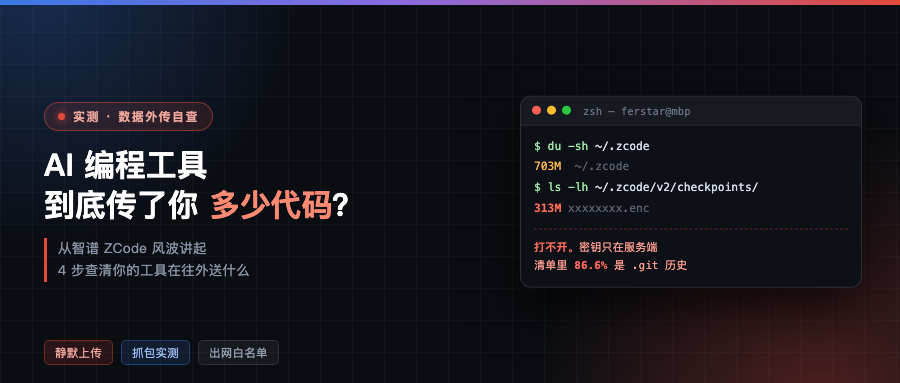
While cleaning up his disk, tech blogger ferstar noticed the ~/.zcode directory was taking up a lot of space – over 700MB.
He dug in. cli/ 257MB, computer-use/ about 130MB, both fairly normal. The real weight was v2/checkpoints/, at 303MB.
Sitting inside was a single 313MB .enc file.
He could not open it. But the status metadata next to it was plaintext, saying this workspace was a commercial project, marked as a full snapshot, with a repo totaling about 10GB, and 345MB remaining after stripping dependencies, which was the project’s core assets.
Meaning: the file he could not open contained his entire project.
This was September 18. That same day he published a reverse-engineering analysis of ZCode, and Zhipu apologized, admitting the problem came from a codebase indexing feature that was on by default.
But the part of this story actually worth writing about is not the trending-topic part.
He took the whole upload chain apart
The logs do not record the upload address directly. ferstar got it by unpacking the client and reconstructing the whole chain:
- The client first requests upload credentials from
zcode.z.ai - The server returns an OSS form signature, a dynamic object key, a size limit, and an RSA public key issued just for this round
- The client packages and stream-encrypts locally, producing the
.encfile - Bypassing Zhipu’s own business servers, it POSTs the encrypted file as a multipart form straight to Alibaba Cloud OSS
- OSS then calls back to the Zhipu backend to register it
The encryption is standard envelope encryption: content encrypted with a temporary symmetric key using AES-256-CTR, and that symmetric key wrapped with the server-issued public key using RSA-OAEP-SHA256.
The key point – the private key only ever lives in the cloud.
ferstar tried every private key on the machine. None would open it. That design means the user cannot open the file, the ZCode client cannot open it either, only the Zhipu backend can decrypt it.
He put it carefully himself: if this feature were designed for checkpoint resume or cross-device sync, the key should stay local. An encrypted package only the server can open at least guarantees one thing – only the server can unilaterally look inside.
What was actually in that package
The ciphertext will not open, but the plaintext manifest the client left behind during packaging is readable. A list of 42,411 files, broken down like this:
| Directory | Size | Share | What it is |
|---|---|---|---|
.git/lfs/ | 196.1 MB | 56.8% | every large file and binary asset ever pulled |
.git/objects/ | 102.2 MB | 29.6% | the complete commit / tree / blob object store |
.git/logs/ | 0.6 MB | — | local branch operations, unpushed records |
| source and docs | 46.2 MB | — | the current working tree |
.git total | — | 86.6% |
Here is a point most coverage did not make clear: what the cloud got was not your current code, it was your code’s entire life from birth to now.
Including sensitive config that has since been overwritten or deleted, old keys committed and then removed, branch names never pushed, and your company’s internal GitLab domain and repo path from .git/config.
There is a sneakier problem too. Comparing against the code, ferstar found that ZCode’s file filtering is decided sequentially, and the rule that lets the history directory through is evaluated before the secret filtering and the size limit.
The result: the filter for password files like .pem and .key, and the 1MB size cap, do not apply to anything under .git.
So a package hundreds of megabytes large goes out whole, and every password and key ever committed and then deleted goes along with it, untouched.
The worst part: the switches are fake
There are two related options visible in the UI. ferstar checked each against the code logic to confirm what they actually do:
- Optimize experience → only controls whether data is used for model training
- Repo snapshot index → only controls whether the server builds a search index after receiving data
Turn both off and the local packaging and upload still run as usual.
The component handling snapshots and uploads is instantiated unconditionally at app startup, with no user preference check at all. The only precondition is that you are logged in.
There are two triggers: captureBeforePrompt before every prompt, and repo-wiki-update at the end of a task. In the log of one active session he observed as many as 62 capture records.
He also tried deleting that 313MB pending file by hand. Half an hour later, ZCode regenerated a new one. Failed upload means retry.
And Zhipu’s privacy policy says it collects text, files and code submitted in conversations – it never mentions silently packaging and uploading the entire workspace and full Git history. The official docs, the FAQ, the changelog: not a word there either.
(The community workaround is to empty and lock the ~/.zcode/v2/checkpoints/ directory. On macOS use chflags uchg, on Linux sudo chattr +i. The cost is that checkpoint rollback and the timeline UI stop working, while chat, completions and tool execution are unaffected. I put the commands below.)
After the official response, it was not over
Zhipu apologized on September 18, saying the feature was meant to generate a repo index locally, to support historical version rollback and Repo Wiki; that the Wiki page is generated in the cloud and the data destroyed immediately without being saved; that having it on by default affected some users and it has been fixed. It also promised to open source the ZCode codebase soon, bring in third-party reviewers, and give all users one weekly quota reset as compensation.
Four days later, the enterprise side reacted harder than individual users.
On the evening of the 19th, customer Taiyuan Chengming Technology published an open letter demanding 12 answers from Beijing Zhipu Huazhang. Their independent forensics:
- What was uploaded from their side was 6 workspaces, 34,549 files, about 425MB, including source code, version control history, config files, plus database passwords, cloud service credentials and employee personal information
- The uploads were triggered automatically and happened in bulk, far beyond the collection scope stated in the privacy policy
- The ZCode client had been updated to 3.12.3 on September 16, yet uploads were still detected in the early hours of September 18, the day Zhipu publicly apologized
- The client’s network requests point to a Singapore entity, while the service agreement is signed with Beijing Zhipu Huazhang – they demand to know which entity is responsible, and whether the data is transferred across borders or stored overseas
Their demands include: stop processing immediately, thoroughly delete the uploaded data and its derivatives, caches and backups, provide a complete inventory of the data processing, and explain in writing where the data went.
According to Hongxing Capital Bureau, Zhipu’s response to media inquiries was four words: not true.
This is not an isolated case, and none of it was found by regulators
Around the same time, other tools got dug up too.
Independent security researcher cereblab used packet capture to prove that xAI’s coding Agent Grok Build packages up the user’s entire project and uploads it to Google Cloud Storage – including files the user explicitly told the AI not to read, and unredacted passwords.
Earlier, Claude Code was found sending back location and identity information without the user’s knowledge. An Anthropic engineer later confirmed it was a deliberate experiment.
Put these together and an uncomfortable pattern shows up:
Not one of these was found by a regulator or a security audit. Every single one came from an individual developer in the community.
And the safety frameworks the industry builds for Agents right now – model alignment, prompt injection defenses, tool permission boundaries – not one rule constrains the vendor’s own behavior.
For the past two years the center of gravity in Agent security discussion has been will the model go out of control, will prompts get poisoned, how do external attackers get in. Vendor data practices were rarely treated as a first-class risk.
That premise just broke.
So the conclusion is plain: in this environment, expecting someone else to gatekeep for you is unrealistic. You have to know how to check yourself.
Below is a self-audit method you can actually run, from individual to corporate network, in four steps.
Step one: work out whether you are on local or cloud inference
This step matters because it determines the shape of every check after it.
Pure local inference has a hard physical signature: it does not need much network. The model is on your disk, the compute is on your machine.
Conversely, any cloud inference means your prompt (and the file contents the tool stuffed into context) has to leave through a network request.
First check whether the model files really exist:
# Ollama's model blob directory, if you really run local models there is something here
du -sh ~/.ollama/models/blobs 2>/dev/null

# common local model file formats
find ~ -maxdepth 5 \( -name "*.gguf" -o -name "*.safetensors" \) -size +100M 2>/dev/null | head
Then look at what that process is doing while it infers:
PID=$(pgrep -f "ollama|llama-server|lmstudio" | head -1)

# does it have any network connections?
sudo lsof -i -P -n -a -p "$PID"

# its CPU / memory usage (local inference eats memory equal to the model size)
top -pid "$PID" -l 1 | head -12
The read is simple:
- outbound connections + tiny memory footprint + idle CPU → cloud inference, your content is leaving
- no outbound connections + memory roughly equal to model size + GPU/CPU clearly busy → local inference
Incidentally, this also lets you call bluff. Some tools put runs locally on the marketing page, you run the commands above, and the process is connected to api.xxx.com. No more guessing needed.
Step two: capture packets and look at the request body directly
This is the most direct method, and it is what cereblab used to prove Grok Build.
Install mitmproxy:
brew install mitmproxy          # macOS
# or sudo apt install mitmproxy
Write a plugin that only records, never rewrites, watching request body size and the start of the body:
# ~/ai_traffic_dump.py
from mitmproxy import http
import json, os

LOG = os.path.expanduser("~/ai_traffic.log")

# only care about traffic to these, ignore the rest
WATCH = ("api.", "openai", "anthropic", "z.ai", "aliyun",
         "googleapis", "zhipu", "bigmodel")

def request(flow: http.HTTPFlow) -> None:
    host = flow.request.pretty_host
    if not any(k in host for k in WATCH):
        return

    body = flow.request.get_text() or ""
    rec = {
        "host": host,
        "method": flow.request.method,
        "url": flow.request.pretty_url[:300],
        "ctype": flow.request.headers.get("content-type", ""),
        "body_bytes": len(body),
        "body_head": body[:1200],
    }
    with open(LOG, "a", encoding="utf-8") as f:
        f.write(json.dumps(rec, ensure_ascii=False) + "\n")
Start it and route the tool’s traffic through it:
mitmproxy -p 8080 -s ~/ai_traffic_dump.py
In another terminal:
export HTTPS_PROXY=http://127.0.0.1:8080
export HTTP_PROXY=http://127.0.0.1:8080
First use requires trusting mitmproxy’s root certificate (~/.mitmproxy/mitmproxy-ca-cert.pem, import into the system keychain and set to always trust), otherwise the TLS handshake fails.
After using it a while, sort by request body size – who uploads the most is obvious at a glance:
python3 - <<'PY'
import json, os
rows = [json.loads(l) for l in open(os.path.expanduser("~/ai_traffic.log"))]
rows.sort(key=lambda r: -r["body_bytes"])
print(f"{'size':>12}  {'method':<6} URL")
for r in rows[:25]:
    kb = r["body_bytes"] / 1024
    print(f"{kb:>10.1f}KB  {r['method']:<6} {r['url'][:88]}")
PY
A normal chat request usually has a body of a few KB to a few tens of KB. If you see a request body of several MB or tens of MB, and all you did this round was have it change one line of code, that is worth opening body_head to look at.
One easily missed point: many clients ignore the HTTPS_PROXY environment variable – especially tools written in Electron/Node and clients with their own network stack. For those you need mitmproxy’s transparent proxy mode, or TUN interception at the system layer.
Step three: what if you cannot capture – fall back to traffic volume
Some clients do certificate pinning, and the moment you inject a certificate the handshake fails. Do not grind on decryption. You can learn a lot without decrypting.
Real-time network traffic by process on macOS:
# live bytes in and out per process
sudo nettop -m tcp -l 1 -t wifi | head -25

# just one tool
sudo nettop -P -J bytes_in,bytes_out -l 1 | grep -i -E "zcode|codex|cursor"
On Linux:
# connections and traffic by process
ss -tp state established
# or watch continuously
sudo nethogs
The criterion is still the same one: an interaction where you only changed one line of code pushing a few hundred KB out, versus pushing a few hundred MB, are different orders of magnitude. The latter is almost certainly a packaging upload.
Also look at what the tool has been accumulating locally:
# the most effective move for an individual: find abnormally large hidden directories
du -sh ~/.zcode ~/.cursor ~/.codex ~/.continue 2>/dev/null | sort -hr

# find abnormally large encrypted packages / snapshots
find ~ -maxdepth 4 -type f \( -name "*.enc" -o -name "*checkpoint*" \) -size +50M 2>/dev/null
ferstar started from exactly that du -sh step. If a tool left behind a pile of large files you have never seen and cannot open, it probably has an upload chain nobody told you about.
If you confirm such directories, you can freeze them the community way:
# macOS: mark the directory immutable
chflags -R uchg ~/.zcode/v2/checkpoints

# Linux
sudo chattr -R +i ~/.zcode/v2/checkpoints

# undo
chflags -R nouchg ~/.zcode/v2/checkpoints
sudo chattr -R -i ~/.zcode/v2/checkpoints
Be clear about the cost up front: checkpoint rollback and the timeline UI stop working, while chat, completions and tool execution are unaffected. This is an emergency measure, not a long-term fix.
Step four: the corporate network backstop
Doing this by packet capture is already a stretch for one person – nettop shows one machine at a time. The place that really needs control is the team and the company.
The right posture there is not blocking ports (AI tools all use 443, block it and everything dies), it is a domain allowlist at the egress.
An observation-mode proxy you can run as is:
# /opt/egress/egress_proxy.py -- record only, no blocking yet
import fnmatch, time
from mitmproxy import http

ALLOW = [
    # code hosting
    "github.com", "*.github.com", "*.gitlab.com",
    # package managers
    "registry.npmjs.org", "pypi.org", "*.pypi.org",
    "repo.maven.apache.org", "*.gradle.org",
    # approved model services (add what you actually use)
    "api.deepseek.com", "open.bigmodel.cn",
]

LOG = "/var/log/ai-egress.log"

def _allowed(host: str) -> bool:
    return any(fnmatch.fnmatch(host, p) for p in ALLOW)

class Egress:
    """Observation mode: log outbound traffic that leaves the allowlist, allow everything."""
    def request(self, flow: http.HTTPFlow) -> None:
        host = flow.request.pretty_host
        if _allowed(host):
            return
        with open(LOG, "a") as f:
            f.write(f"{time.strftime('%F %T')} PASS {host} {flow.request.path[:120]}\n")

addons = [Egress()]
Run it by hanging it off mitmdump with -s:
sudo mitmdump -p 8080 -s /opt/egress/egress_proxy.py
One pitfall I stepped in for you: do not start another DumpMaster inside the script and then call asyncio.run(). mitmdump -s is already running an event loop, starting another in the script throws RuntimeError: asyncio.run() cannot be called from a running event loop outright, and the proxy does not even get to listen on the port. Just write it in the form above, where you only define the addon and end with addons = [...].
Run observation mode first, for at least a week. This matters – going straight to blocking blows up everyone’s workstation, and you have no idea what is secretly depending on some domain.
A week later, aggregate the log into a real egress inventory:
# count hits per domain, highest first
awk '{print $4}' /var/log/ai-egress.log | sort | uniq -c | sort -rn | head -40
Walk that list with the business side: what is build-necessary goes into ALLOW; what is some tool secretly shipping data does not need discussion, flip it to blocking.
Then change observation mode into blocking mode, adding only a flow.response:
    def request(self, flow: http.HTTPFlow) -> None:
        host = flow.request.pretty_host
        if _allowed(host):
            return
        with open(LOG, "a") as f:
            f.write(f"{time.strftime('%F %T')} BLOCK {host} {flow.request.path[:120]}\n")
        flow.response = http.Response.make(
            403,
            b"blocked by egress policy\n",
            {"Content-Type": "text/plain"},
        )
A few things to watch when deploying:
- Force clients through the proxy. Environment variables alone are unreliable, use system-level proxy settings, a PAC file, or transparent proxying on the gateway
- Handle clients with certificate pinning. Those tools error out instead of degrading, so list them as exceptions with auditing, do not expect them to let you decrypt quietly
- Allowlist by domain, not by IP. Cloud service IP ranges are dynamic and maintaining by IP will wear you out
- Keep the logs. When something goes wrong, this log of who sent what and when is the only evidence you have. Chengming could send that letter because they did independent forensics
Last
Looking back at the whole thing, I do not think the most memorable part is Zhipu specifically.
It is the sequence: a developer cleaning his disk notices a folder looks off → unpacks the client → reconstructs the full upload chain → the whole internet finds out.
No regulator, no security audit, no third-party assessment.
And before that, that encrypted upload mechanism had been running for who knows how long – every logged-in account triggers it, turning off two switches that look related does not stop it, and a deleted package regenerates itself half an hour later.
For developers, what you can take from this is simple: change your trust in tools from believe to verifiable.
You do not need to become a security researcher. You only need three skills – see whether a process is going out to the network, see how big the request body is, see whether there are large unopenable files piling up locally.
Those three things take under ten minutes, and they are the only part you currently control yourself.
References: ferstar’s reverse-engineering analysis of the ZCode client (9/18), Zhipu’s official ZCode apology statement (9/18), the open letter from Taiyuan Chengming Technology and the Hongxing Capital Bureau interview (9/19-20), industry roundups on Agent data practices from Wallstreetcn and Sina Finance (9/19), cereblab’s packet capture analysis of Grok Build, Anthropic’s public confirmation about Claude Code. The macOS commands in this post (pgrep / lsof / nettop / top -pid / du / find / chflags) were tested on a Mac mini (M4); both mitmproxy plugins loaded and ran on mitmproxy 12.2.3.