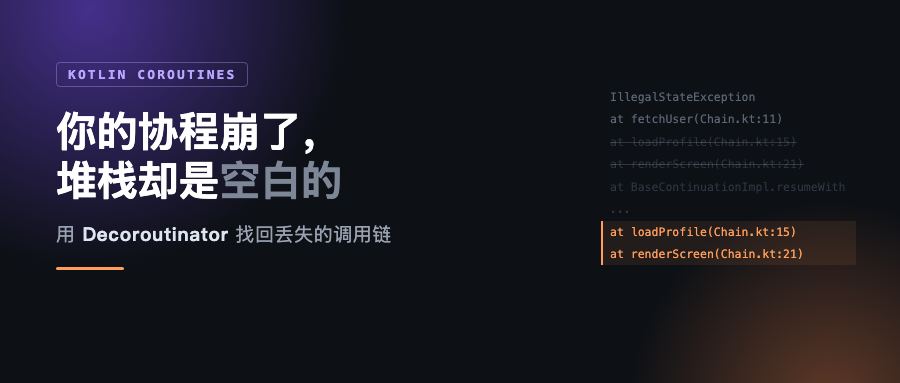
线上报了个 IllegalStateException,你点开堆栈,看见这个:
java.lang.IllegalStateException: user 42 not found
	at demo.ChainKt.fetchUser(Chain.kt:11)
	at demo.ChainKt$fetchUser$1.invokeSuspend(Chain.kt)
	at kotlin.coroutines.jvm.internal.BaseContinuationImpl.resumeWith(ContinuationImpl.kt:34)
	at kotlinx.coroutines.DispatchedTaskKt.resume(DispatchedTask.kt:233)
	at kotlinx.coroutines.DispatchedTaskKt.dispatch(DispatchedTask.kt:152)
	... 后面十几行全是协程内部
一行自己的代码,然后全是框架。你知道了出事的位置,但不知道是谁叫的它。fetchUser 在这个工程里被好几个地方调用,每一个都可能传进 42。
这不是偶发,是协程的常态。而修它只要加一个依赖。
为什么调用链会消失
协程的核心是把异步代码写成同步的样子。编译器把每个 suspend 函数改造成一个状态机,函数"返回"的时候并不是真的从 JVM 调用栈上返回,而是把结果交给 continuation,由调度器决定在哪、什么时候继续。
问题就在这个"继续"上。挂起的那一刻,中间那些帧已经从 JVM 栈上弹掉了;恢复执行时,是一个全新的栈——从调度器开始,直接跳到 fetchUser 的续体。loadProfile 和 renderScreen 在这个过程中没有任何帧留在栈上,异常自然也就找不到它们。
所以丢帧不是 bug,是这套机制的必然结果。Kotlin 团队知道这件事,也给过方案:打开 kotlinx.coroutines.debug 会启用 stacktrace recovery。
只是它救不回来。我在本地把这个例子跑了一遍,属性确认进了应用 JVM:
Picked up JAVA_TOOL_OPTIONS: -Dkotlinx.coroutines.debug=on
java.lang.IllegalStateException: user 42 not found
	at demo.ChainKt.fetchUser(Chain.kt:11)
	at demo.ChainKt$fetchUser$1.invokeSuspend(Chain.kt)
	at kotlin.coroutines.jvm.internal.BaseContinuationImpl.resumeWith(ContinuationImpl.kt:34)
loadProfile 和 renderScreen 依然不在。这个官方机制只覆盖一部分场景,而挂起再恢复这条最常见的路径,恰好不在里面。
Decoroutinator 换了个思路
Stacktrace-decoroutinator 的做法是把协程恢复的这套实现整个替换掉,作者自己的说法比较直接:
Decoroutinator replaces the coroutine resumption implementation. It generates methods at runtime with names that match the entire coroutine call stack.
Decoroutinator 替换掉协程的恢复实现。它在运行时生成一批方法,方法名对应整条协程调用链。
These methods do nothing except call each other sequentially in coroutine call stack order, creating real JVM stack frames.
这些方法什么都不做,只是按协程调用链的顺序依次互相调用,从而造出真实的 JVM 栈帧。
翻译成人话:它不试图从 continuation 里"猜"调用链,而是真的把那些帧造出来。既然异常要靠 JVM 栈来找调用者,那就让栈上有东西可找。
项目是 Apache-2.0,⭐374,拿过 Kotlin Foundation 的 grants,最新版 2.6.6 是 9 月 10 号发的,仓库 9 月中旬还有提交。对一个小工具来说,这个维护状态算是相当健康。
先看效果,再讲怎么装
我把同一个源文件放进三个模块,唯一差别是 Decoroutinator 开不开。第一次运行是原始版本:
$ ./gradlew :plain:run
java.lang.IllegalStateException: user 42 not found
	at demo.ChainKt.fetchUser(Chain.kt:11)
	at demo.ChainKt$fetchUser$1.invokeSuspend(Chain.kt)
	at kotlin.coroutines.jvm.internal.BaseContinuationImpl.resumeWith(ContinuationImpl.kt:34)
	at kotlinx.coroutines.DispatchedTaskKt.resume(DispatchedTask.kt:233)
	...
整个堆栈 21 行,属于 demo. 这个包的只有 4 帧,其中两帧还是同一个函数。
加上装饰器之后:
$ ./gradlew :decoroutinated:run
java.lang.IllegalStateException: user 42 not found
	at demo.ChainKt.fetchUser(Chain.kt:11)
	at demo.ChainKt$fetchUser$1.invokeSuspend(Chain.kt)
	at kotlin.coroutines.jvm.internal.DecoroutinatorBaseContinuationAccessorImpl.invokeSuspend(base-continuation-accessor.kt:15)
	at dev.reformator.stacktracedecoroutinator.common.internal.Provider.callInvokeSuspendIfResultIsNotCoroutineSuspended(provider-impl.kt:123)
	at dev.reformator.stacktracedecoroutinator.provider.SharedSpec.$decoroutinator$resume(provider-api.kt:106)
	at demo.ChainKt.loadProfile(Chain.kt:15)
	at demo.ChainKt.renderScreen(Chain.kt:21)
	at demo.MainKt$main$1.invokeSuspend(Main.kt:8)
	...
31 行,demo. 包 7 帧。关键的不是行数变多,是这两行回来了:
	at demo.ChainKt.loadProfile(Chain.kt:15)
	at demo.ChainKt.renderScreen(Chain.kt:21)
renderScreen 第 21 行调了 loadProfile,loadProfile 第 15 行调了 fetchUser——完整的调用链,带行号。此时你一眼能看出是谁传进去的 42。
代码本身一个字没改。下面是装的三种方式。
JVM 上,一行插件就够
plugins {
  kotlin("jvm") version "2.3.21"
  application
  id("dev.reformator.stacktracedecoroutinator") version "2.6.6"
}
这是最省事的一条路。插件会在构建期往你的类里生成辅助方法,运行时不需要额外的 JVM 参数。
同一个库还有另外两种启用方式,都走 JVM instrumentation 而不是构建期生成:
# 方式二:JVM 启动参数
-javaagent:/path/to/stacktrace-decoroutinator-jvm-agent-2.6.6.jar
// 方式三:加依赖,然后在任何协程跑起来之前调一次
import dev.reformator.stacktracedecoroutinator.jvm.DecoroutinatorJvmApi

fun main() {
  DecoroutinatorJvmApi.install()
  // 之后照常跑你的代码
}
依赖坐标是 dev.reformator.stacktracedecoroutinator:stacktrace-decoroutinator-jvm:2.6.6。
方式三有个副作用值得先说:它靠动态加载 Java agent 来实现,JVM 会给你打一行警告——
WARNING: A Java agent has been loaded dynamically
WARNING: Dynamic loading of agents will be disallowed by default in a future release
现在只是警告,未来版本默认会禁掉。如果你的环境对这点敏感,用方式一或方式二更稳。
KMP 项目里,插件不管用
这部分是我这次踩得最实的坑,也是想写给 KMP 读者的主要原因。
看到插件用法,第一反应自然是把它挂到 multiplatform 模块上。我这么做了,结果堆栈一点没恢复——和没装一样。更麻烦的是当时还顺带报了另一个错:
Exception in thread "main" java.lang.NoClassDefFoundError:
dev/reformator/stacktracedecoroutinator/provider/BaseContinuationExtractor
	at demo.MainKt.main(Main.kt:6)
意思是插件确实改写了字节码,但把自己运行时需要的类留在了 classpath 外面。我照着插件在普通 kotlin("jvm") 模块里注入的那三个构件手动补上,NoClassDefFoundError 消失了——但堆栈依然没恢复。
原因不难推:这个插件只把自己接进普通 JVM 模块的编译任务,KMP 的 jvm target 编译任务不在它的接管范围内。所以字节码动了一点,真正负责生成"伪造调用链"的那部分没跑。
对 KMP 项目,正确做法是绕开构建期生成,改用运行期 instrumentation。两种都实测通过:
kotlin {
  jvmToolchain(21)
  jvm()
  sourceSets {
    jvmMain.dependencies {
      implementation("org.jetbrains.kotlinx:kotlinx-coroutines-core:1.11.0")
      // 方式三需要它;用 agent 的话这一行可以不要
      implementation("dev.reformator.stacktracedecoroutinator:stacktrace-decoroutinator-jvm:2.6.6")
    }
  }
}

// 方式二:agent 只加在运行参数上,源码和依赖都不用动
val decoroutinatorAgent by configurations.creating
dependencies {
  decoroutinatorAgent("dev.reformator.stacktracedecoroutinator:stacktrace-decoroutinator-jvm-agent:2.6.6")
}
tasks.register<JavaExec>("runKmp") {
  mainClass.set("demo.MainKt")
  classpath = files(kotlin.targets.getByName("jvm").compilations.getByName("main").output.allOutputs,
                    configurations.getByName("jvmRuntimeClasspath"))
  jvmArgs("-javaagent:${decoroutinatorAgent.singleFile.absolutePath}")
}
这两种在 KMP 模块里都跑出了恢复后的堆栈,loadProfile、renderScreen 都在,demo. 包 7 帧。
还有一句必须说清楚的:Native 和 JS 目标用不了,而且不是配置问题。这库的原理是在 JVM 上造栈帧,没有 JVM 就没有这套机制。作者在 issue #5 里被问过要不要做多平台版本,回复是暂时没有计划——那个 issue 从 2022 年开到现在还开着。
所以 KMP 项目的实际选择是:只给 JVM/Android 侧装,iOS 侧照旧。如果你主要在看 iOS 崩溃,这篇帮不上忙。
几个已知的坑
官方 README 里列了几个,都是真的会撞上的:
- Android 只支持插件方式,而且它依赖
MethodHandle,需要 API 26(Android 8)以上。低版本会自动关掉恢复而不是崩,所以放心引入。 - 开了 R8/ProGuard 会失效。混淆会把运行时需要的代码改掉名,得把
decoroutinatorAndroidProGuardRules()加到 release 的规则里。 - 和 Jacoco 一起用时覆盖率会丢。这是 Jacoco 自己的限制,解决办法是让 Jacoco 的 agent 排在 Decoroutinator 前面。
- Shadow 插件有已知冲突(shadow#882),要打 fat jar 的话得先看 workaround。
- Robolectric 会把它的类放进单独的 classloader,导致测试报错,需要在
packagesToNotAcquire里排掉dev.reformator.stacktracedecoroutinator.。
另外,如果只想在测试里用,官方推荐把测试放到单独的子项目里应用插件;不好拆的话有个开关:
stacktraceDecoroutinator {
  androidTestsOnly = true
}
想知道运行时到底装上没有,可以查状态:
DecoroutinatorCommonApi.getStatus { it() }
Android 那边它还能顺带把 DebugProbes 打包进去,配合 embedDebugProbesForAndroid = true 用,能在运行期 dump 协程状态。
要不要装
我倾向装,尤其是团队里还有人在用"加日志猜"的方式定位协程问题时。
它做的事很单一:让 JVM 栈上有真实的帧。没有 API 变化,没有侵入式的重构,删掉就是一个依赖的事。代价是运行时多了一层 instrumentation,以及上面那串坑——其中大部分只在 Android 打包场景才遇到,纯 JVM 项目基本无感。
有一点值得留意:它改变的是恢复实现本身。所以上线前值得在预发环境跑一轮,确认没有行为差异,而不是直接在核心链路打开。
完整的对照工程在 https://github.com/trewvip-arch/decoroutinator-kmp-demo
三个模块共用同一份源码,plain / decoroutinated / kmp,跑一遍就能看到本文所有堆栈输出的原始版本:
./gradlew :plain:run          # 不装,链是断的
./gradlew :decoroutinated:run # 插件方式,链完整
./gradlew :kmp:runKmp         # KMP + agent,链完整
./gradlew :kmp:runKmpInstall  # KMP + install(),链完整
实测环境:Stacktrace-decoroutinator 2.6.6、Kotlin 2.3.21、kotlinx-coroutines 1.11.0、JDK 21、macOS。文中所有堆栈输出都是真跑出来的。