
Write Stroke(join = StrokeJoin.Round) and it draws spiky. The bug applies to Compose Multiplatform on desktop, iOS and web. Android was never affected.
1.13.0-beta02 fixed it. Released November 4, 2026, with one line of release notes: Stroke(join = Round) and Stroke(miter = 0f) are no longer ignored.
I verified it locally, rendering a set of images with each version and comparing them pixel by pixel.
How to reproduce it first
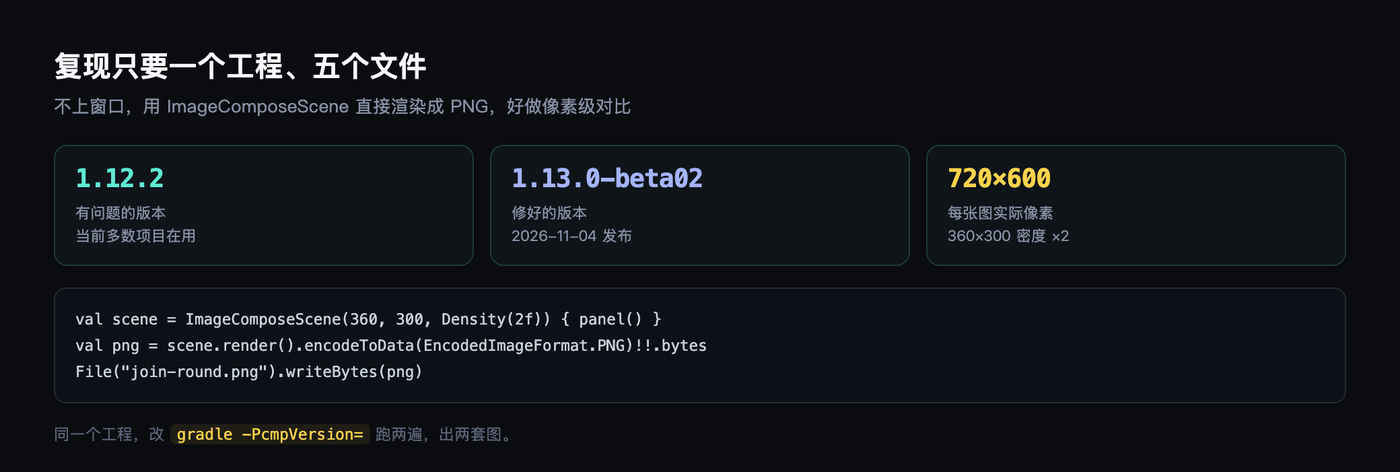
You do not need to open a window. Compose desktop has ImageComposeScene: give it a size and a density, render the Compose tree into an Image, encode it as PNG.
A 360×300 canvas at density 2 produces a 720×600 image, enough to see the corners clearly.
Only two things change between runs: the dependency version, and the Stroke parameters.
Same code, two shapes
This first group is join = Round, width 30, with rounded caps as well.
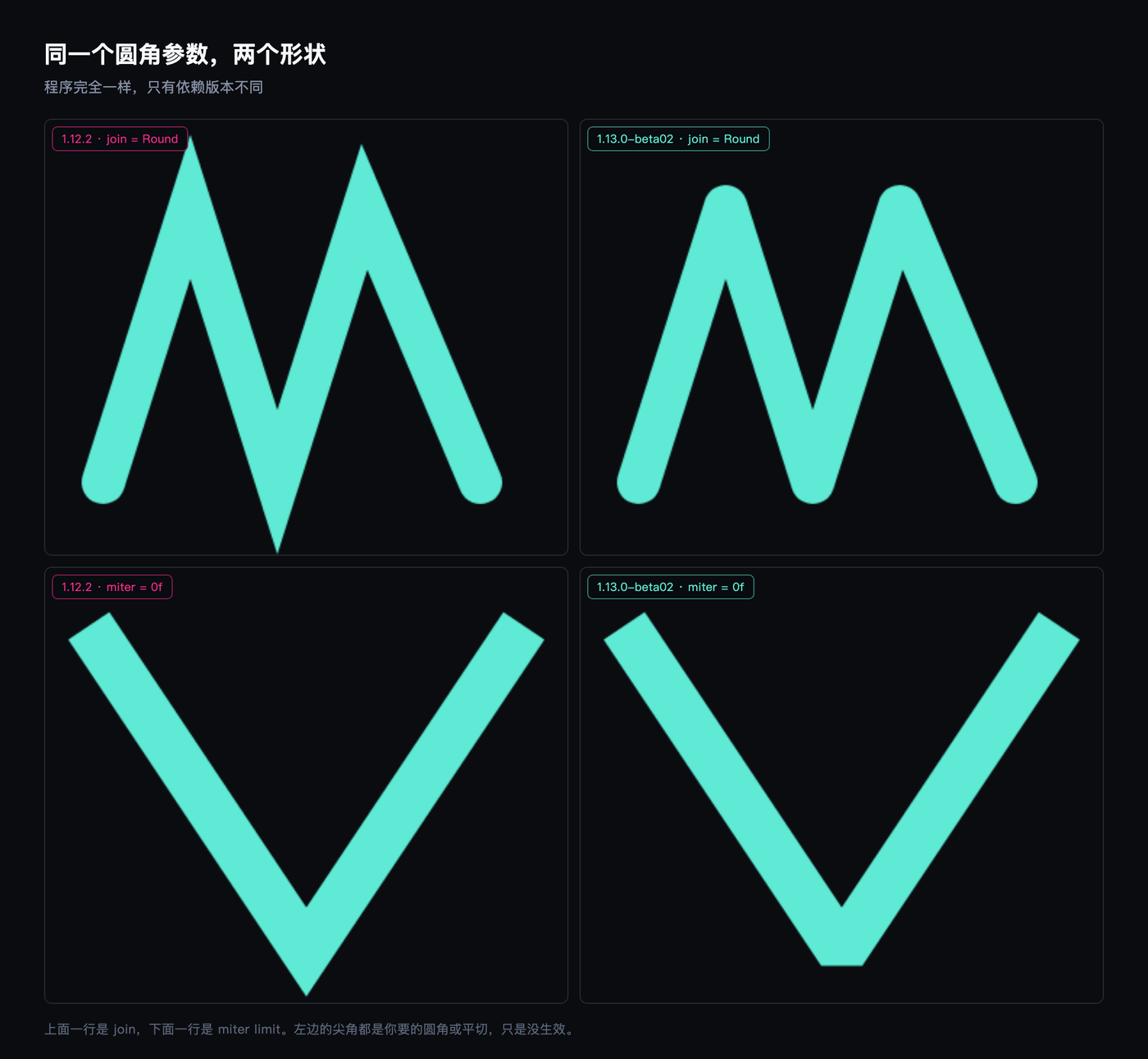
On the left all three corners are sharp, with small spikes on top. On the right they are round and the spikes are gone.
The second group is miter = 0f, drawn as an acute-angled V on purpose. Left keeps the long spike, right gets cut flat.
By Skia’s rules, a miter limit of 0 means no spike at all: every join falls back to a bevel. In 1.12.2 that 0 was written for nothing.
Numbers are harder than pictures
I diffed the two images within each version against each other, then diffed corresponding images across versions.
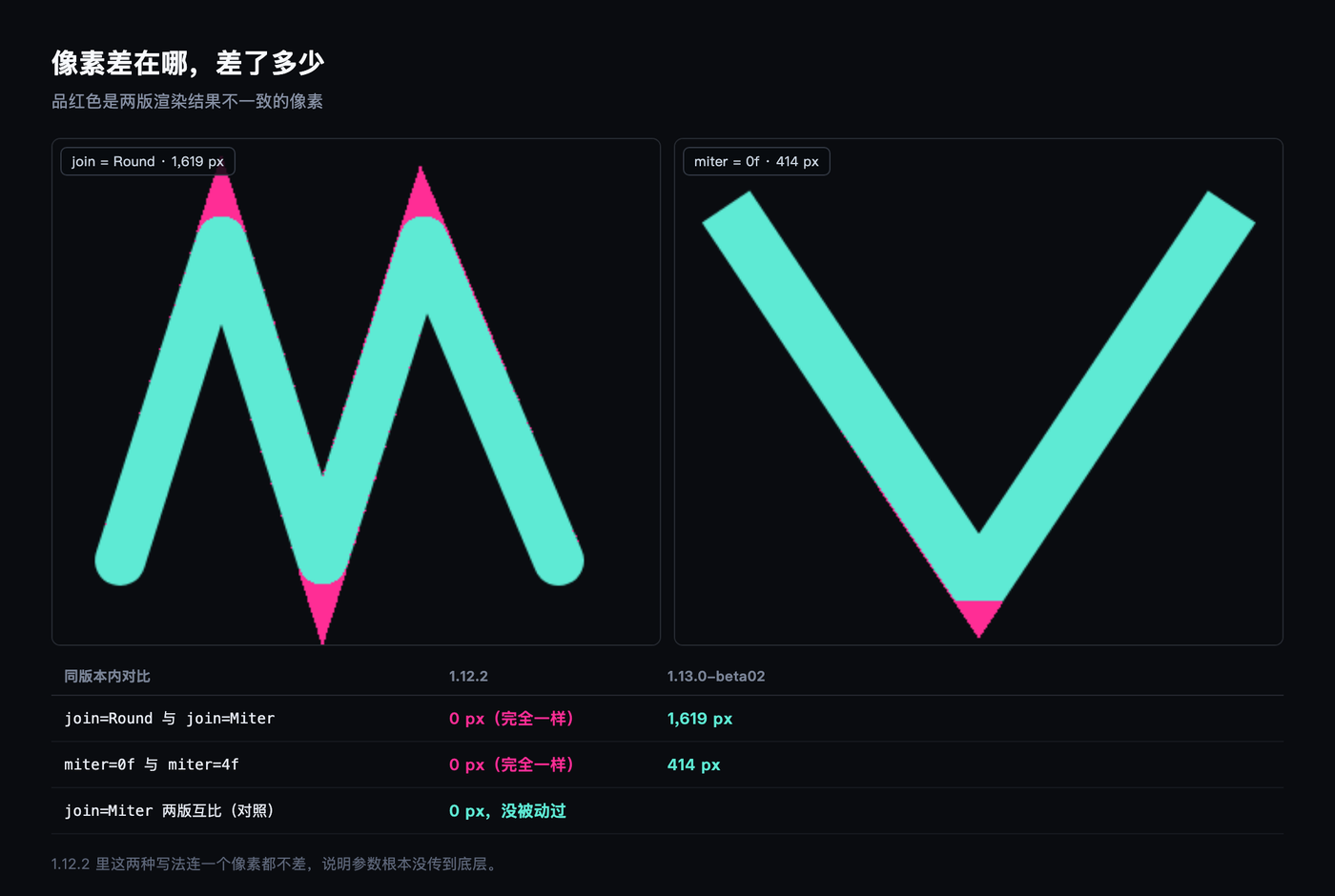
In 1.12.2, the join=Round and join=Miter images are pixel-identical, identical in PNG byte count too, both 8,905 bytes, hashes matching character for character.
miter=0f and miter=4f are likewise identical, both 4,176 bytes.
Under 1.13.0-beta02, the same two comparisons differ by 1,619 pixels and 414 pixels respectively. The full image is 108,000 pixels, so the first is 1.5%.
All the difference sits at the tips of three corners, the magenta patches in the figure above.
Root cause: a setter that never runs
Compose’s Paint is a wrapper around Skia’s Paint. The properties look like this:
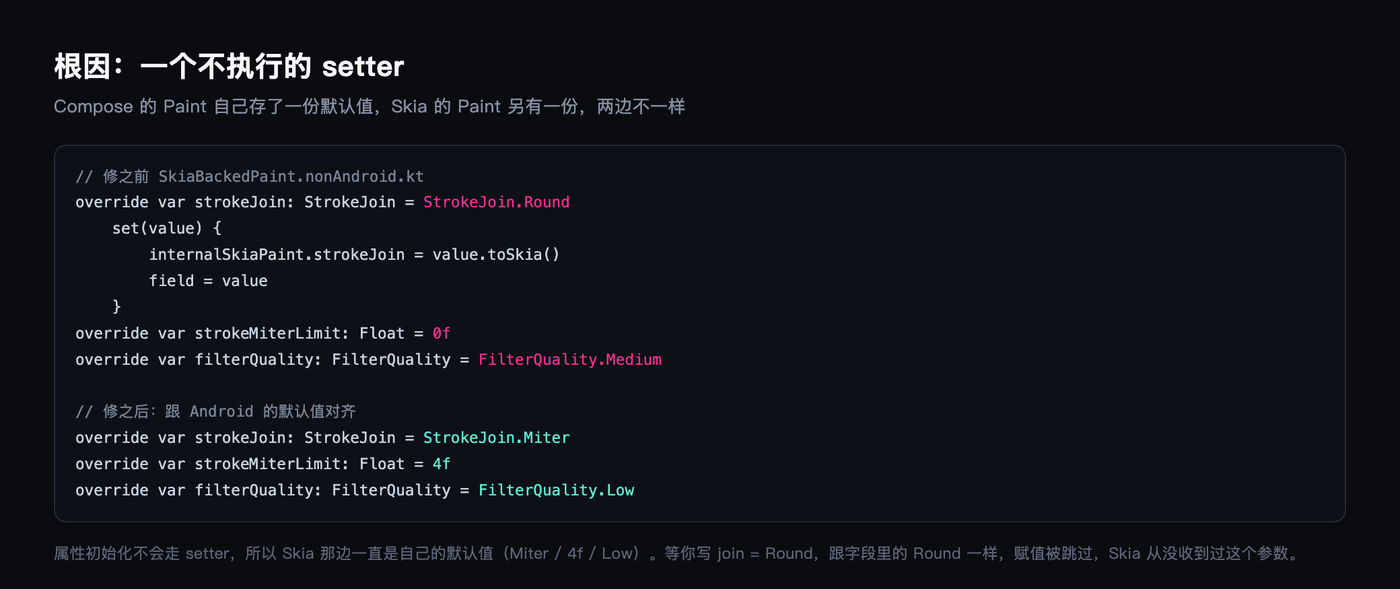
strokeJoin has a custom setter that writes through to the Skia copy on assignment. But property initialization does not go through setters. It only fills the Kotlin field.
So the wrapper says the default is Round while Skia actually holds Miter. The two sides diverge.
What makes it fatal is the next step. During drawing, before assignment there is a check: if the value equals the current field, skip. You write join = Round, the field already holds Round, the check passes, the setter is never called, and Skia never learns you changed anything.
miter = 0f is the same story. The field default is already 0f.
A side note on filterQuality: it has no setter at all, just a plain field, so changing it does not notify Skia either. This wrapper has more than one field like that. The ones that do not affect shape simply go unnoticed.
Tim Haywood filed the issue on YouTrack three months ago, CMP-10688, titled “incorrectly renders StrokeJoin.Round as Miter”. He laid out the root cause, the Skia source location, potential fixes, and even proposed deleting the Kotlin field and proxying directly to Skia.
Ivan Matkov fixed it. The PR is compose-multiplatform-core #3528, merged into release/1.13 on October 26, reviewed twice. Three months from issue to merge.
The fix is correcting the defaults
The PR is surprisingly small: change three defaults so they match Android.
strokeJoin from Round to Miter, strokeMiterLimit from 0f to 4f, filterQuality from Medium to Low.
After that, the wrapper’s field and Skia’s actual state agree. You write Round against a field holding Miter, the check fails, the setter runs normally, and the parameter goes through.
So this is not a drawing fix. It is reconciling books that were reporting the wrong numbers.
The control group’s zero says nothing else broke
My worry with a change at this level is that it drags something else off course. So I kept a control: join = Miter, compared across both versions.
Zero pixels differ. Not a single byte.
In 1.13.0-beta02 the round-versus-bevel changes land only on the affected path.
Why it took so long to be seen
I suspect three reasons stacked up.
First, the default join is already Miter. Most charts, icons and progress bars never pass this parameter. The shape comes out right, so nobody digs.
Second, where Round is passed explicitly, the result is merely “not round enough,” not something loud like a crash. A designer says “this corner looks a bit sharp,” and nine engineers out of ten suspect their own path before they suspect the framework.
Third, it only happens off Android. The same code is correct on a real device and spiky in the desktop preview, and people readily attribute that to the preview tool’s rendering rather than a framework bug.
Only non-Android is affected
The diff lands in compose/ui/ui-skiko/src/nonAndroidMain/. Android goes through android.graphics.Paint, whose defaults were already Miter, 4f, Low.
Which gives this bug an ugly property: you cannot see it on an Android device, but the moment you run desktop or iOS, it deforms. People writing cross-platform UI see a different shape on their own machine than everyone else does.
The third default I could not measure
filterQuality changed from Medium to Low, which in theory affects sampling quality on image scaling. I took a 256-pixel checkerboard, scaled it down to 40 and to 80, and scaled an 8-pixel image up to 320.
Three comparisons, all zero pixels different.
The reason is that drawImage carries its own filterQuality parameter and does not route through Paint. This change only matters if you construct a Paint yourself to draw. So it is a latent hazard, not an observable symptom.
I looked for a path where it shows and found none, so I wrote it down as it is instead of inventing a scenario for it.

What you should do now
If your project is on 1.12 or earlier and you use parameters like join = Round or miter = 0f that appear to do nothing, you are affected.
Two paths. Upgrade to 1.13.0-beta02 and accept that it is still pre-release. Or rewrite the shape so it does not depend on those parameters, drawing a rounded polyline yourself.
To find out whether you are affected, you do not need to read code. Write an ImageComposeScene, render the same shape twice, once with join = Round and once with join = Miter, and diff the two PNGs. Zero pixels different means you are affected; a few thousand means you are fine. That method worked well for my images and should work for any drawing bug where a parameter appears not to take effect.
One thing to know before upgrading: in 1.13, Paint() gained a precondition and constructing one directly throws No Compose UI graphics implementation is registered. Either create a scene first or go through the normal drawing path. I hit this on my first run and only got going after rendering one image to warm things up.
As for how long this had been sitting in the wild, I do not know. The issue was filed three months ago, and the code may be older. Bugs where “the parameter is written correctly but does nothing” can only be seen with pixel-level comparison.