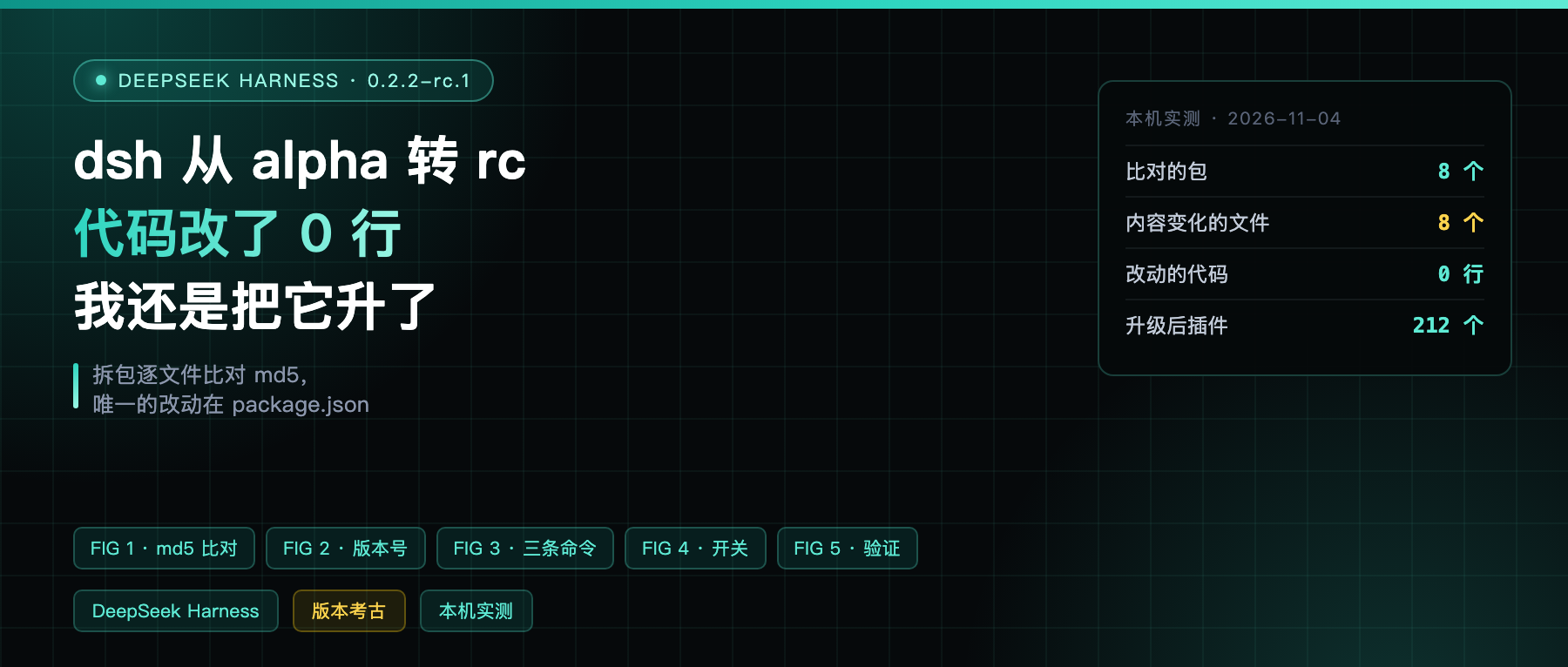
At 5:20 this afternoon, DeepSeek Harness shipped 0.2.2-rc.1.
Going from alpha to rc sounds like a milestone. I unpacked both versions and compared them. Conclusion: not a single byte changed.
The short version first
0.2.2-rc.1 was published at 17:20 Beijing time on November 4, 2026 (2026-11-04T09:20:32Z).
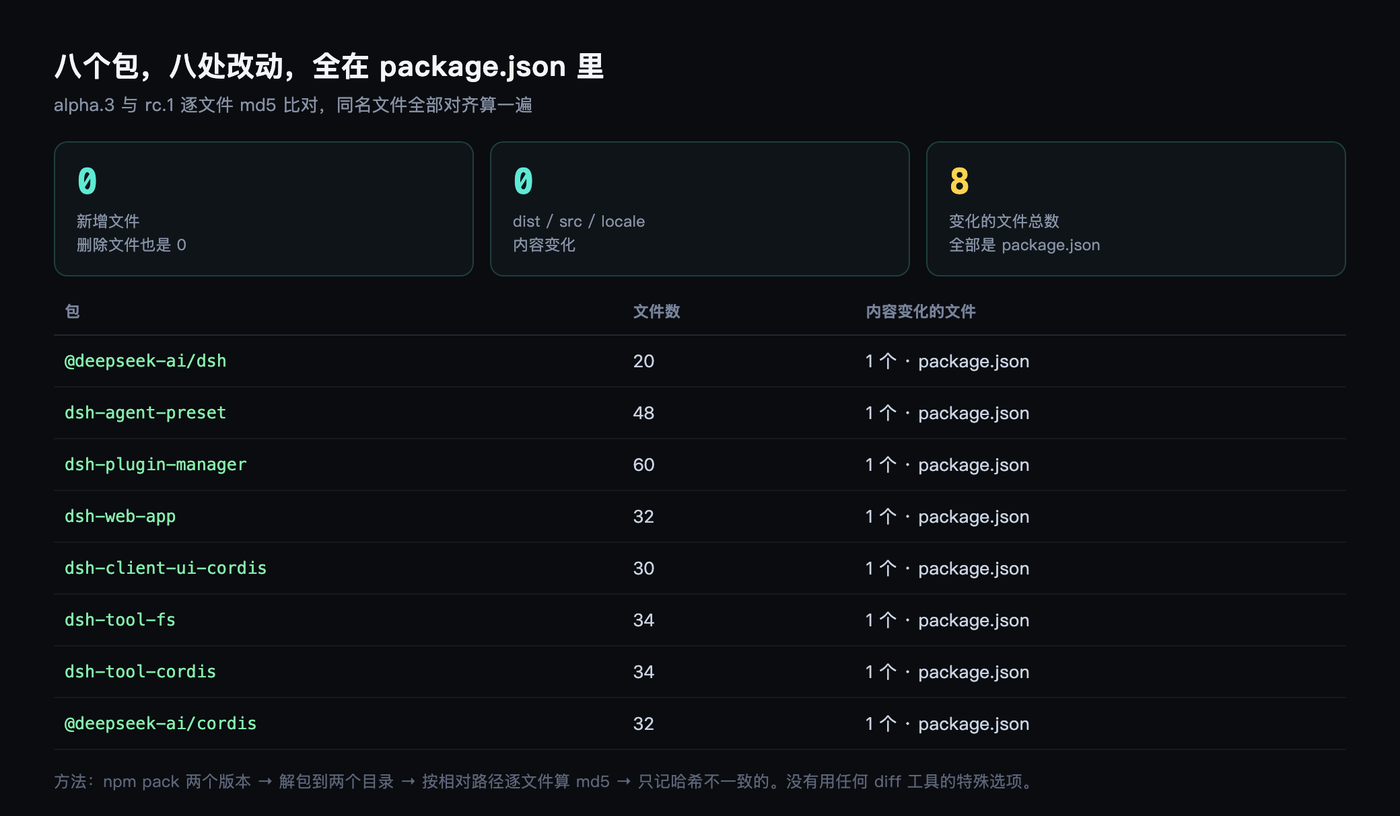
I ran a per-file md5 comparison against 0.2.2-alpha.3, which shipped on November 3, 2026. The scope was the top-level package, the six core sub-packages, and the underlying framework cordis. 290 files, all lined up and hashed.
Result: in every package, the only file that differs is package.json.
dist, src, locale, README, all identical. This is not “a small change”. This is zero change.
How I compared them
Three steps on the command line, no special tooling.
npm pack @deepseek-ai/[email protected] and @0.2.2-rc.1 to pull one tarball each, unpack them into two directories, then hash every file by relative path.
The top-level package has 20 files, the six sub-packages have 30 to 60 each, cordis has 32. Every file with a matching name on both sides got hashed, and I only kept the ones whose hashes disagreed.
| Package | Files | Files with changed content |
|---|---|---|
| dsh (top level) | 20 | 1, package.json |
| dsh-agent-preset | 48 | 1, package.json |
| dsh-plugin-manager | 60 | 1, package.json |
| dsh-web-app | 32 | 1, package.json |
| dsh-client-ui-cordis | 30 | 1, package.json |
| dsh-tool-fs | 34 | 1, package.json |
| dsh-tool-cordis | 34 | 1, package.json |
| cordis | 32 | 1, package.json |
No additions, no deletions. Eight packages, eight changes, all of them in the version number and dependency range lines.
The only thing that actually changed
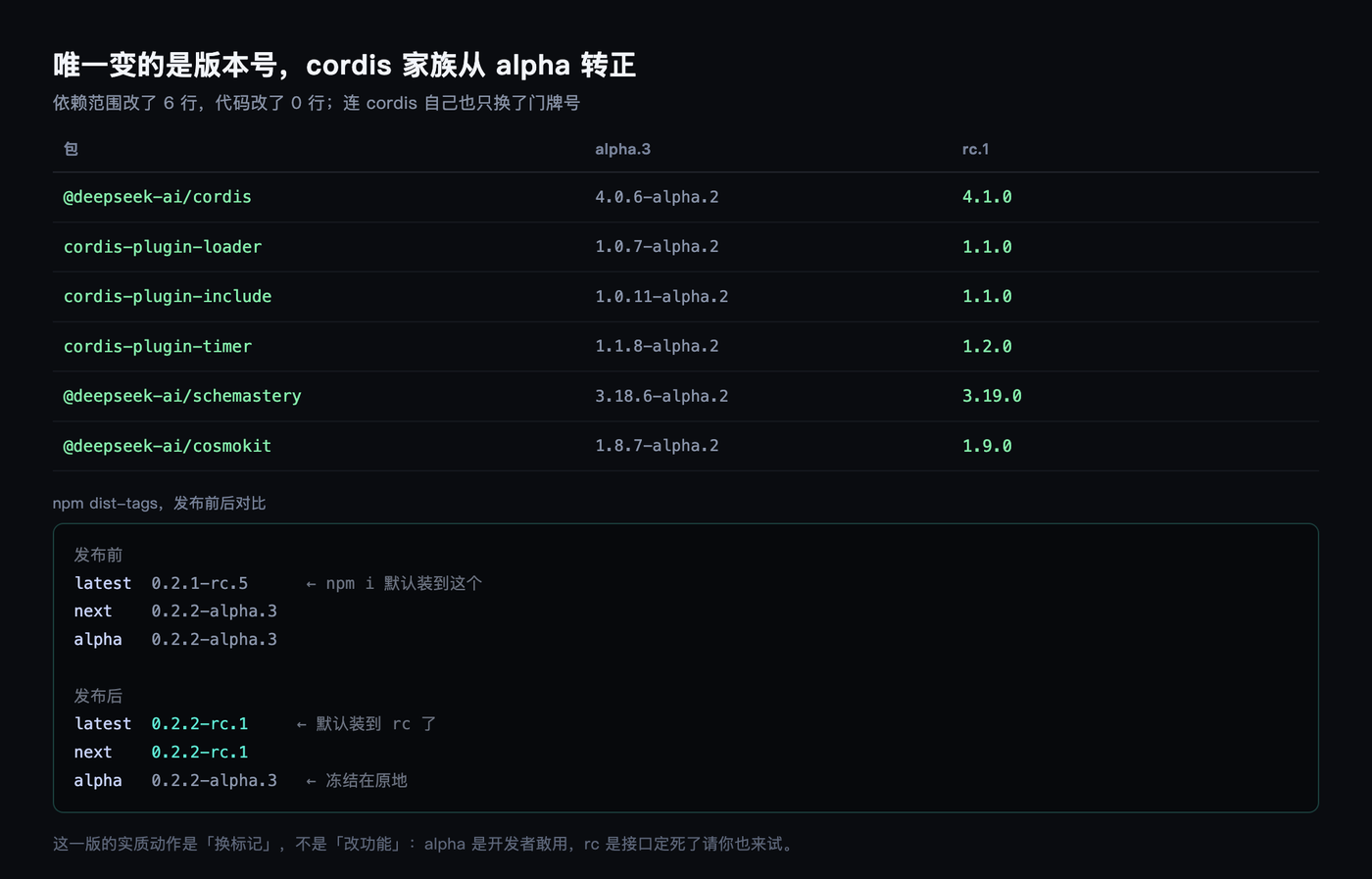
The code did not change. But every dependency version moved, and that is the only substantive act in this release:
| Package | alpha.3 | rc.1 |
|---|---|---|
@deepseek-ai/cordis | 4.0.6-alpha.2 | 4.1.0 |
cordis-plugin-loader | 1.0.7-alpha.2 | 1.1.0 |
cordis-plugin-include | 1.0.11-alpha.2 | 1.1.0 |
cordis-plugin-timer | 1.1.8-alpha.2 | 1.2.0 |
@deepseek-ai/schemastery | 3.18.6-alpha.2 | 3.19.0 |
@deepseek-ai/cosmokit | 1.8.7-alpha.2 | 1.9.0 |
In one sentence: strip the alpha suffix off the entire cordis family and promote it to release version numbers.
But there is a detail here worth spelling out. I also unpacked cordis 4.0.6-alpha.2 and 4.1.0 and compared those two. Of its 32 files, again only package.json differs. Which means even the framework layer was carried over as-is, with nothing but the house number changed. That is more interesting than the table above.
The “version number goes from alpha to stable” event had a change count of zero.
So what was the point of this release
A tag.
Before this release, latest pointed at 0.2.1-rc.5 and next pointed at 0.2.2-alpha.3. If you wanted the newest one, you had to type the full version number by hand.
After it, both latest and next point at 0.2.2-rc.1. That means npm i -g @deepseek-ai/dsh with no version number installs this one by default.
For a project this size that is not a small thing. The alpha line is the “we are willing to use it ourselves” marker. rc is the “you try it too, the interfaces are frozen” marker. Changing features is development. Changing the marker is a promise. This release did the latter.
The upgrade took under a minute
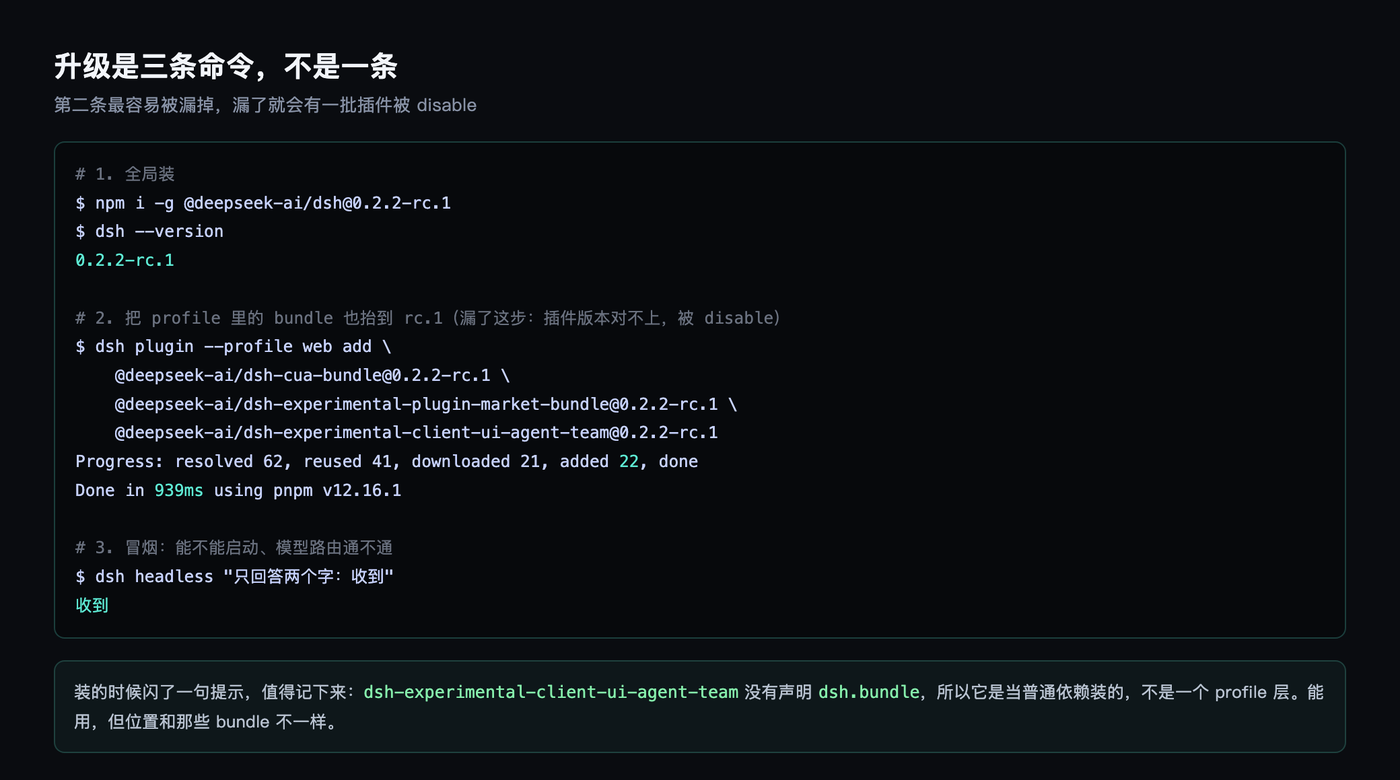
One command for the global install, npm i -g @deepseek-ai/[email protected], and once it finishes dsh --version says 0.2.2-rc.1.
The second command is not an upgrade, it is a profile fix. A lot of people skip this one. I skipped it last time:
dsh plugin --profile web add @deepseek-ai/[email protected] @deepseek-ai/[email protected] @deepseek-ai/[email protected]
pnpm came back with: resolved 62 packages, reused 41, downloaded 21, added 22, in 939 milliseconds.
After the install I ran a headless smoke test first, telling it to “answer with two words only: received”. It answered “received”, which means the profile boots, model routing works, and no plugin is stuck in a disabled state. That step is faster than looking at the UI.
Why run it again? Because a dsh profile is plugin layers stacked on plugin layers. Once you upgrade dsh globally, the plugins in the profile that are still pinned to alpha.3 no longer match the host program’s version, and the version check disables them at startup.
Last time, when I went to alpha.3, I only upgraded globally. Six plugin rows got shut off, storage-domain among them. Once that one died, the workspace, the session list, and the scheduled tasks all froze with it, the web app was effectively dead, and this command is what brought it back.
So my order is fixed now: global first, then profile, then verify. Skip a step and you are making trouble for yourself.
The one that never came back last time is back
The only leftover damage from the previous upgrade was ui-agent-team. Its version line is unusual, there was no package on npm that lined up with alpha.3, so it stayed disabled the whole time.
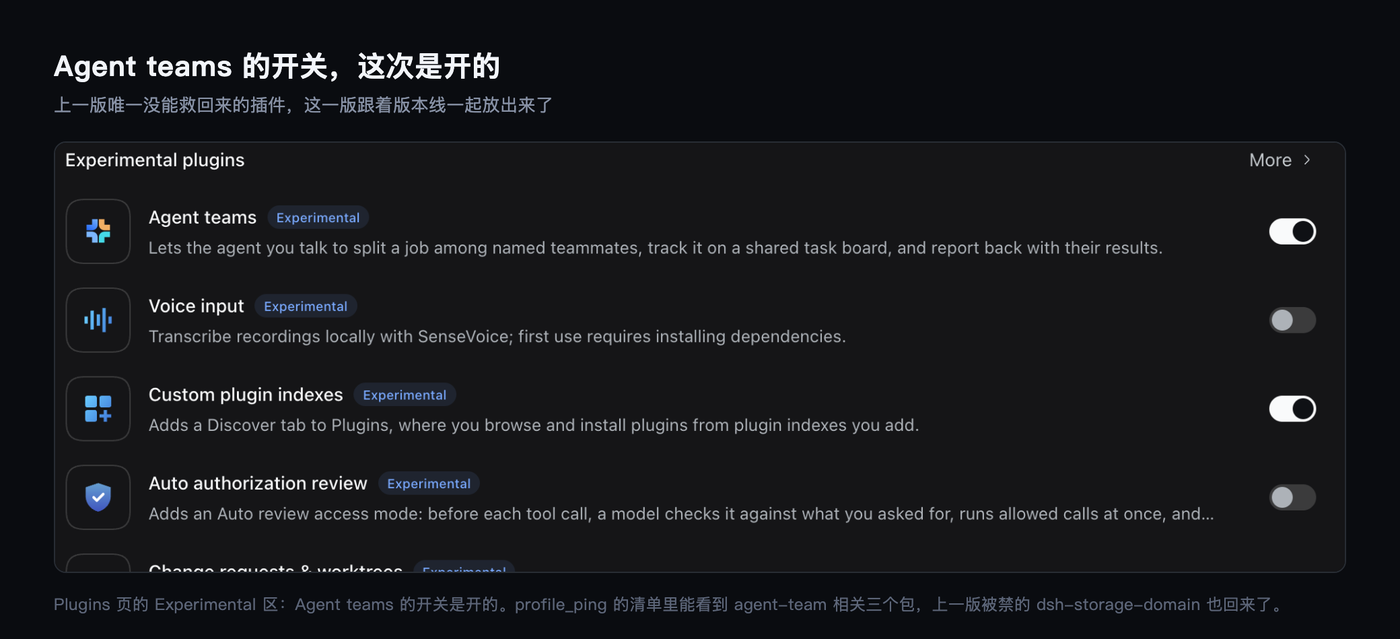
This time it has a matching version. In the plugin list that profile_ping reports after the install, all three of these are present:
@deepseek-ai/dsh-experimental-agent-team
@deepseek-ai/dsh-experimental-client-ui-agent-team
@deepseek-ai/dsh-experimental-tool-agent-team
dsh-storage-domain, the one that got disabled last round, is in the list too. On the plugins page the “Agent teams” toggle is on, and a new session’s title bar now carries an extra Agent team badge.
The installer printed one line that I think is worth recording verbatim: @deepseek-ai/dsh-experimental-client-ui-agent-team does not declare dsh.bundle, so it was installed as an ordinary dependency, not as a profile layer.
In other words it works, but its position in the system is not the same as those bundles. Vendors do not put this in the release notes. It flashes by once, in the install output.
Not everything in a profile is an official package
I took a look at the profile’s dependency list while I was there. Six entries.
Three bundles are on rc.1 now. agent-team-web-profile is still stuck on 0.1.6-alpha.2. The last two I installed myself, one from a local tgz, one straight from a GitHub repo.
Which tells you that a dsh profile is not a closed official bundle, it is a combination you assemble yourself. The upside is you can add whatever you want. The cost is that on upgrade you have to watch it yourself: which ones are official, which are pinned to a specific version, which are not on the official version line at all.
agent-team-web-profile is the example. It is the UI layer for agent-team, its version line is completely independent of the host program, and the host is on rc.1 while it sits on alpha.2. A package like that will not follow your upgrade. It goes its own way.
A quick sanity check
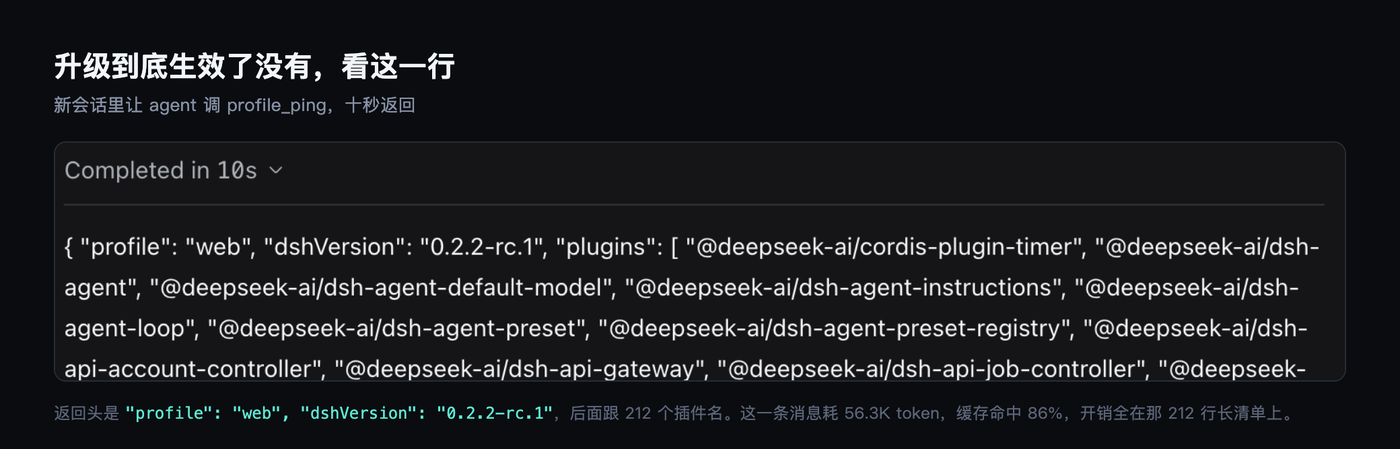
After the upgrade I opened a new session in the web app and sent one line: call profile_ping and paste the returned JSON back as-is.
Ten seconds and it was done. The response started with "profile": "web", "dshVersion": "0.2.2-rc.1", "plugins": [ followed by 212 plugin names.
Those 212 lines are what my profile actually contains right now, from cordis-plugin-timer all the way to dsh-plugin-profile-ping, which I wrote myself. If you want to confirm the upgrade really took effect, that one number is more reliable than any UI.
Incidentally the query itself cost 56.3K tokens, with an 86% cache hit and 3% of context used. The cost is the long plugin list, not the reasoning.
One lesson about checking versions
If you want to track dsh versions too, there is a trap to avoid: the latest tag on sub-packages lags.
Take dsh-experimental-client-ui-agent-team. Its latest is stuck at 0.1.5-alpha.2, alpha is stuck at 0.2.2-alpha.3, and the actual new version lives under next.
npm view <package> dist-tags and read all three tags together, not just latest. The main package’s latest is correct right now. The sub-packages’ are not.
My call
Is a release like this worth following? My answer is yes, but there is no rush.
Zero code change means risk close to zero. Upgrading or not upgrading will not break your environment. The real payoff is not in dsh itself but in the plugins that got promoted along with it: a package like ui-agent-team that spans version lines only gets released when the whole line moves to rc together.
On the flip side, if you have an alpha.3 that runs fine and no plugin is disabled, you do not need to touch anything this time. Wait for the 0.2.2 stable release and catch up in one go. There are no new features coming your way in the meantime.
When you upgrade, do you read the release notes first, or just unpack the tarballs and diff them yourself?