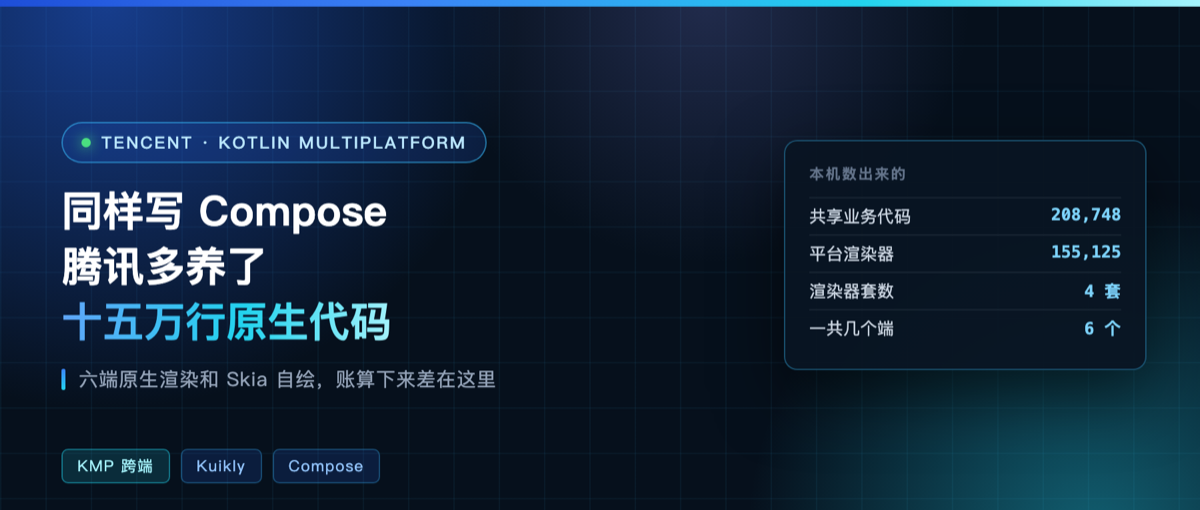
Tencent TDS’s KuiklyUI hit the GitHub trending list today at 3,600 stars. It’s a UI framework for KMP, one codebase across six platforms.
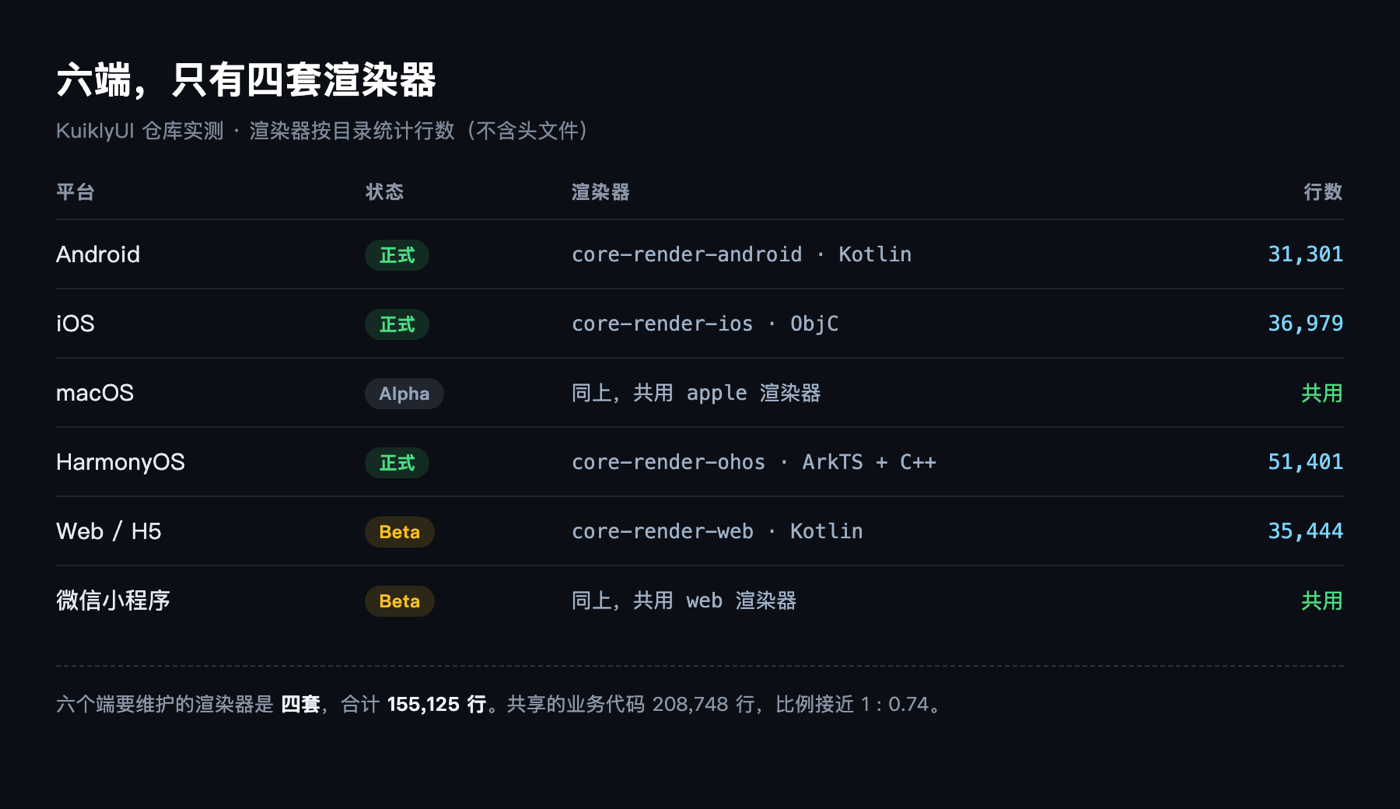
That “six platforms” claim needs unpacking. Android, iOS and HarmonyOS are officially supported. Web and WeChat Mini Programs are marked Beta. macOS is Alpha. The docs say so plainly, so don’t mistake a trending spot for maturity.
It gets confused with Compose Multiplatform most easily because both let you write Compose. Underneath they’re two completely different roads. I dug through the repo, and the numbers add up.
One draws everything itself, one rents the drawing
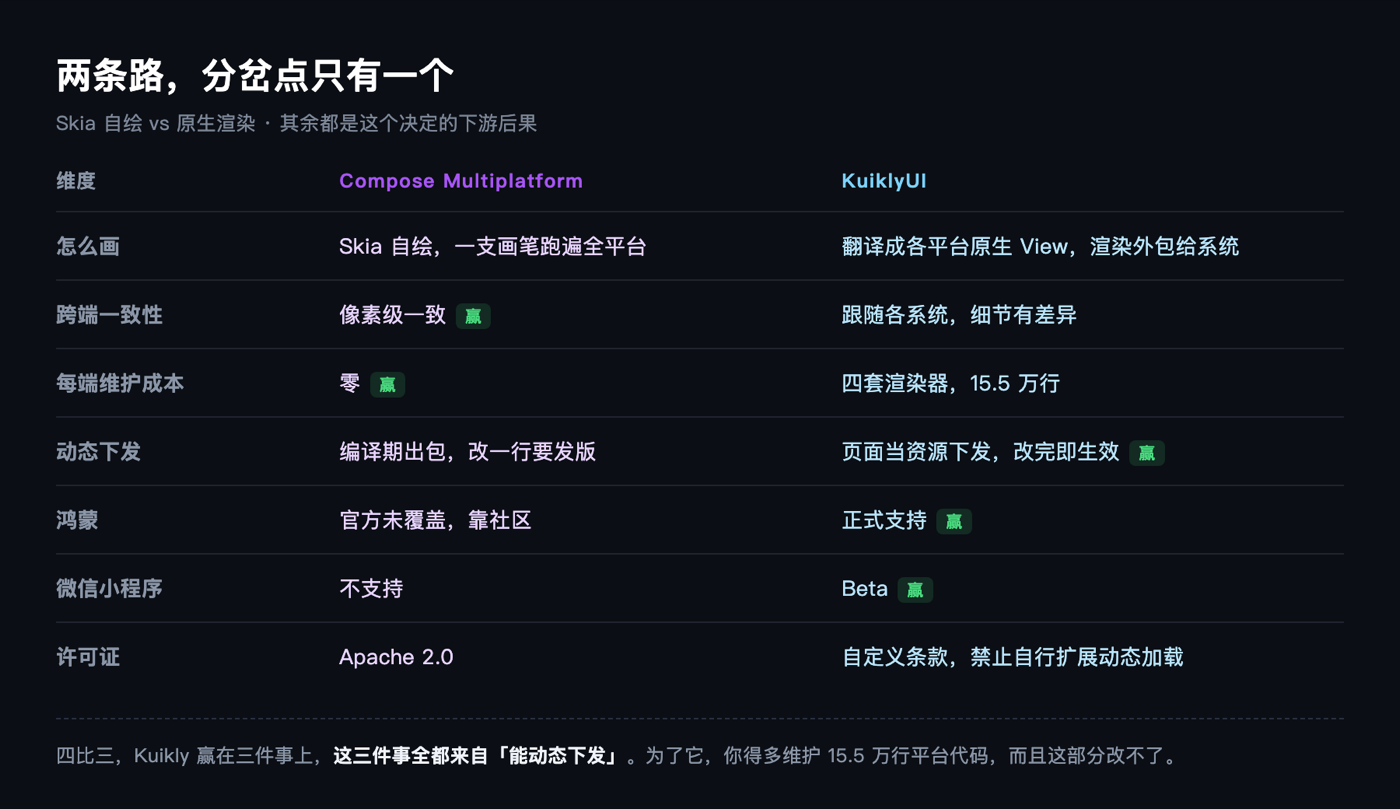
Compose Multiplatform draws with Skia. You write a Box, and it takes a brush and paints the pixels itself. All six platforms come out identical, because it’s the same brush.
Kuikly doesn’t draw. It translates your Box into each platform’s own View: View on Android, UIView on iOS, ArkUI components on HarmonyOS. The rendering job is outsourced to the system.
The official post announcing the Compose DSL puts it bluntly. The original wording: “CMP adopts Skia self-rendering, while Kuikly Compose DSL can directly reuse the existing mature native rendering system, delivering an experience fully consistent with the native system, such as scrolling feel, text input, animation and accessibility.”
Both the payoff and the price are in that sentence. Scrolling feel, text cursors, screen reader output, the system hands you all of it, so you don’t have to simulate it yourself, and that simulation is exactly what drains a self-rendering framework. The price is that every platform needs a translation layer, and whatever the system looks like, you follow.
Here’s how the numbers add up
I cloned the repo and counted lines by directory.
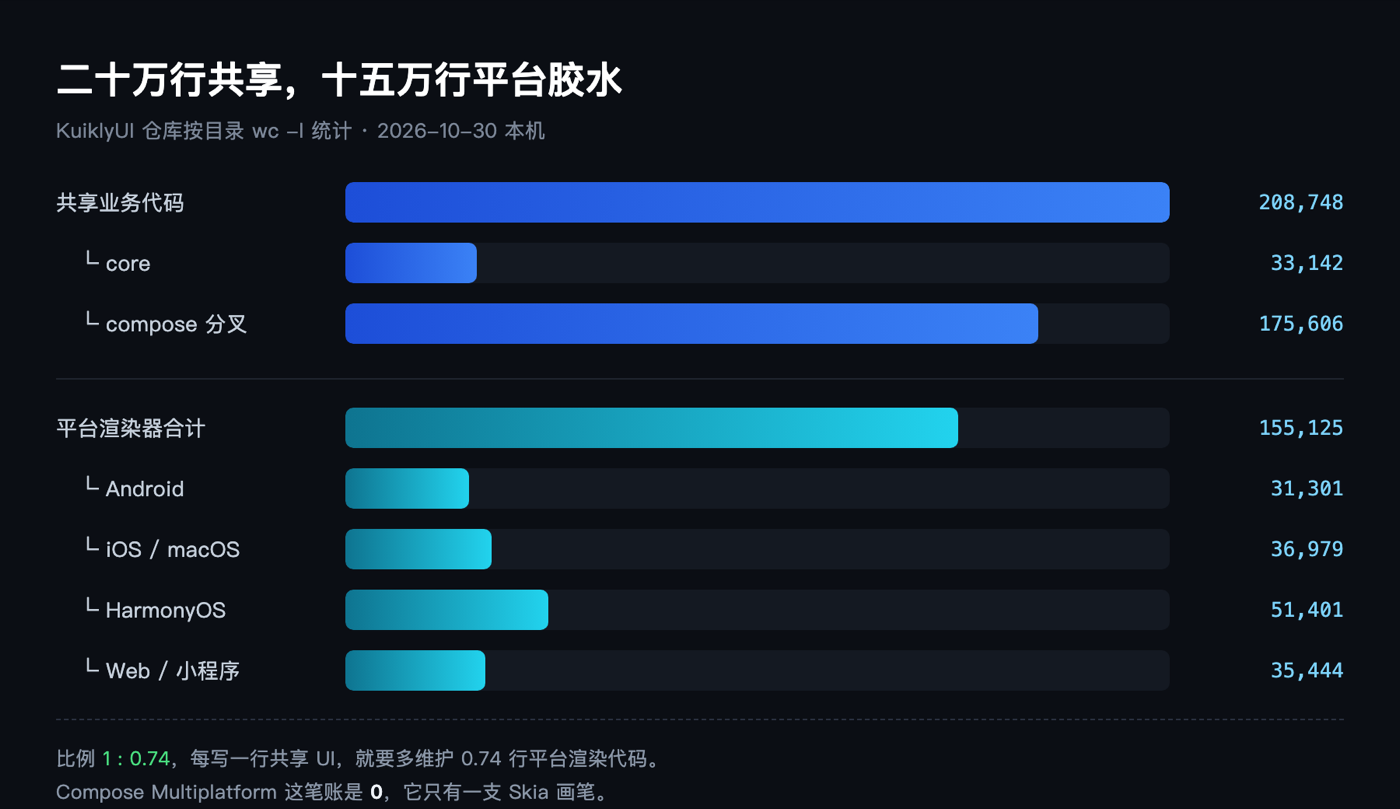
Shared Kotlin comes to 209,000 lines. The core module is 33,000 of those, and the other 175,000 sit in the compose directory.
The per-platform renderers total 155,000 lines. Android is 31,000 lines of Kotlin, iOS 37,000 lines of Objective-C, HarmonyOS 51,000 lines of ArkTS plus C++, Web 35,000 lines of Kotlin.
One shared codebase, four platform renderers. That ratio is the fixed cost of this road, not sloppy work by Tencent. On the CMP side the bill is zero, because there’s only one brush to maintain.
The HarmonyOS 51,000 deserve a closer look. ArkTS accounts for only 5,900 of them, and the remaining 42,000 are C++ and C. Calls into ArkUI have to go through the native layer, and ArkTS alone can’t carry that volume. It also shows where native rendering leads: the deeper you go, the closer you end up to the system side.
Those 175,000 lines aren’t theirs
The compose directory is forked from JetBrains’ compose-multiplatform-core, based on Compose 1.7.3.
The README says as much: they renamed the package from androidx.compose to com.tencent.kuikly.compose, commented out what they don’t use, and chose not to upgrade all the way so they can track upstream later.
So running Compose isn’t compatibility, it’s Compose moved over and modified. The official claim of “compatible with more than 95% of Jetpack Compose APIs” holds because physically it’s the same code. What changed is the layer that connects it.
It had its own DSL first, Compose came later
This part is easy to miss. Kuikly had no Compose at the start. It shipped its own DSL, building UI with ViewBuilder, marking pages with the @Page annotation, and handling state through the observable decorator.
Both styles coexist in the demo directory: 300 pages in the homegrown DSL, 123 written in Compose. The count tells you which is primary. Compose is a layer grafted on later, not the foundation.
I opened one homegrown DSL page. It looks like this, a completely different route from Compose.
@Page("NetworkExamplePage")
internal class NetworkExamplePage : BasePager() {
    private var output by observable("")
    override fun body(): ViewBuilder = { NavBar { attr { title = "网络请求示例" } } }
}
Same job: Compose writes @Composable plus recomposition, the homegrown side writes a declarative tree. Keeping both alive means the framework maintains two front ends.
The real work happens in the middle layer
Recomposition keeps adding, removing and changing nodes, and those changes have to reach the rendering backend through an Applier. Android and Skia both have official implementations. Kuikly had to write its own.
Its KuiklyApplier extends AbstractApplier. Each KNode hangs a LayoutNode for layout on one side and a DeclarativeBaseView for rendering on the other, one to one.
The trouble is coordinate systems, and the example in the official docs gives it away in a single line.
Box(Modifier.padding(10.dp).size(50.dp).background(Color.Blue))
background is bound to the inner coordinate system, so it paints 50×50. With padding added, the outer boundary is already 70×70. But Kuikly’s View has only one frame, so whichever number you put in is wrong.
Fill in the outer one and the background stretches across the full 70×70, too big. Fill in the inner one and the size is right but the padding offset is gone, so every child node is misplaced. Creating a View per Modifier is worse: three Modifiers means three levels of nesting, and any real page blows up the hierarchy.
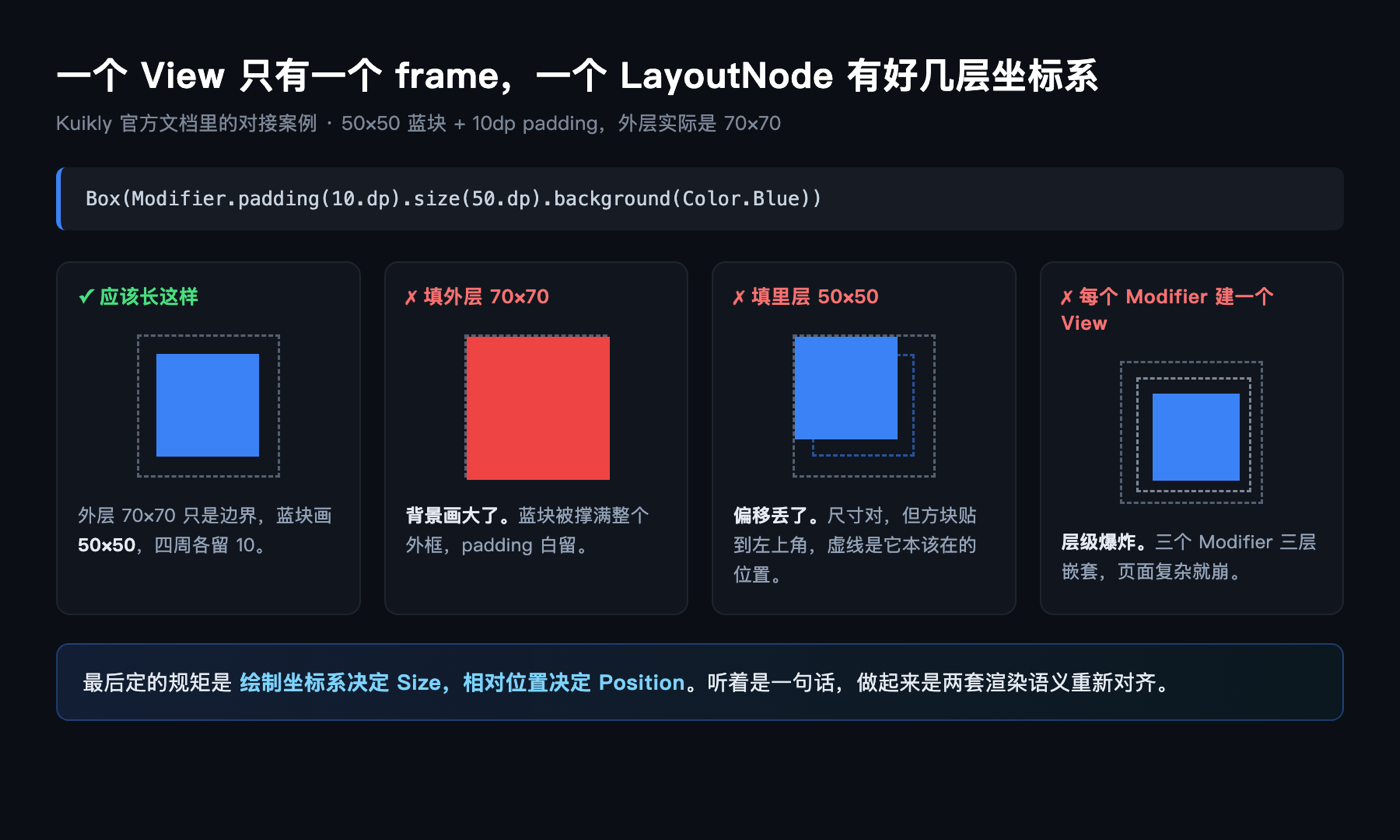
The rule they settled on: the drawing coordinate system decides Size, the relative position decides Position. One sentence, but behind it is the alignment of two rendering semantics, and that’s where frameworks like this actually spend their time.
Eleven build scripts
The repo root holds eleven Gradle scripts, running from Kotlin 1.3.10 all the way to 2.1.21, each paired with its own identically named settings file.
Not out of a love of tidiness. The Kotlin Multiplatform Gradle plugin API has kept changing over the years, one set of scripts can’t serve every version, so they keep one per major version and switch when needed.
That detail is more convincing than any performance claim. For a large company building a long-lived framework, the biggest cost is that someone is still on an old Kotlin three years from now, and you have to keep it running for them.
One clause in the license worth reading
The LICENSE is MIT at its core, with one extra restriction. The key phrase is may not modify, extend, or create derivative works, limited to the purpose of adding or enabling dynamic code loading / live updating capability, and only with Tencent’s prior written consent.
In plain terms, dynamic delivery and hot updates you cannot build yourself without Tencent’s written approval.
And dynamic delivery happens to be its biggest selling point. Compose Multiplatform produces a build at compile time, so one changed line means a new release. Kuikly can ship pages as assets and have the change take effect immediately. For domestic businesses that gap matters more than any performance number.
The repo’s license field on GitHub shows NOASSERTION for exactly this reason: it isn’t a standard license.
Who should use it
The official validation data: more than 30 internal apps, scenarios at 500 million daily active users, over 20 external teams onboarded including Kuaishou, Founder Securities and MiniMax. On migration cost they write that 50-plus standard Compose pages moved over in one pass, plus 73 AI-generated feature demos that compiled and ran with zero modification.
If you need HarmonyOS or WeChat Mini Programs, this is the least painful road right now, since CMP doesn’t cover them. If you only target Android, iOS and desktop, maintaining four renderers yourself isn’t a good trade. Those 155,000 lines become yours to maintain.
What I verified stops at project structure and line counts, plus the compiler boundary. The Gradle config works, 13 modules in 2m49s; the core module also compiled into a macOS arm64 native library, 1m06s, with JDK17 and Kotlin/Native and no Android SDK needed.
I didn’t build complete apps for the six platforms. That needs Xcode with CocoaPods and DevEco Studio, one setup each.
When you pick a cross-platform framework, do you first ask how many platforms it covers, or how many releases a single change costs you?