
If you have run Claude Code or any similar CLI agent inside an IDE terminal, you have probably hit the same thing. You type a sentence, press Shift+Enter to add two more lines, and the half-finished message goes out immediately. The agent is already working from a broken instruction.
JetBrains put that experience into the reasoning of their October 27 blog post. Starting with 2026.3, the built-in terminal in their IDEs no longer runs JediTerm. It runs libghostty, the core library behind the Ghostty terminal emulator.
Shift+Enter starts a new line in your prompt instead of sending a half-written message.
That one clause, “instead of sending a half-written message,” says plainly what the default behavior has been for over a decade.
What makes a terminal library good enough to replace a thirteen-year-old one
JediTerm is JetBrains’ own pure-Java terminal emulator. The repository opened in January 2013 and has been maintained ever since. It handles SSH and PTY. It works, and it is stable.
The problem is that it does not support the batch of modern terminal protocols that came later.
The official framing is that TUI applications increasingly depend on protocols JediTerm never supported, and that gap used to feel like a minor annoyance. The experience differed from other terminals, but not enough to warrant a bug report.
What changed is what runs inside the terminal now. Claude Code, Codex, Neovim, tmux, assorted system monitors and dashboards all push the terminal far harder than a shell prompt ever did.
libghostty took over parsing and terminal state. The IDE still handles rendering, along with higher-level features and integrations. The official post is clear about the split. This is not a rewrite of the whole terminal.
A word on where libghostty itself comes from. It is written in Zig and exposes a C ABI. Both Ghostty front ends, the macOS one in Swift with AppKit and the Linux one in Zig with GTK4, consume it. Mitchell Hashimoto says it plainly in the project introduction: this is something he works on in his free time, not a full-time job for anyone.
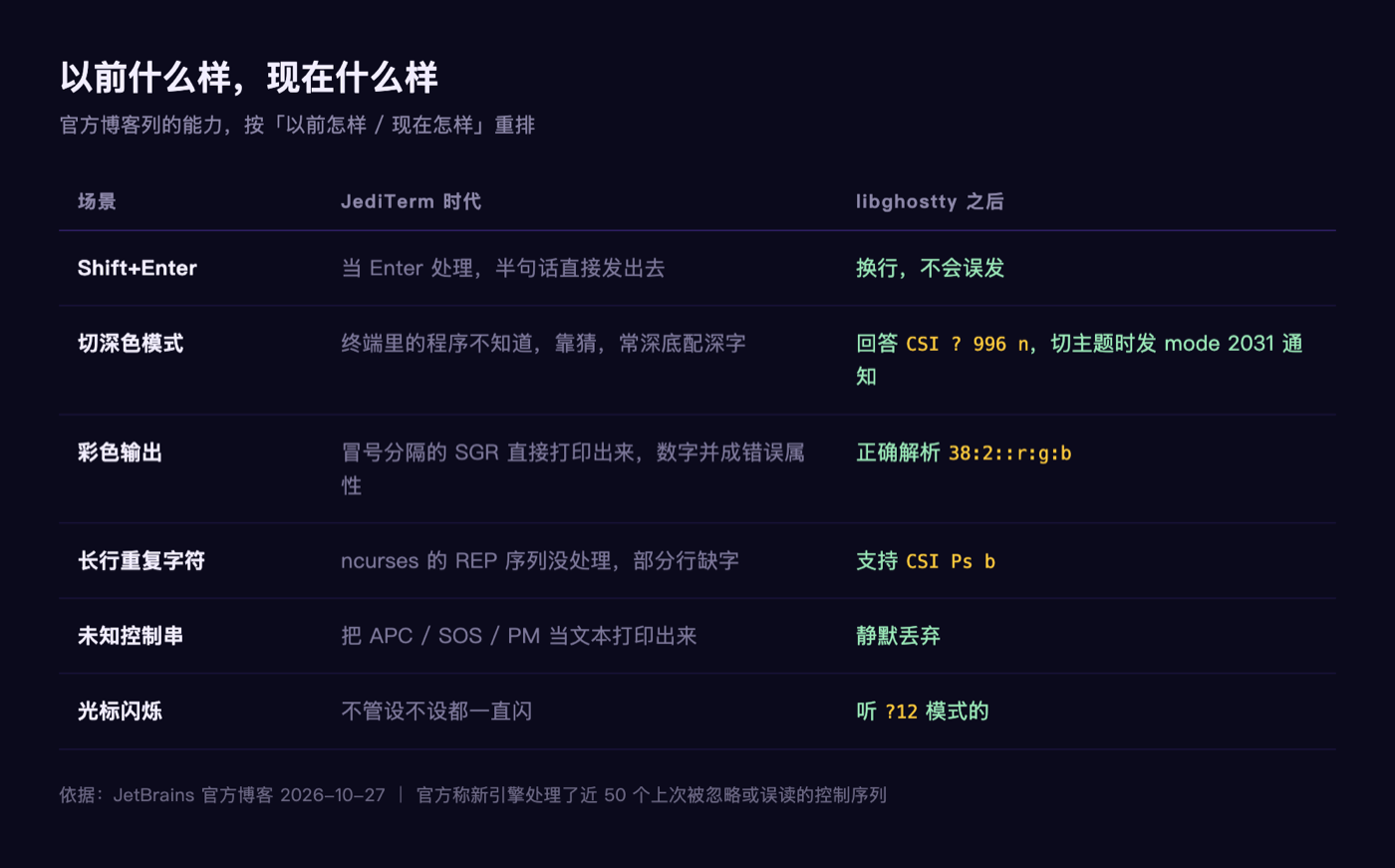
Shift+Enter finally makes a new line. Why did it never work before
The old protocol for keyboard events in terminals only distinguishes which key was pressed. It cannot tell you whether Shift, Ctrl, or Alt was held, and it does not say whether a key went down or came up.
The Kitty keyboard protocol fills that in. Terminal applications can now distinguish Enter, Shift+Enter, and Ctrl+Enter, and can ask to receive key-release and repeat events.
Vim uses the older xterm modifyOtherKeys, which is supported now as well.
For anyone who spends the day with agents in a terminal, this produces two changes. A newline is a newline, and half a sentence does not fly off on its own. Shortcuts built from Ctrl, Shift, and Alt combinations reach the application intact.
The official post notes one detail. The old setting that sent Esc + CR on Shift+Enter is no longer needed, and is ignored if set.
Switch to Dark mode, and the tools inside the terminal follow. Why didn’t they before
The experiential gap here is obvious.
When the IDE switches to dark mode, programs inside the terminal have no way of knowing. They guess. Guess wrong and you get dark text on a dark background, or a bright terminal panel inside an otherwise black IDE. Fixing it means hand-configuring one tool after another.
Now the terminal answers the dark/light query, CSI ? 996 n, drawing the answer from the current IDE theme. When the theme changes it broadcasts a notification through mode 2031.
Claude Code, OpenCode, Pi, Neovim, and tmux subscribe to these notifications, so most tools switch along with the IDE without any configuration on the IDE side.
Palette queries expanded too. JediTerm handled only OSC 10 and 11. The new terminal also answers OSC 4 and Kitty’s OSC 21. Programs can set extended palette colors 16 through 255 with OSC 4, while colors 0 through 15 stay under the IDE theme’s control.
Those garbled control characters in the terminal. Why did they show up at all
The official post says the new engine handles close to 50 control sequences that JediTerm either ignored or misread. Here are three that map to everyday experience.
REP (CSI Ps b) is what ncurses uses to compress runs of repeated characters, seven or more of the same. Lines used to render with characters missing because this was not handled.
Colon-separated SGR colors (38:2::r:g:b): the old terminal printed the colons literally and merged the digits into the wrong attribute. If you have ever seen a stray 38:2::255:0:0 string appear in your output, that was this.
Unknown APC, SOS, and PM strings used to be printed as ordinary text. They are now silently dropped.
A batch of edge capabilities came along as well: left and right margins, protected areas, tab stop control, insert mode, XTSAVE/XTRESTORE, Kitty’s scroll-and-clear, and X10 mouse reporting. Cursor blink mode used to blink no matter what you set. Now it listens.
I pulled the library out and ran it myself
Everything above is the official account. What follows is what I verified on my own machine.
First the before-and-after. My machine has IntelliJ IDEA 2026.2.3 installed. Under Contents/lib you find intellij.libraries.jediterm.core.jar, intellij.libraries.jediterm.ui.jar, and pty4j. A find for ghostty returns nothing at all.
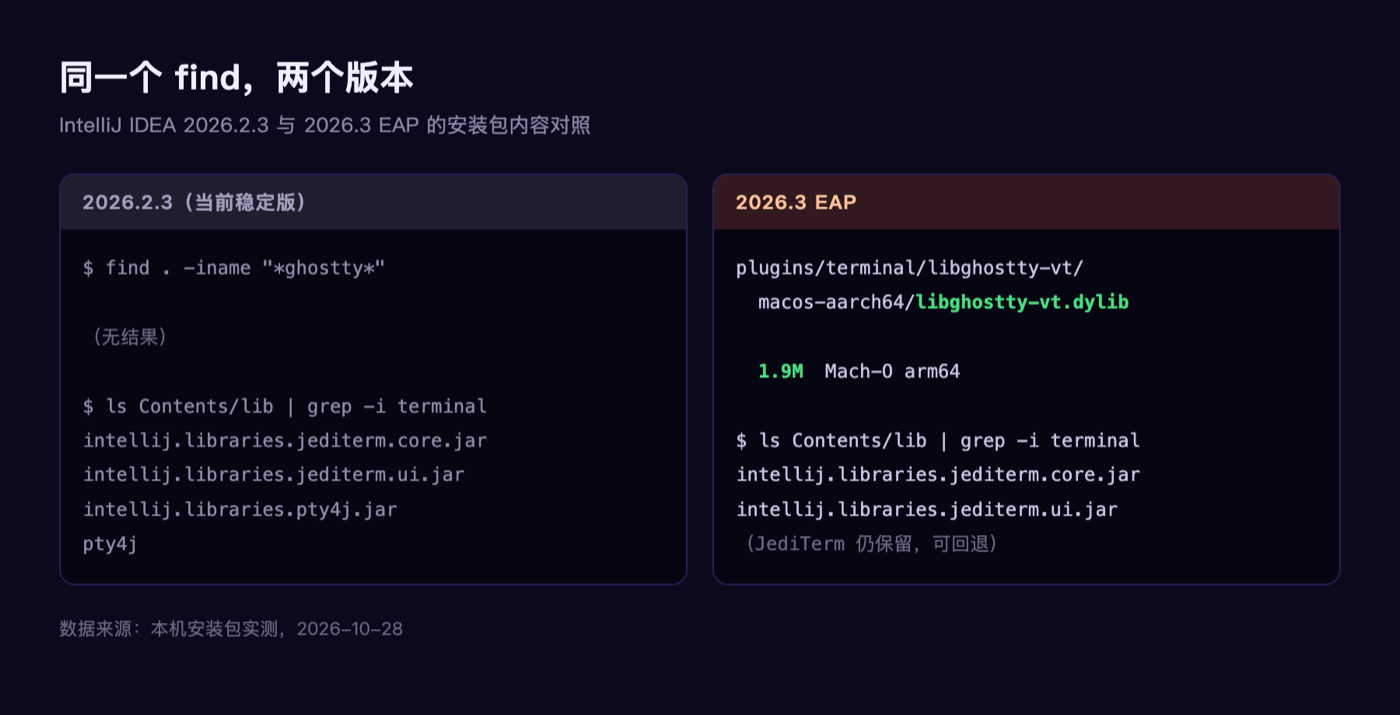
Then I pulled the 2026.3 EAP build from JetBrains’ release endpoint. It is 1510 MB, and mounting the disk image lets you inspect it without installing anything. The addition is this:
Contents/plugins/terminal/libghostty-vt/macos-aarch64/libghostty-vt.dylib
-rw-r--r--  1.9M  Oct 23 13:10
Mach-O 64-bit dynamically linked shared library arm64
A 1.9 MB native dynamic library, shipped under the terminal plugin in the plugins directory rather than the main lib. What surprised me is that both JediTerm jars are still present in 2026.3, which matches the official claim that you can switch back.
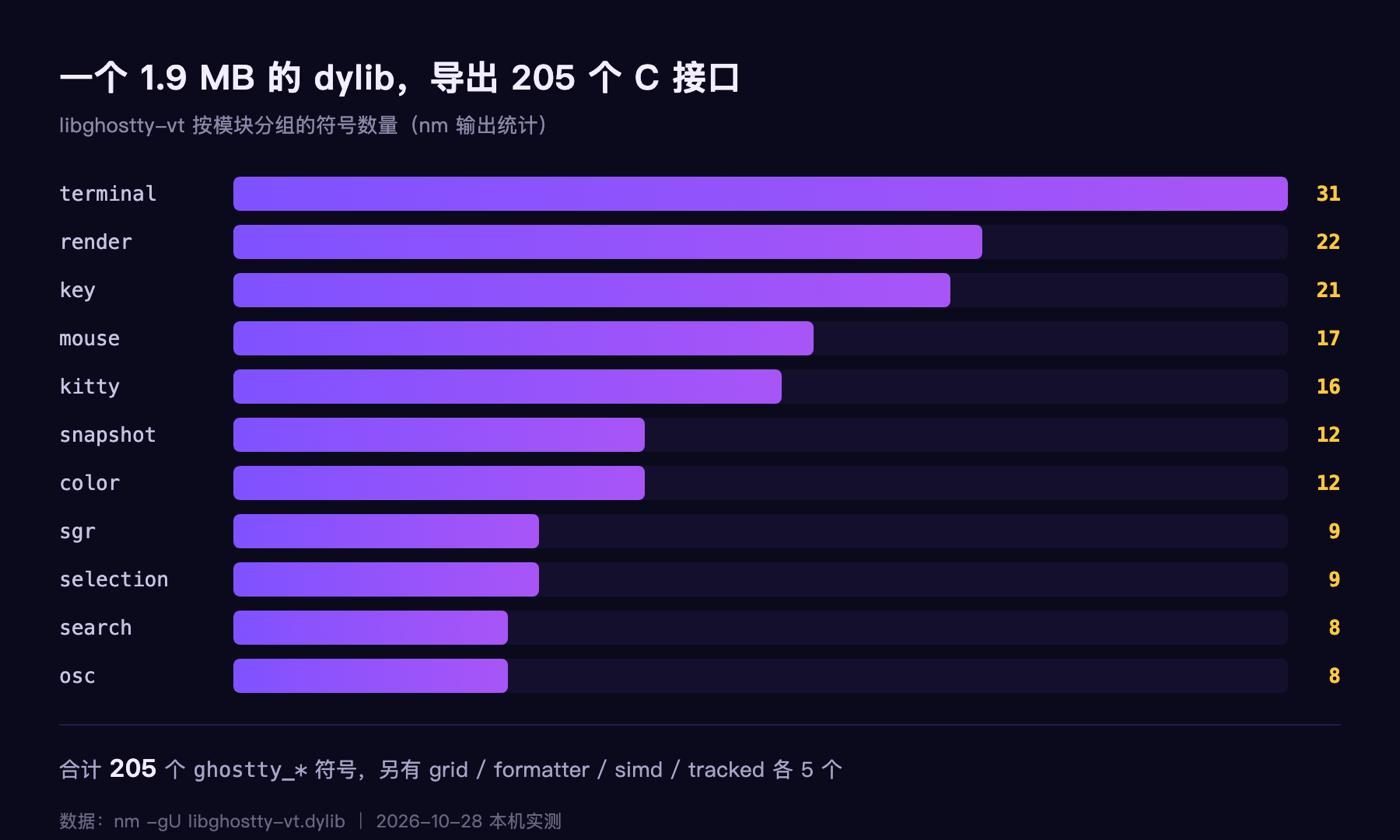
The library exports 205 C symbols, all prefixed ghostty_. Roughly by module: terminal 31, render 22, key 21, mouse 17, kitty 16, followed by snapshot, color, sgr, selection, search, and osc.
The dylib also embeds a complete ABI type description as JSON, opening with "library_version":"0.1.0-dev".
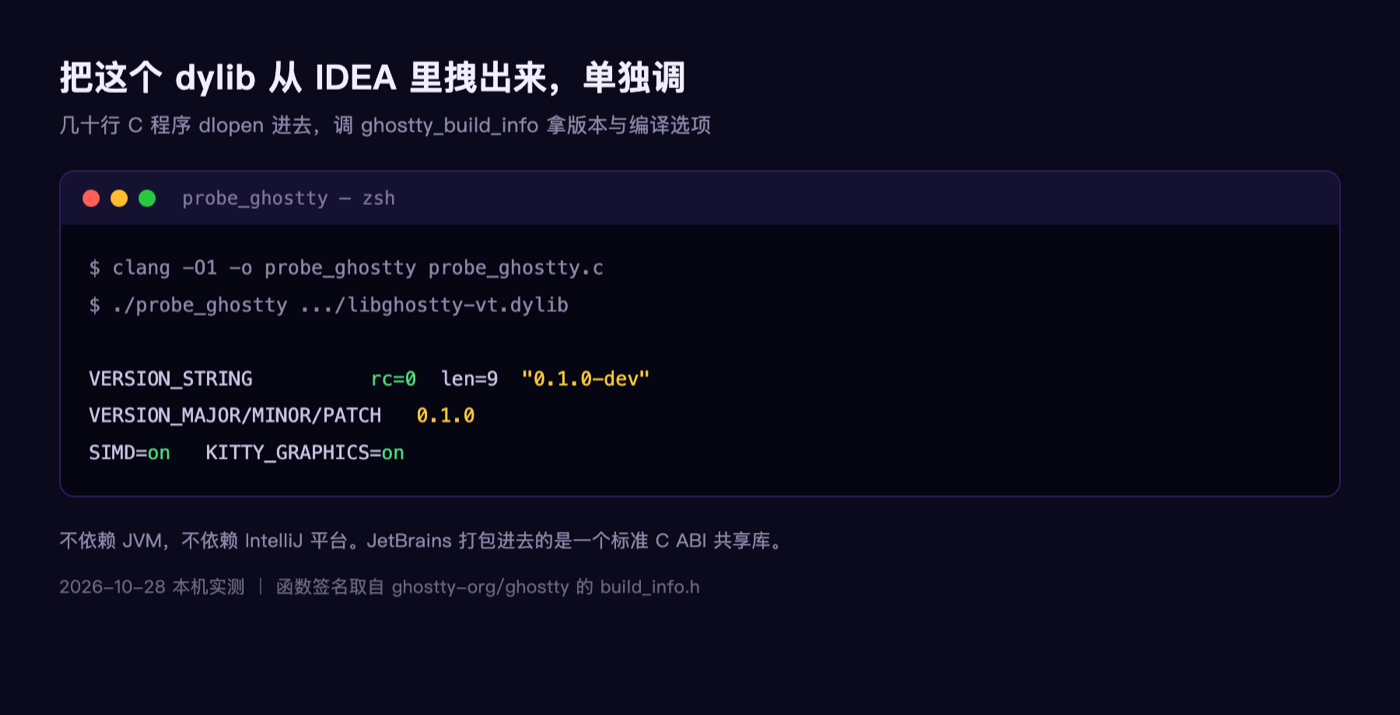
Then I took the dylib out of IDEA entirely, wrote a few dozen lines of C to dlopen it, and called ghostty_build_info:
VERSION_STRING  rc=0 len=9  "0.1.0-dev"
VERSION_MAJOR/MINOR/PATCH  0.1.0
SIMD=on  KITTY_GRAPHICS=on
It ran. That is more worth saying than whether the engine changed at all. What JetBrains shipped is a standard C ABI library that any program can link against. It needs no JVM and no IntelliJ platform.
I also checked the rollback switch the post mentions. Unpacking terminal.jar, the key terminal.use.ghostty.emulator is genuinely present in TerminalEmulatorType and in plugin.xml. You find it under Help, then Find Action, then Registry.
What this has to do with people writing Kotlin and Android
If your day is an IDEA window with a terminal running Claude Code, with gradlew and adb alongside, this engine swap moves the floor you walk on every day.
Three things you feel directly. Shift+Enter stops sending half a message. Switching to Dark mode brings the terminal tools along. The control characters that used to come out as garbage no longer pollute the output.
There is another set the library can already parse but the IDE side has not wired up yet, which the official post lists: OSC 52 clipboard, desktop notifications, ConEmu progress bars, Kitty graphics, and styled and colored underlines. The point is that parsing is no longer the bottleneck. What remains is on the IDE side.
The most practically useful of those is desktop notifications, where a program running in the terminal can raise a notification when it finishes a task, such as Claude wrapping up a prompt and waiting on you. That one is not connected yet. The post says it will arrive faster than it did under JediTerm.
One more thought
Replacing a thirteen-year-old in-house terminal with someone else’s library is a more interesting decision than any of the technical details.
JetBrains is capable of continuing to improve JediTerm. What they chose was to acknowledge the gap. The modern terminal protocol layer is no longer something you bolt on in passing, and catching up from scratch loses to standing on a library built specifically for the job.
And libghostty was always meant for other people to use. The Ghostty documentation states the architectural goal plainly: let other terminal projects build on a shared core, focus on higher-level features and the interface, and skip reimplementing terminal emulation.
At the end of the post JetBrains thanks Mitchell Hashimoto and Tim Culverhouse by name, noting that over the past months libghostty also picked up the capabilities JediTerm users depended on, which is what made the switch possible.
Read that backwards and it holds up too. A library treated as a side project added a large customer’s decade of requirements in order to catch them.
What is your daily terminal now, the one built into the IDE, or a separate Ghostty, iTerm, or Warp window? If the IDE terminal genuinely catches up to standalone terminals on features, would you still open a second window for it?
References
- JetBrains blog: The Terminal in JetBrains IDEs Now Runs on libghostty (October 27, 2026)
- Ghostty documentation, About: https://ghostty.org/docs/about
- The libghostty ecosystem list: https://github.com/Uzaaft/awesome-libghostty
- libghostty build_info header: https://github.com/ghostty-org/ghostty/blob/main/include/ghostty/vt/build_info.h