AI writing frontend code stopped guessing a long time ago. The Chrome DevTools Protocol is right there, an agent can read the DOM, click buttons, pick colors, and check its own work afterward.
Native apps are a different story. iOS and Android have no equivalent protocol, so all an agent gets is a screenshot.
A screenshot shows you something, but it cannot show that “this button’s border went from 5.25 to 15.75 over 1.8 seconds”, or that “this line of text is buried under a translucent layer”. It guesses, edits, screenshots again.
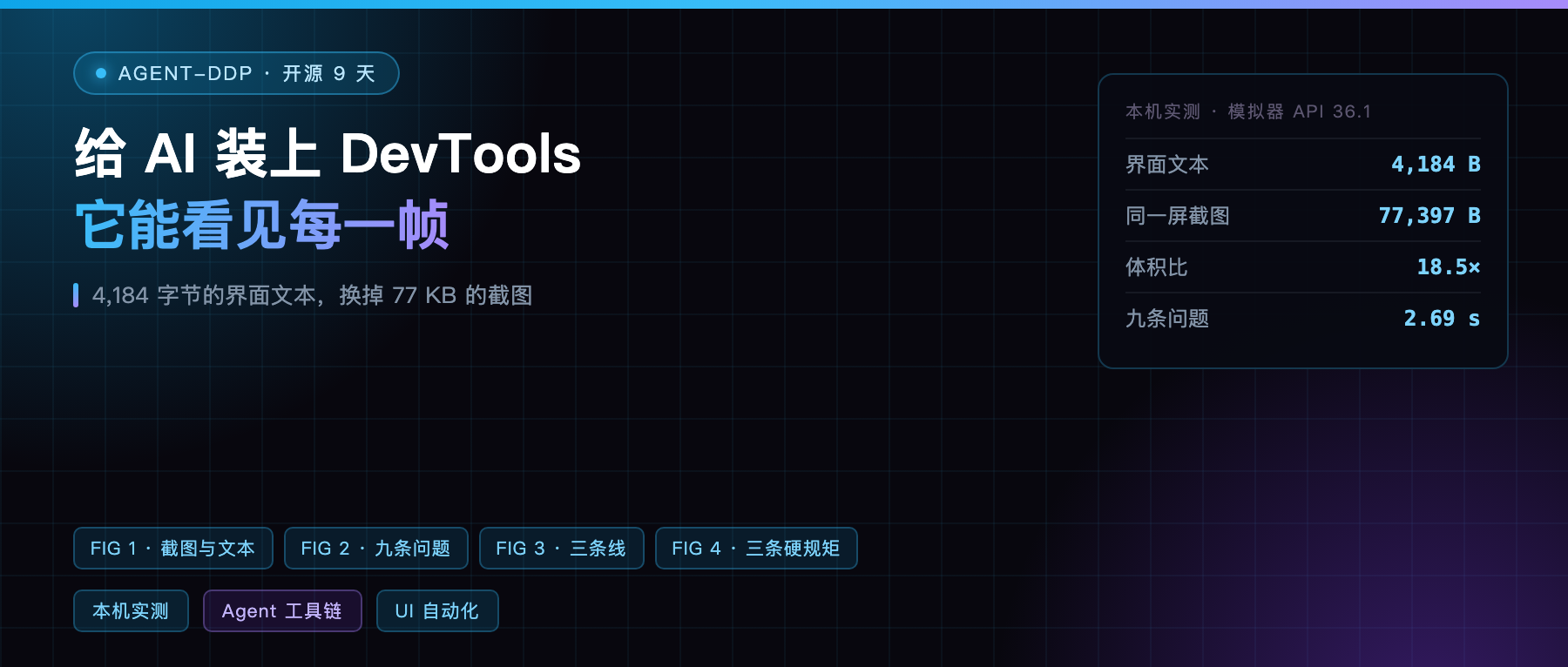
On October twenty-third a project called agent-ddp went open source to fill that gap.
It turns the screen into a few hundred lines of text
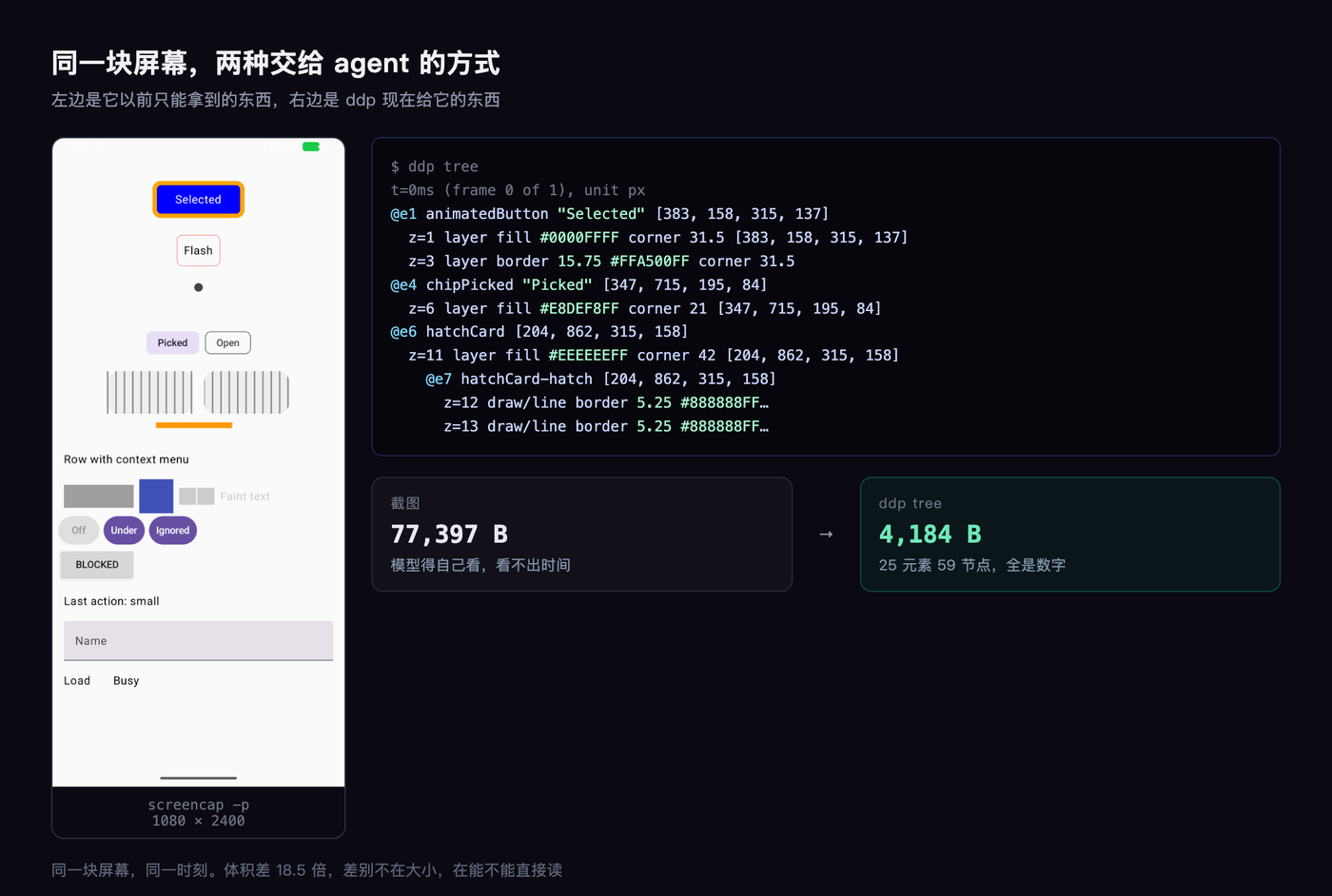
Once installed, an agent asking what is on screen gets this back:
@e1 animatedButton "Selected" [383, 158, 315, 137]
  z=1 layer fill #0000FFFF corner 31.5
  z=2 bitmap [467, 195, 147, 63]
  z=3 layer border 15.75 #FFA500FF corner 31.5
@e2 flashBox "Flash" [460, 358, 160, 115]
Every element carries a reference like @e1, usable in the next command. Fill, border, corner radius, coordinates, z-order, all numbers.
I measured it: this screen has 25 elements across 59 draw nodes, and ddp tree outputs 4,184 bytes. The same screen saved as a screenshot is 77,397 bytes.
That is 18.5 times smaller, and the difference is not size, it is determinism. A screenshot has to be interpreted, text is read.
Running it locally: install to result
I used the emulator already on my Mac, Medium Phone, API 36.1.
npm i -g agent-ddp installs the CLI, a Rust binary with no runtime dependencies. The sample project builds a 10 MB debug APK with Gradle, installs to the emulator, and launches.
First command is ddp doctor, which checks device, app, library, and endpoint:
ok agent-ddp library in the build ok control endpoint answers ok 25 elements on screen ok hook compose.zSortedChildren (internal): answered 4608 times
About twenty lines, all green. That step matters, because it does not just check connectivity, it reports how many times each hidden hook was called. More on why later.
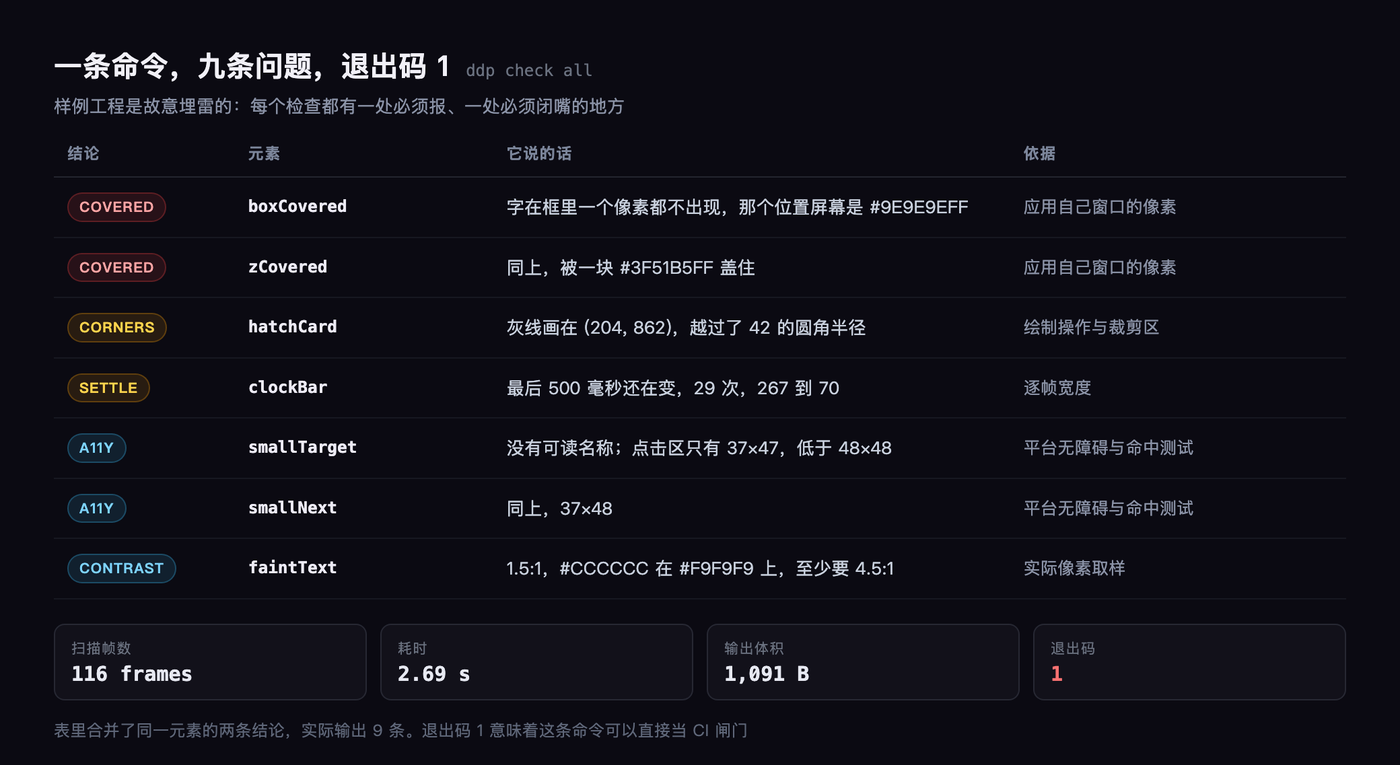
Then I typed one line, ddp check all. 2.7 seconds, 116 frames scanned, nine problems, exit code 1.
The nine problems look like this
- Two cases of text covered: not a single pixel of
boxCovered’s glyphs appears inside its own frame - One corner radius violation:
hatchCarddraws a gray line outside its rounded corner - One animation that never settles:
clockBarstill changing in the last 500 ms, 29 times - Two accessibility elements without labels, two tap targets at 37×47, under the 48×48 minimum
- One contrast ratio at 1.5:1, under 4.5:1
Every item carries evidence coordinates. The covered text one reads that its glyphs never appear inside [42, 1283, 258, 85], and that the screen at that spot is #9E9E9EFF.
I checked the screenshot. There really is a gray block sitting on top of the text.
What I liked most is the time it refused me
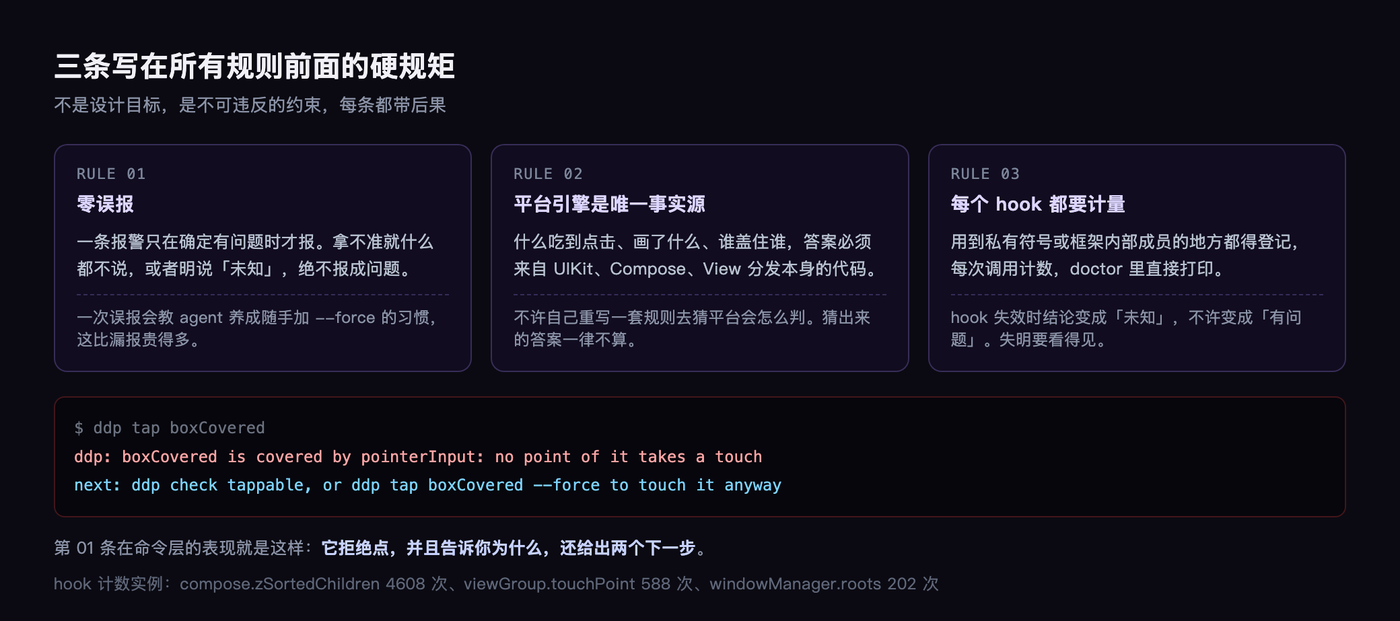
That covered button in the UI, I tried to make it tap:
ddp: boxCovered is covered by pointerInput: no point of it takes a touch next: ddp check tappable, or ddp tap boxCovered –force to touch it anyway
It will not tap, it tells you why, and it offers two next steps.
Anyone who has done UI automation knows how backwards that is. Traditional frameworks tap anyway and leave you guessing why nothing happened.
Three hard rules it sets for itself
Going through the docs I found the project writes three sentences as inviolable rules, placed ahead of everything else.
First, zero false positives. A report only fires when something is certainly wrong, and when unsure it says nothing. The reason is in the docs: one false positive teaches the agent to habitually add --force, and that costs far more than a missed report.
Second, the platform engine is the only source of truth. What consumed a tap, what got drawn, who covers whom, those answers must come from UIKit, Compose, and View dispatch themselves. It is not allowed to reimplement its own rules that approximate the platform.
Third, every hook must be instrumented. Anywhere a private symbol or framework internal is used, it gets registered and every call gets counted. When a hook goes dead, the conclusion becomes “unknown”, never “broken”.
That answered 4608 times line in ddp doctor is the product of this rule. If an OS update changes an internal structure, the count drops and you immediately know one of your checks quietly went blind.
It wrote the CDP design and killed it the same day
There is a decision record in this project worth reading.
The earliest design had the library in the debug build speak Chrome DevTools Protocol directly, so Chrome and existing CDP clients could connect and the agent would not need a second protocol.
The same day, it rejected its own proposal.
The reasoning is concrete: to imitate a browser it would have to fake a #document > html > body above the native element tree, support CSS selectors, name preferences localStorage, and fill fake values into fields Chrome expects.
Every one of those is a translation layer, and you are the person who has to learn and maintain it. Worse, those translations hide the app’s real structure.
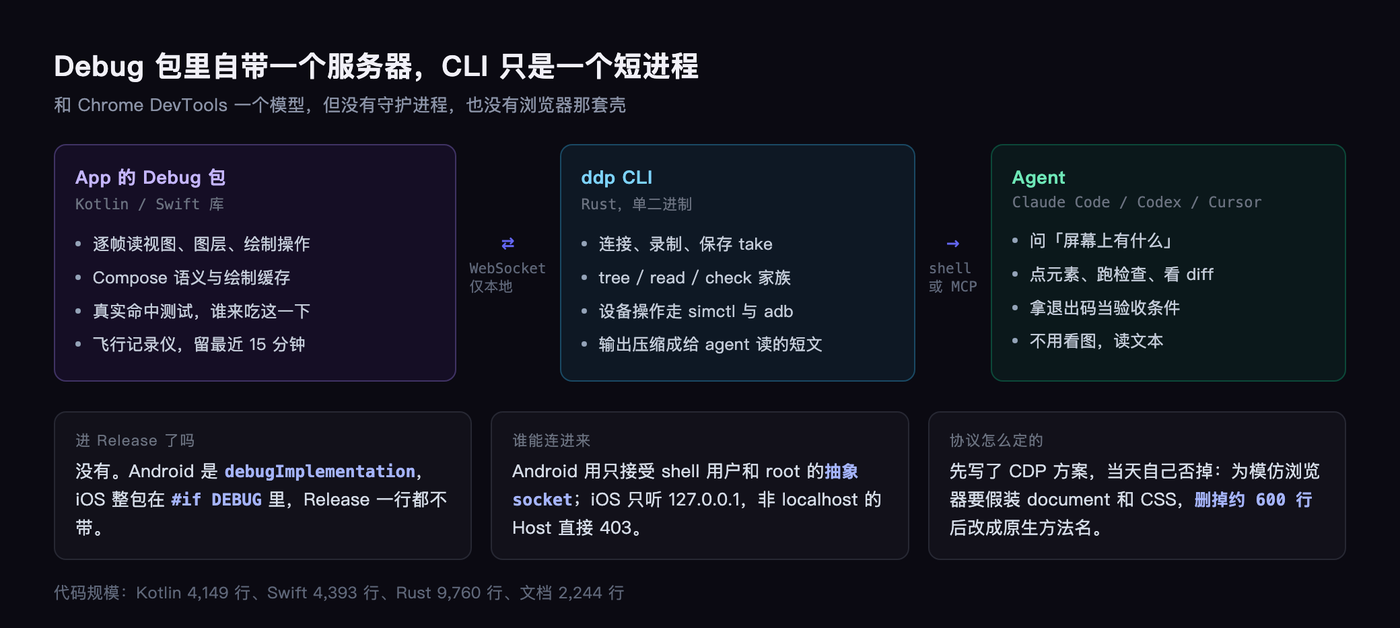
After the switch, the protocol names became native: screen.elements, input.touch, prefs.write. The deleted browser layer was about six hundred lines.
What goes into the app is light
The iOS side is Swift, a bit over 4,300 lines. Android is Kotlin, a bit over 4,100. The CLI is Rust, a bit over 9,700.
The library in the debug build is itself the server, running on a local WebSocket. On Android it uses an abstract socket only the shell user and root can reach, on iOS it listens on 127.0.0.1 and rejects Host headers that are not localhost.
No daemon. Every ddp command is a short-lived process, and recording produces a jsonl file. The same file can be asked different questions repeatedly.
None of that code exists in the release build. On Android it is debugImplementation, on iOS the whole package sits inside #if DEBUG.
The unflattering part
It has 0 stars. Created October twenty-third, now 114 commits, five releases, and five open issues all filed by dependency upgrade bots.
The iOS side only supports the simulator, real devices are not done. The list of things it cannot see is long too: text and images inside SwiftUI Canvas, system dialogs, some covered text, and certain cached drawing inside Compose layers.
I tried one class deliberately: a button that only responds to touch on release. It cannot judge that case, it will only say the touch reaches, then after tap it tells you nothing changed.
That is not a defect, it is honesty. It would rather say it does not know than guess an answer for you.
My read
The real dividing line in this wave of tools is not how many properties they can read, it is whether they dare to stay quiet.
A checker that reports everything teaches an agent to route around it. A checker that speaks only when it should is one an agent can trust as an acceptance condition in a pipeline.
Nine real problems, 2.7 seconds, one thousand and ninety-one bytes of output, one exit code. If this holds steady, agent UI work stops being “write the code” and becomes “write it, then verify it yourself”.
When you have an agent change UI today, do you hand it a screenshot, or do you let it feel the tree?