MCP spent this year solving the server side: how an agent discovers tools, calls them, and gets structured results back.
On the phone it has been a blank. Your app holds a pile of capabilities, search, send a message, create an event, and an agent can reach none of them. It falls back to screenshots, taps a guessed coordinate, takes another screenshot.
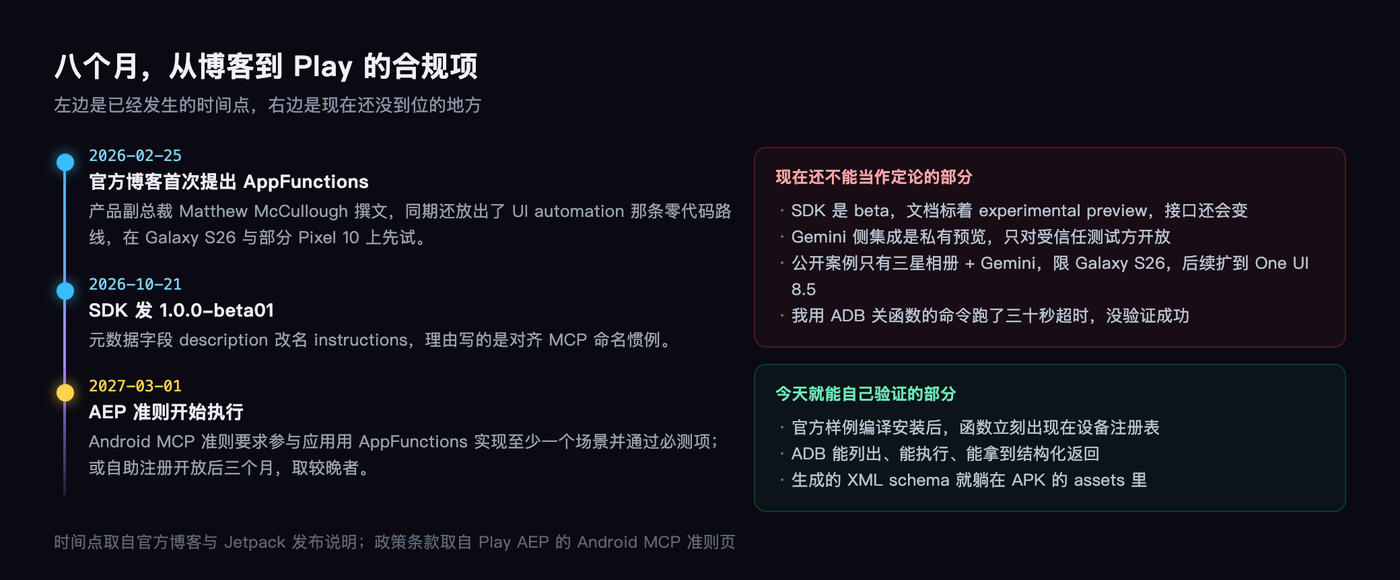
In February Google put something called AppFunctions on the Android Developers Blog. On the twenty-first of last month its SDK shipped 1.0.0-beta01.
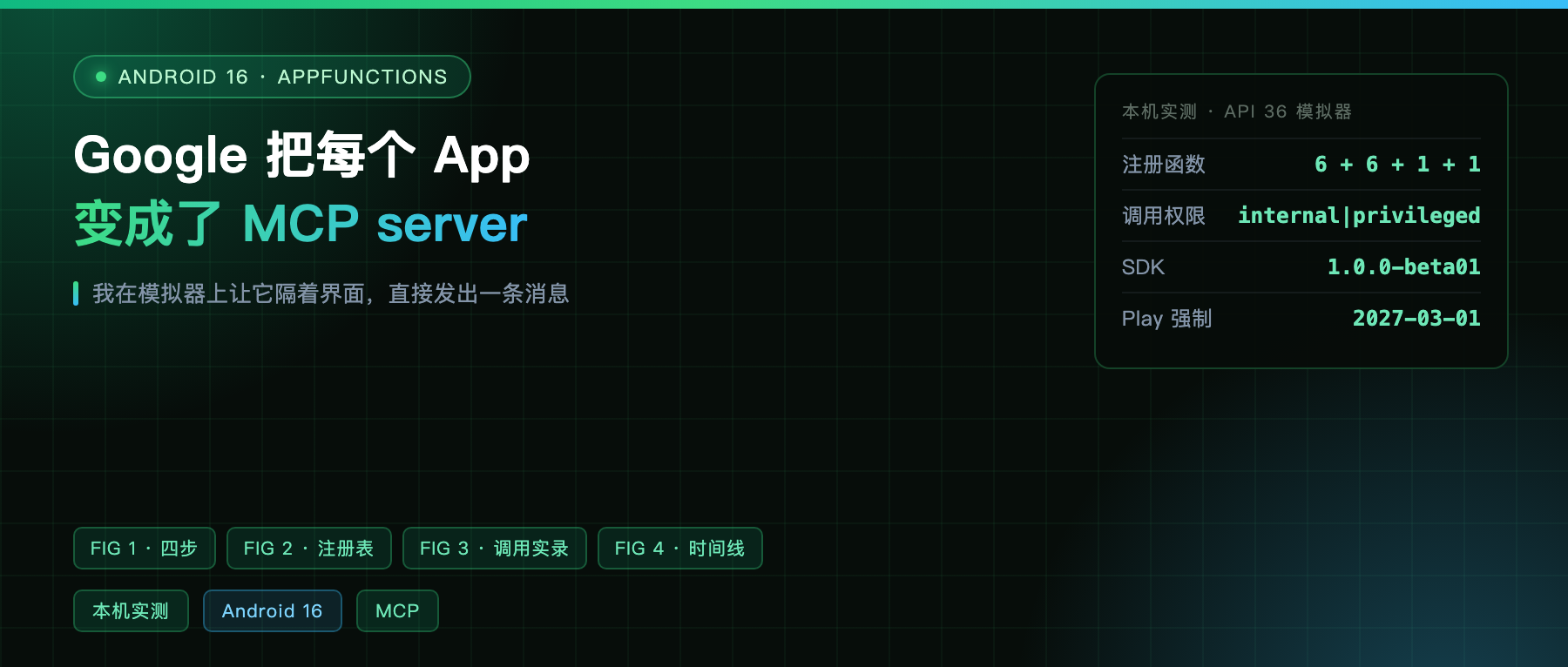
I got it running on an emulator, including letting an “agent” send a message straight through my app’s UI.
The official framing is blunt
That post was written by Matthew McCullough, VP of Product Management for Android Developer. His wording: AppFunctions let apps declare what they can do the way backends declare capabilities through an MCP cloud server, except execution happens on device.
The same paragraph mentions WebMCP, saying the two are part of one line, one in the browser, one in the system.
So the positioning is clear. This is not another custom intent protocol, it is deliberately shaped like MCP. A detail from the October beta confirms it: they renamed the metadata field from description to instructions, and the stated reason was aligning with MCP naming conventions.
One AppFunction takes four steps
First, you write a service class in your app that extends AppFunctionService, annotate methods with @AppFunctionDeclaration, and the KDoc becomes the description the model reads. Second, an annotation processor generates an XML at build time carrying every parameter, type, enum constraint, and return shape.
Third, that XML goes into the APK’s assets directory and Android reads it to register functions in a global table.
Fourth, an authorized caller gets AppFunctionManager, checks whether the function is enabled, and calls it.
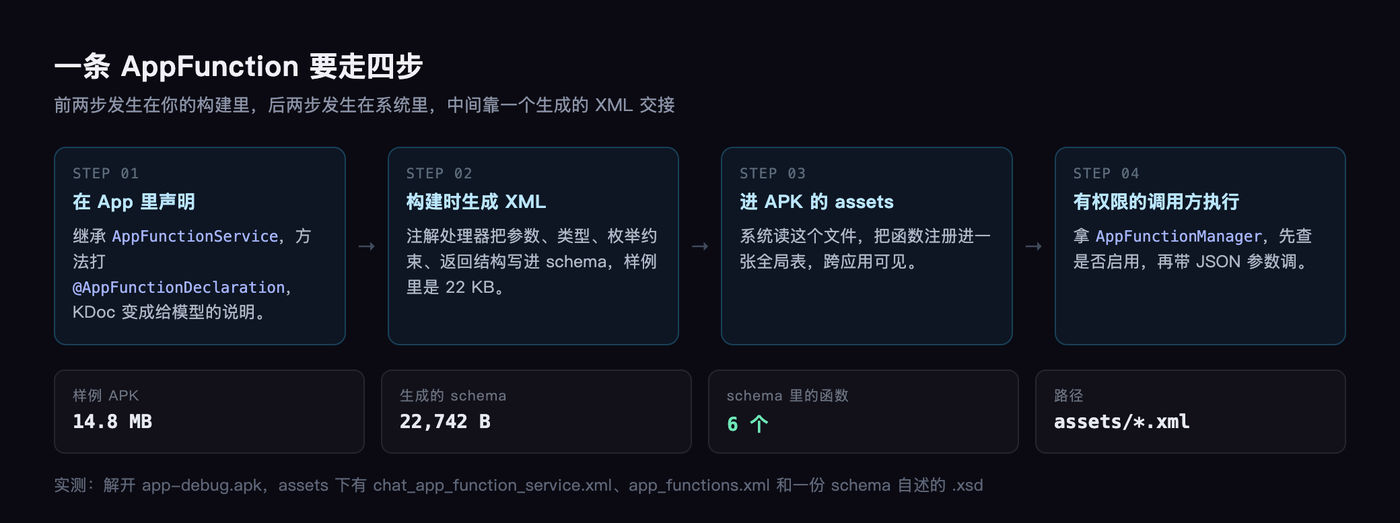
I went digging inside the APK and the XML is really there. The sample’s assets/chat_app_function_service.xml is twenty-two kilobytes, six functions, every parameter description pulled out of KDoc.
Local test: from compile to an actual sent message
The sample is ChatApp from the official android/appfunctions repo, Compose plus Hilt, building into a 14.8 MB debug package. Installed on the emulator, it registers six functions on first launch: search contacts, send a message, place a call, search messages, fetch send details, change the wallpaper.
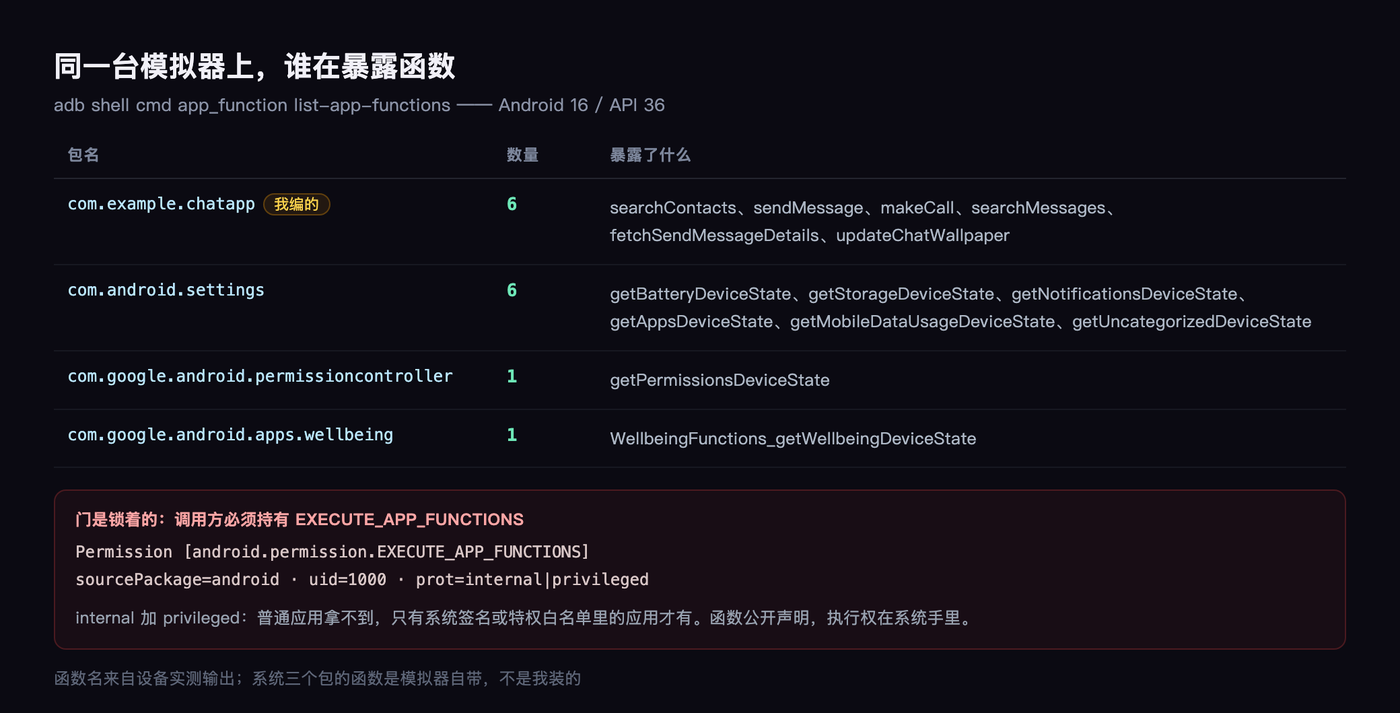
The device listing looks like this, and the same emulator has system apps doing it on their own:
com.example.chatapp, six, all business functions of that chat appcom.android.settings, six, all namedgetXxxDeviceState, reading battery, storage, notificationscom.google.android.permissioncontroller, one, reading permission statecom.google.android.apps.wellbeing, one
System apps are already using this thing themselves. That is more convincing than any documentation.
One call, and what comes back
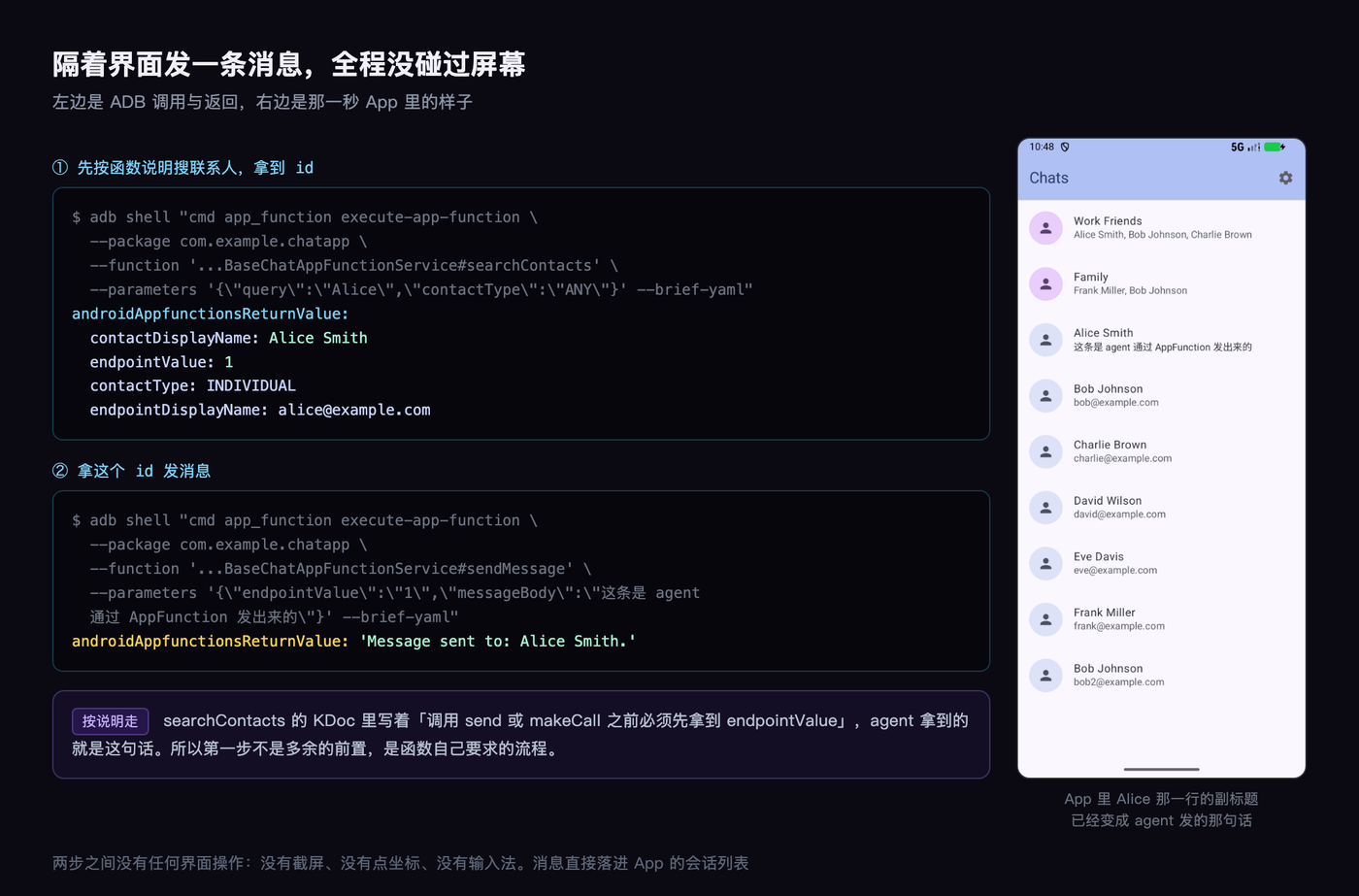
I called it over ADB, straight past the UI, imitating what an agent would do. Following the function’s own instruction that you must search contacts first to get an endpointValue, I searched a contact:
androidAppfunctionsReturnValue:
  contactDisplayName: Alice Smith
  endpointValue: 1
  contactType: INDIVIDUAL
  endpointDisplayName: [email protected]
With that 1 in hand, step two sends the message, taking the id plus the body. It returns Message sent to: Alice Smith.
Then I opened the app and looked. The message I had passed in, which said in Chinese “this one was sent by an agent through AppFunction”, was sitting in Alice’s conversation.
No screen interaction at any point. No screenshot, no coordinates.
The one thing to remember: who gets to call
This is the part I most want you to notice.
For another app to discover and execute your AppFunction, the caller must hold EXECUTE_APP_FUNCTIONS. I pulled the permission definition on the emulator:
Permission [android.permission.EXECUTE_APP_FUNCTIONS] sourcePackage=android prot=internal|privileged
Internal plus privileged means an ordinary app cannot get it, only the system signature or apps on a privileged allowlist have it. Today that means system assistants like Gemini.
Which makes both camps right. “Android apps can finally talk to AI agents” is true. “This is not open agent access” is also true. The functions are publicly declared, and the door is locked.
It is already turning into policy
The other thread in the docs is AEP, Google Play’s Apps Experience Program.
It carries an explicit guideline called Android MCP, requiring participating apps to implement at least one relevant scenario with AppFunctions and pass its required tests. The scope is spelled out: messaging, notes, calendar, tasks, health, shopping.
Enforcement is March 1, 2027, or three months after self-service registration opens, whichever is later.
In other words, today it is an experimental API, next year it is a Play compliance item. That cadence is worth seeing early.
There is also a zero-code path, worth seeing side by side
The same blog post put a second route on the table: UI automation.
The platform operates your interface itself, so the developer’s workload is zero. Users long-press the power button on a Galaxy S26 or some Pixel 10 devices and hand a multi-step task to Gemini, starting in the US and Korea with food delivery, groceries, and ride hailing.
Users can watch progress, take over at any point, and get a prompt before sensitive actions like payment.
Side by side, the tradeoff gets clear. AppFunctions gives you control: you decide what to expose, how to describe it, how failures come back. UI automation gives you reach, but you have no part in the definition, and the agent can only tap your UI like a person would.
Google says Android 17 will broaden both. My read is that serious product teams will treat the first as home turf and the second as a fallback.
What is not here yet, stated plainly
The SDK is beta, not final. The docs mark it experimental preview, the API will move, and October moved a fair amount.
The Gemini integration is a private preview open to trusted testers. The public case that actually works is Samsung Gallery, on the Galaxy S26, expanding to One UI 8.5 soon.
And one honest note: I tried disabling a function over ADB to verify the claim that users can turn them off, and the command timed out after thirty seconds with the function state unchanged. I did not verify that, so it does not belong in the conclusions.
My read
What makes this different from the usual “AI integration APIs” is the shape.
Before, each vendor invented an intent and agents had to adapt one by one. This one is cut from the MCP mold: self-describing, discoverable, with enum constraints, required fields, and error codes.
For people who write apps, the real change is not this year. It arrives when that policy takes effect next year, and the question becomes whether your app can explain its own core capabilities.
A well thought out function declaration does more for an agent than ten pages of help docs.
If your app were only allowed to expose three functions to a system assistant, which three would you pick?
Tell me in the comments. I will pick a few interesting ones and take them apart next time.