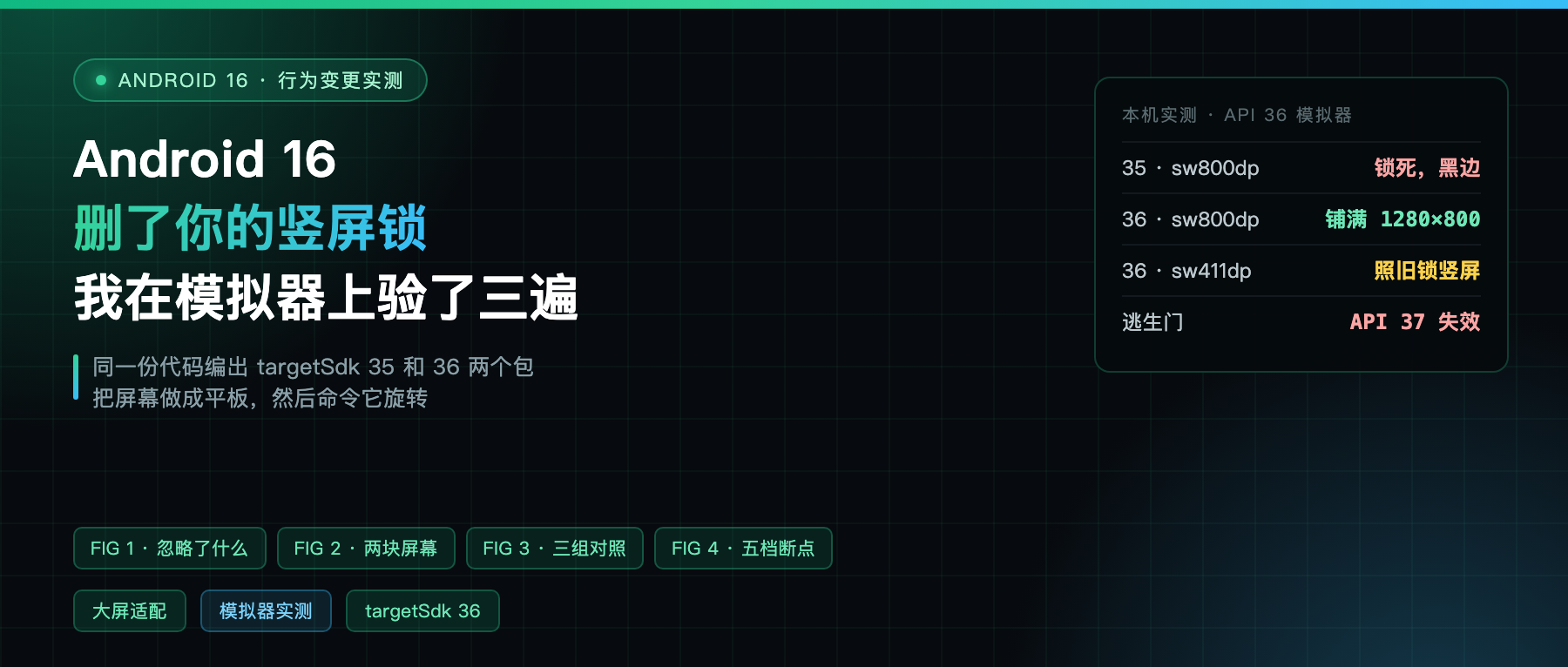
The story going around Chinese tech circles these past two days is that Google is pressuring developers into foldable support.
So I went and read the Android 16 behavior changes doc. The word the documentation uses is not “encourage.” It is ignore. Ignore your portrait lock, ignore your non-resizable flag, ignore your aspect ratio cap.
It is not asking. It removed the switch at the system level.
So I ran a controlled test: one codebase, two builds at targetSdk 35 and 36, installed on the same emulator with the display resized to tablet dimensions, then a command to rotate.
What the doc actually says
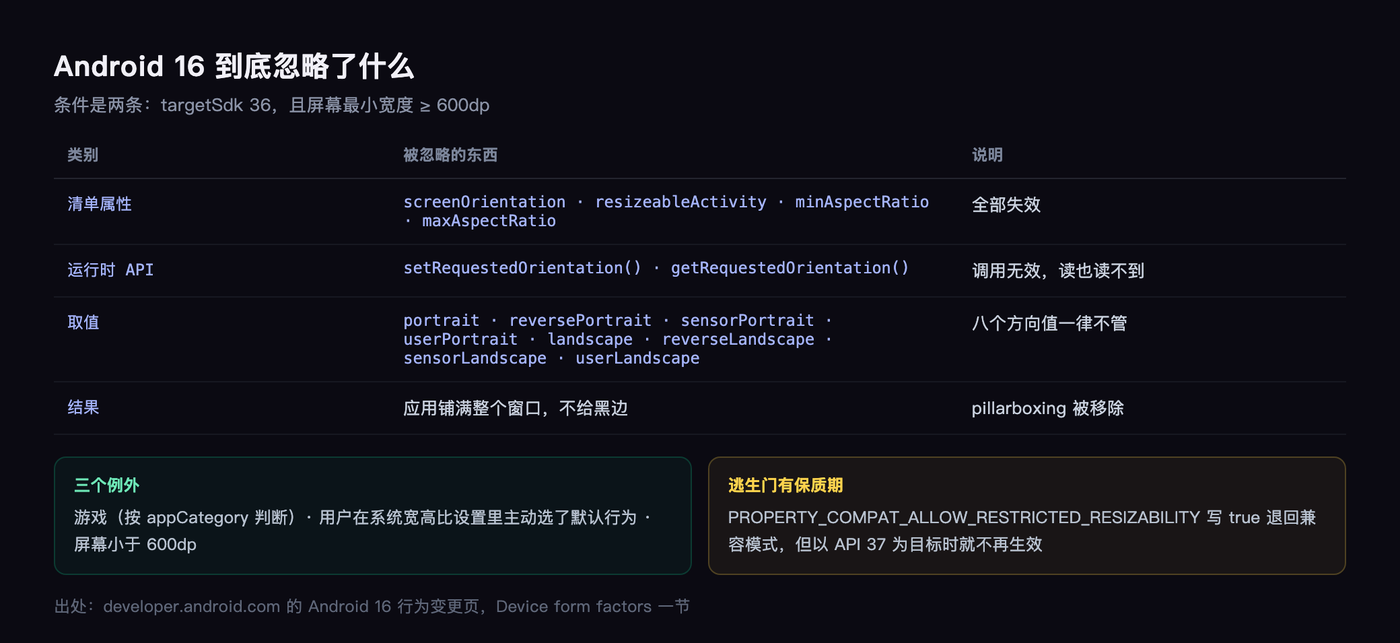
For apps targeting Android 16 (API level 36), orientation, resizability, and aspect ratio restrictions no longer apply on displays with smallest width >= 600dp.
Two conditions: target 36, and smallest width at least 600dp. Meet them and the app fills the entire window, without even the courtesy of letterboxing.
The list of what gets ignored is specific. Three manifest attributes: screenOrientation, resizeableActivity, minAspectRatio, maxAspectRatio. Two runtime methods: setRequestedOrientation() and getRequestedOrientation().
Portrait, landscape, reverse portrait, sensor portrait, user portrait, the whole set of values stops mattering.
Why Google dared to just remove it
The Android Developers documentation writes that apps today have to run on phones, tablets, foldables, desktop mode, cars, TVs, and inside multi-window shapes like split screen and desktop windows. Its words: locks on orientation and size are now “overly restrictive.”
Plainly: a portrait lock protects your layout on a phone, and on a tablet or a desktop window it turns into “the user cannot use this.”
The docs also name the direction, saying apps are expected to adapt to any orientation, size and aspect ratio themselves. That reads soft. In system behavior it is hard.
How I built the test
One Activity, plain Java, no Compose, printing four lines on screen: current orientation, screenWidthDp, screenHeightDp, smallestScreenWidthDp.
The manifest deliberately turns every restriction on: android:screenOrientation="portrait", android:resizeableActivity="false", android:maxAspectRatio="1.5".
The same source compiled twice with only targetSdk changed, 2.5 MB per APK. Device: an API 36 emulator.
To make it a tablet: wm size 1200x1920 and wm density 240, which works out to an app area of 1280×800dp with a smallest width of 800dp, just over the line. Then settings put system user_rotation 1 to command it into landscape.
Result one: targetSdk 35 stays locked, with a nudge
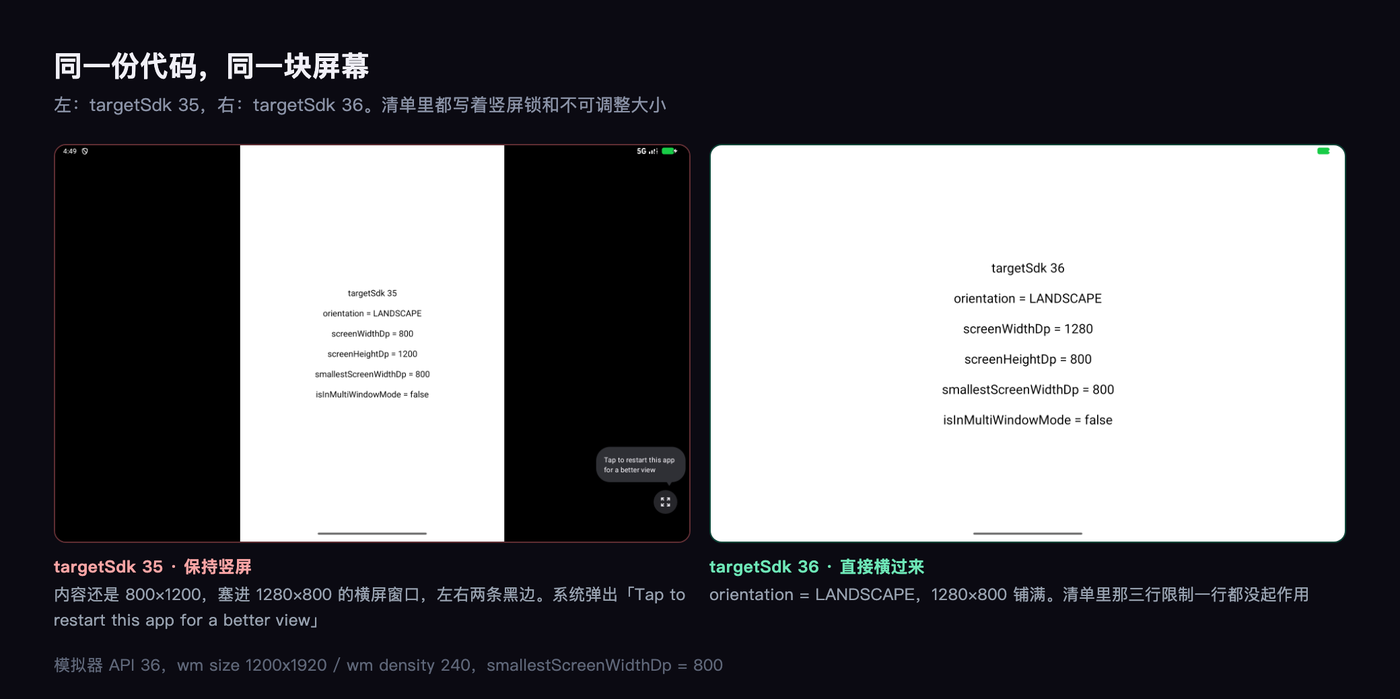
The 35 build dutifully stays in portrait. Its content is still 800×1200, stuffed into a 1280×800 landscape window with two fat black bars on the sides.
That is the old behavior, compatibility mode. The system even pops a hint in the corner: “Tap to restart this app for a better view.”
Which is to say: tap this and it will look right. The system is not being subtle about its opinion.
Result two: targetSdk 36 defies the manifest
Switch to the 36 build, same rotate command, and it flips.
The screen reports itself: orientation is LANDSCAPE, screenWidthDp 1280, screenHeightDp 800, smallestScreenWidthDp 800. Full bleed, no bars.
Three lines in the manifest, not one of them had any effect.
Result three: back to phone size, the restriction returns
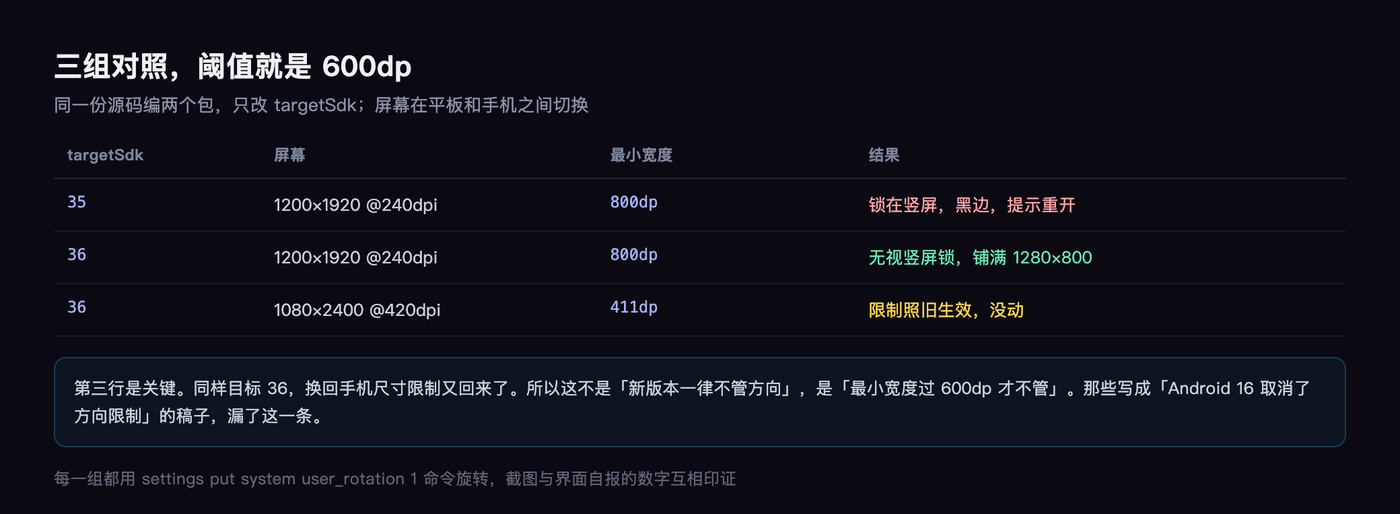
I reset the display to phone dimensions (1080×2400 at 420dpi, smallest width 411dp) and told the 36 build to rotate again.
It did not move. Still PORTRAIT.
So the rule is not “new target version, no restrictions.” It is “smallest width over 600dp, no restrictions.” At 411dp your portrait lock still holds.
This matters, because a lot of the coverage rendered it as “Android 16 removed orientation restrictions,” which is wrong.
The exceptions, and one temporary escape hatch
Per the Android 16 behavior changes page, there are three exceptions: games (determined by android:appCategory), users who explicitly opt into an app’s default behavior in the system aspect ratio settings, and displays smaller than 600dp.
There is also an opt-out, written in the manifest:
<property android:name="android.window.PROPERTY_COMPAT_ALLOW_RESTRICTED_RESIZABILITY"
          android:value="true" />
It can sit on the activity or on the application. Declare it and you fall back to compatibility mode.
But it has an expiry date. The same doc notes this opt-out stops working on future Android versions when targeting API 37. In other words, you get a year to move house, not a permanent switch.
If you want to preview the behavior on 36 without changing targetSdk, flip the compatibility framework flag UNIVERSAL_RESIZABLE_BY_DEFAULT. I compiled two APKs instead, which is cleaner.
What this change will knock loose
The docs list the typical symptoms in a Common breaking changes section, and it is more precise than any secondhand write-up I have read: stretched layouts, and off-screen animations and components.
Both are the same underlying thing: your layout assumed a fixed aspect ratio. A RecyclerView with a hardcoded height, margins computed from screen width, a background image prepared at one size, none of it visible while you were locked to portrait, all of it obvious the moment you rotate.
There is a sneakier category. With a portrait lock, the Activity never recreated on rotation, so a sloppy onSaveInstanceState never showed up. Now it recreates, and state you failed to save is data the user just lost.
So how do you actually fix it
The official answer is a single sentence: lay out by window size, not by device type.
Window size classes now come in five width tiers: under 600 is compact, 600 to 840 is medium, 840 to 1200 is expanded, 1200 to 1600 is large, above 1600 is extra large.
Height is classified separately, with breakpoints at 480 and 900.
The breakpoint table lives on the Use window size classes page.
That page also offers a useful reference. The compact width tier covers 99.96% of phone portrait configurations; expanded covers 97.22% of tablet landscape ones.
One sentence from the doc worth copying down: window size classes are explicitly not determined by the size of the device screen, and they are not for writing isTablet logic. Split-screen an app and the window is half as wide, so it should use the medium set.
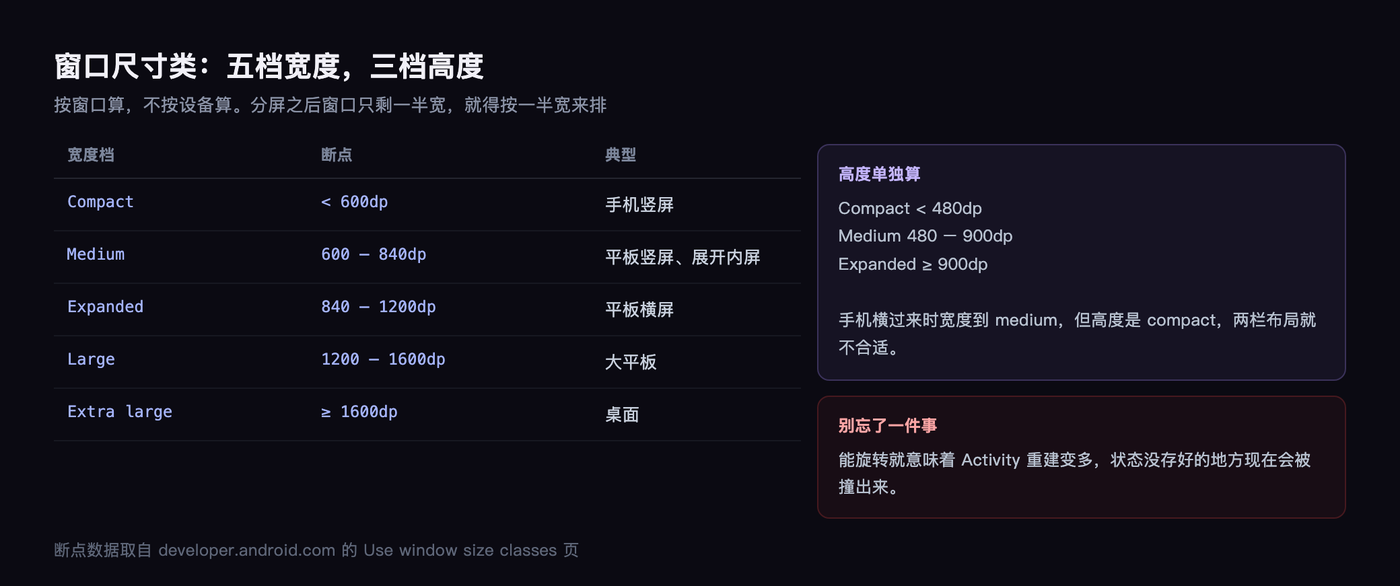
One more thing that is easy to miss: allowing rotation means more Activity recreation. Before, with a portrait lock, rotation simply never happened. Now it does.
The limits of my test, stated plainly
First, I resized an emulator display rather than using a real foldable. Fold posture, desktop windowing, and resize inside split screen, I have no real-device behavior for any of it and can only describe what the docs say.
Second, I tested one Activity with an empty UI. What I verified is whether the system-level restriction applies, not how well some real app adapts.
Third, I skipped Android Studio’s foldable AVD because it meant downloading another system image and the time was not worth it. If you want better data, the official foldable emulator config gives you posture with one install.
I state plainly the parts I can prove, and flag the parts I cannot. That is the rule I hold myself to on every hands-on piece.
My take
This change matters more than “foldable support” makes it sound.
For the past decade the portrait lock was an honest compromise: phone screens are narrow, landscape wrecks the layout, so lock it. The system just removed it, which turns “can your layout adapt” into a hard requirement.
For product people that is good news, less room to be lazy. For the people writing the code it is work: onConfigurationChanged and state saving need a careful pass.
Will the app you are working on today survive a rotation? You do not need to wait for 37. Spin up an emulator, set the display to 1200×1920 and density to 240, and you will know in five minutes.