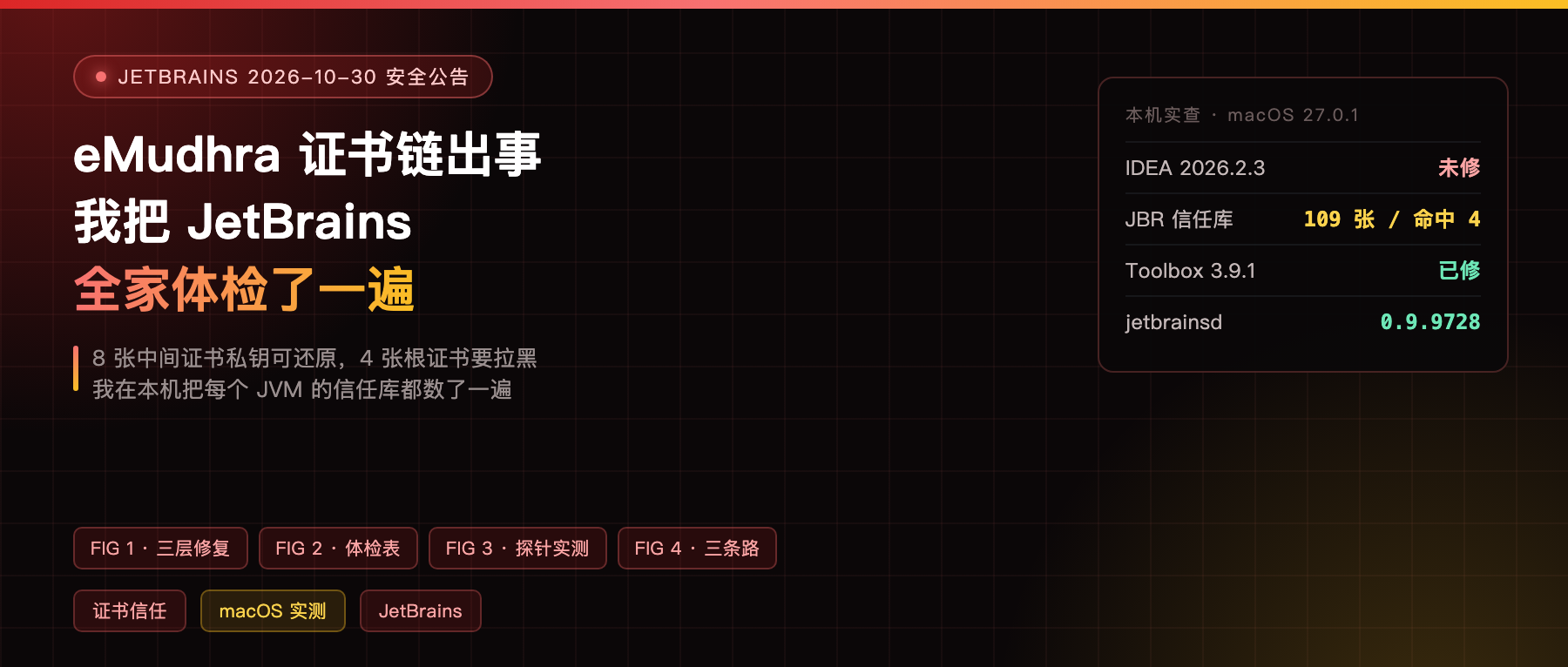
On October 17 a security researcher reported that eight intermediate certificates issued by eMudhra had recoverable private keys, because the entropy used to generate them was weak.
That means anyone who can sit in the middle of your network can sign a “trusted” certificate with one of those keys and impersonate the services JetBrains tools talk to.
JetBrains published two advisories on October 30. One covers what to do about the IDEs, the other is a status table across the product line. I read through the coverage in Chinese, and it was all paraphrase. Nobody actually went and checked their machine.
This post is that check, written as a manual. Everything runs locally, and nothing in here changes your configuration.
What the advisory actually says
The affected components are the ones that run on Java: the IDEs, Toolbox, Gateway, ReSharper. They trust the trust store shipped inside the bundled JetBrains Runtime, not the macOS Keychain.
The advisory is blunt about one thing: updating your operating system does not protect you here.
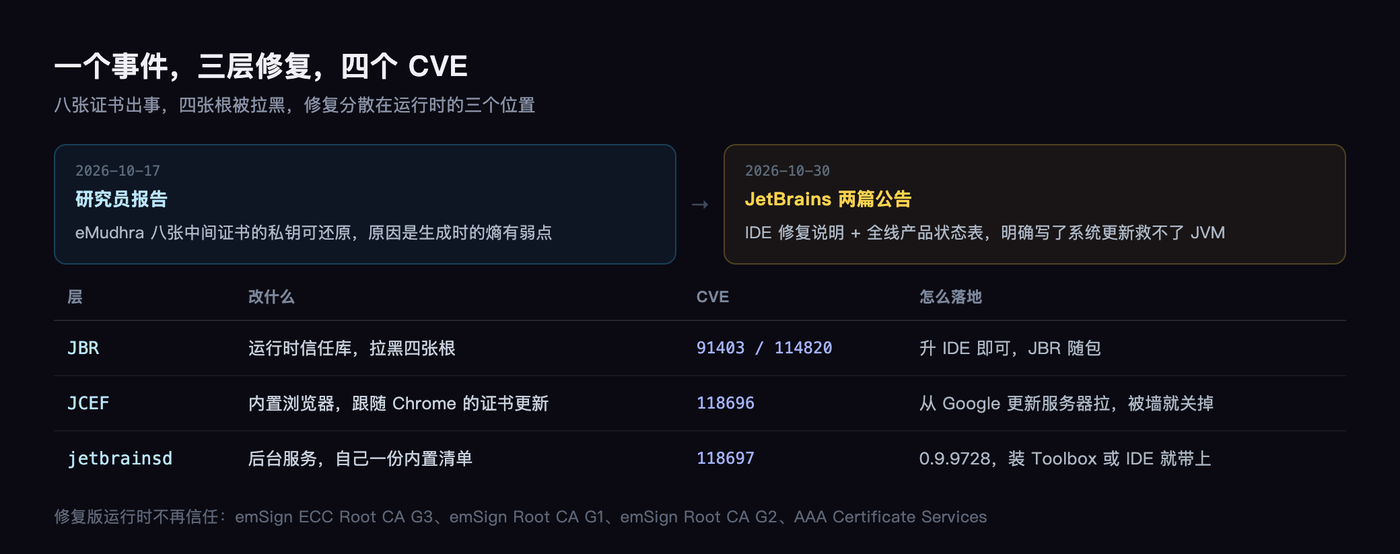
The fixed JBR no longer trusts these four root certificates: emSign ECC Root CA G3, emSign Root CA G1, emSign Root CA G2, and AAA Certificate Services.
Under the hood that is four CVEs. CVE-2026-91403 and CVE-2026-114820 are Oracle’s fixes inside the JBR. CVE-2026-118696 covers the embedded browser JCEF taking Chrome’s certificate revocation list. CVE-2026-118697 covers the background service jetbrainsd and its own bundled list.
Three layers, each fixed separately.
Step one: check whether your versions even line up
Don’t start deleting certificates. First find out which build you are running. A JetBrains .app carries an Info.plist, and the build number is in it.
/usr/libexec/PlistBuddy -c 'Print :CFBundleShortVersionString' \
  "/Applications/Android Studio.app/Contents/Info.plist"
/usr/libexec/PlistBuddy -c 'Print :CFBundleVersion' \
  "/Applications/Android Studio.app/Contents/Info.plist"
Swap the path for whichever IDE you have. Toolbox installs live under ~/Applications.
On my machine:
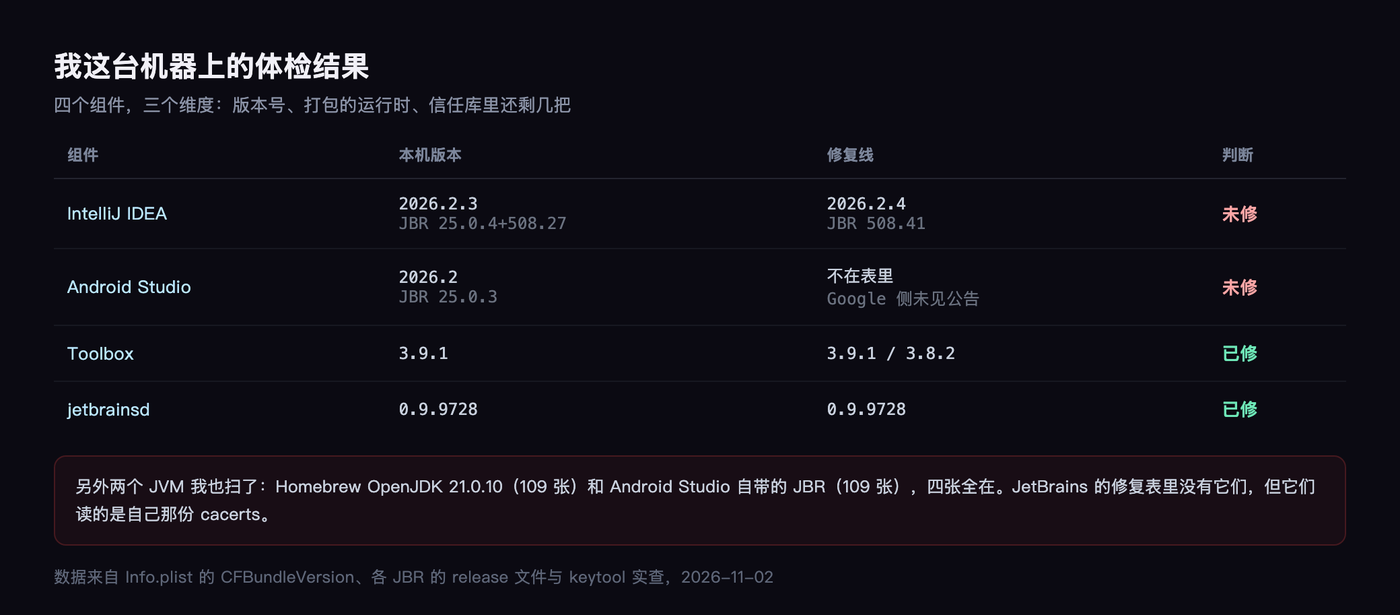
- IntelliJ IDEA 2026.2.3, build IU-262.10968.63, bundled JBR 25.0.4+1-508.27
- Android Studio 2026.2, build AI-262.9437.185.2621.16467767, JBR 25.0.3
- JetBrains Toolbox 3.9.1, build 3.9.1.89198
Cross-checking against the fixed-version list: IDEA has to be 2026.2.4 to count as fixed, and I am on 2026.2.3, one patch short. Toolbox 3.9.1 is on the list, so that one passes.
Android Studio is a blank spot. It is not in JetBrains’ table at all, and I could not find an equivalent Google advisory, so I checked the JBR version myself: 25.0.3, while the fixed JBR 25 builds are 635.79, 508.41, and 329.142. 25.0.3 is obviously old.
Step two: just ask the trust store how many are left
Version numbers can lie. Trust stores cannot. Every JBR ships a cacerts file, and its own keytool will list it.
"/Applications/Android Studio.app/Contents/jbr/Contents/Home/bin/keytool" \
  -list -cacerts -storepass changeit | grep -iE "emsign|comodo"
Android Studio returns four lines:
comodoaaaca [jdk]emsigneccrootcag3 [jdk]emsignrootcag1 [jdk]emsignrootcag2 [jdk]
All four are there. IntelliJ IDEA’s copy is the same, all four present, 111 certificates in total.
There is a trap here I have to mention, because I walked into it: the alias as printed carries a space and a bracketed suffix, emsigneccrootcag3 [jdk]. If you type just emsigneccrootcag3 to delete it, keytool tells you no such alias exists, even though it is sitting right there in the list.
Step three: prove your fix actually took effect
This is the step the official documentation does not have.
The official workaround is: copy the cacerts file, delete the affected roots, then point the IDE at the copy with a VM option. The problem is knowing whether that -Djavax.net.ssl.trustStore actually got loaded. A wrong path, a missing slash, a ~ that never expands, and it fails silently.
So I wrote a thirty-line program that asks the JVM directly: how many of these do you still trust?
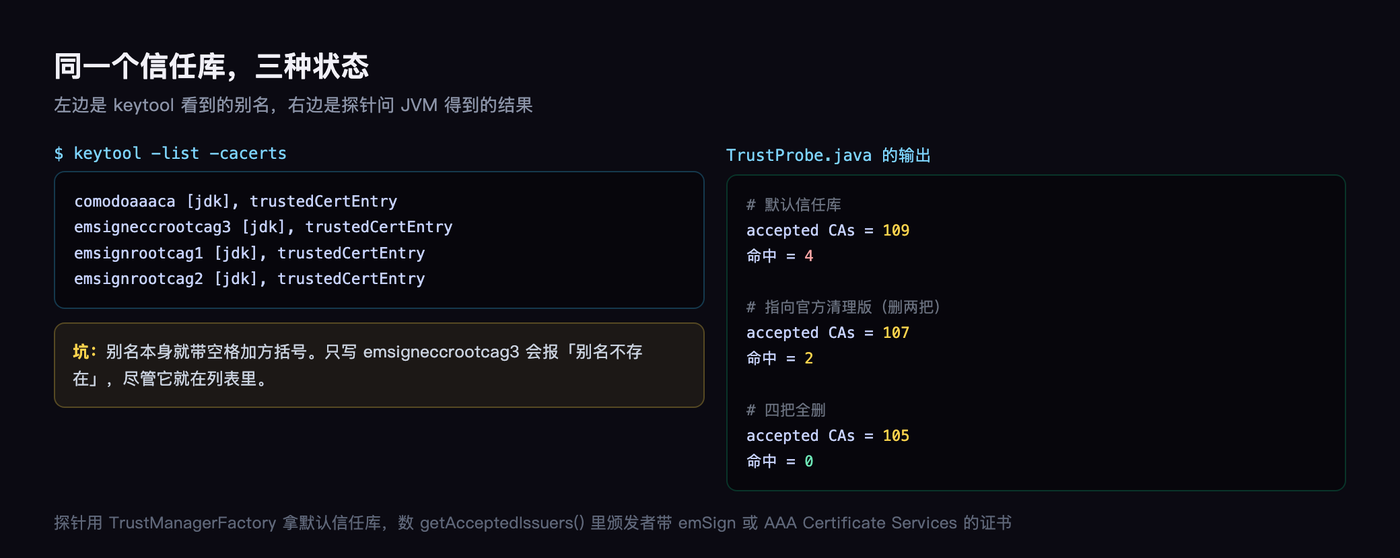
The key line is tmf.init((KeyStore) null), which makes the JVM use its default trust store, the one that honours javax.net.ssl.trustStore. Then you count how many issuers in getAcceptedIssuers() are named emSign or AAA Certificate Services.
Here is what came out:
With no VM option, it reports 109 certificates and 4 hits. Pointed at the officially cleaned copy, 107 and 2 hits. With all four removed, 105 and 0 hits.
Three numbers, and the gap between “I think I fixed it” and “I did fix it” closes.
Two things the advisory does not tell you
First: the official workaround removes two aliases, comodoaaaca [jdk] and emsigneccrootcag3 [jdk].
But what I found on my machine was all four present, G1 and G2 included. After deleting those two, my probe still reported two hits. So if you follow the two documented steps on this machine, two eMudhra root certificates stay behind.
I am not in a position to explain why JetBrains listed only two. Maybe the fixed runtime handles G1 and G2 elsewhere, maybe they were being conservative. On the plain question of what is on the machine, the number is four, not two. If you want to be thorough, delete all four; I measured 105 certificates and zero hits afterwards.
Second: macOS’s own system roots still contain these two.
emSign ECC Root CA - G3 has SHA-1 3043FA4FF257DCA0C380EE2E58EA78B23FE6BBC1, and emSign Root CA - G1 has 8AC7AD8F73AC4EC1B5754DA540F4FCCF7CB58E8C.
security dump-trust-settings shows no per-certificate distrust policy in either the system or the user domain. That does not mean macOS is letting them through, TLS has other mechanisms, but from the Keychain side at least, they are still there.
While you are at it, scan the other JVMs
This is the part most people will miss.
JetBrains only speaks for its own products. But your Gradle daemon runs on some JDK, your command-line Kotlin compile uses some JDK, Homebrew installed another one, and every single one has its own cacerts, unrelated to the IDE’s.
I walked every JVM on the machine that can run keytool:
- Homebrew OpenJDK 21.0.10, 109 certificates, all four present
- Android Studio’s bundled JBR 25.0.3, 109 certificates, all four present
- IntelliJ IDEA’s bundled JBR 25.0.4, 111 certificates, all four present
Not one of them is fixed.
JetBrains also shipped fixed JBR builds on two jbr21 lines, 21.0.11b1163.125 and 21.0.9b1038.91. When upstream OpenJDK catches up I have no first-hand source for, so I will not draw that conclusion for you. All I can say is that the 21.0.10 on this machine still has all four.
What to do
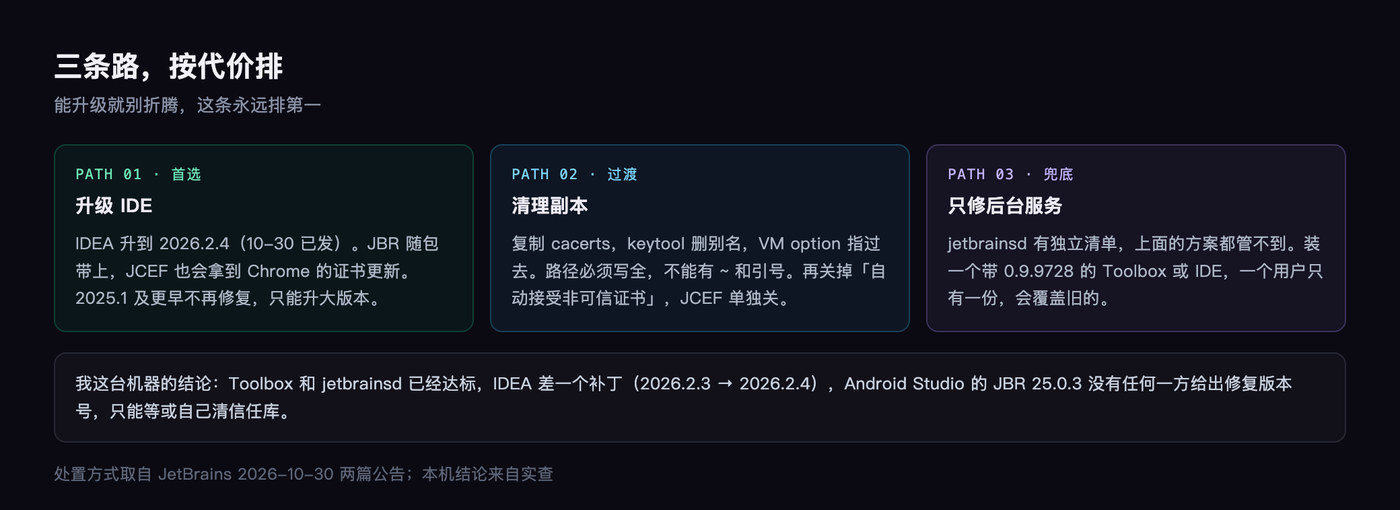
The priority order is obvious: upgrade if you can, and skip the workarounds.
IDEA 2026.2.4 shipped on October 30; I checked the date against JetBrains’ release API. Toolbox 3.9.1 is already installed, and I checked jetbrainsd too, which runs 0.9.9728, the fixed version. So the only thing left to touch is the IDE itself.
If you cannot upgrade yet, the official three steps are: copy cacerts, delete the aliases with the keytool from that jbr, then add a line to Help → Edit Custom VM Options with -Djavax.net.ssl.trustStore= pointing at the copy.
The path has to be absolute. No ~, no quotes. Get it wrong and it will not complain, it just silently does nothing. Then confirm in Settings → Server Certificates that automatically accepting untrusted certificates is off.
One more detail: the JCEF embedded browser’s certificate list cannot be changed, so on 2025.2.6.4 and earlier you have to turn it off entirely with the registry key ide.browser.jcef.enabled. Markdown previews and notebook output stop working when you do, so remember to turn it back on after you upgrade.
My take
The thing worth remembering here is not which version got fixed. It is where your trust boundaries actually are.
You updated macOS, so you assume you are safe. You updated Chrome, so you assume you are safe. But the IDE carries its own trust store, Gradle has another one, and the JDK on your command line has a third. Each one needs its own fix.
A security advisory is written for everyone. It will never answer “what state is this specific machine in.” That answer only comes out if you run it yourself.
How many JVMs are on your machine right now? Go scan them. I would bet more than one still has all four.